PMA Lab 5-1: IDA Pro
Analyze the malware found in the file Lab05-01.dll using only IDA Pro. The goal of this lab is to give you hands-on experience with IDA Pro. If you’ve already worked with IDA Pro, you may choose to ig
Lab 5-1
Analyze the malware found in the file Lab05-01.dll using only IDA Pro. The goal of this lab is to give you hands-on experience with IDA Pro. If you’ve already worked with IDA Pro, you may choose to ignore these questions and focus on reverse-engineering the malware. Questions
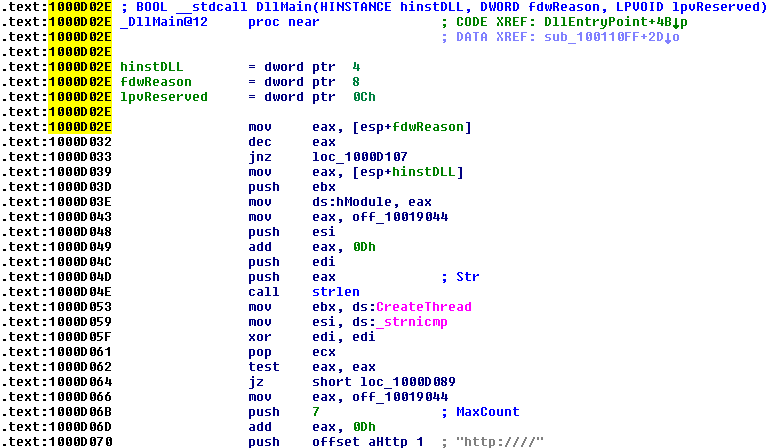
1) What is the address of DllMain ?
The address of DllMain is 0x1000D02E:
2) Use the Imports window to browse to gethostbyname . Where is the import located?
The import gethostbyname is located in address 0x100163CC, in the .idata section.

3) How many functions call gethostbyname ?
After using the Imports window, finding gethostbyname, double-clicking the function, and then using xargs we can obtain the following results:
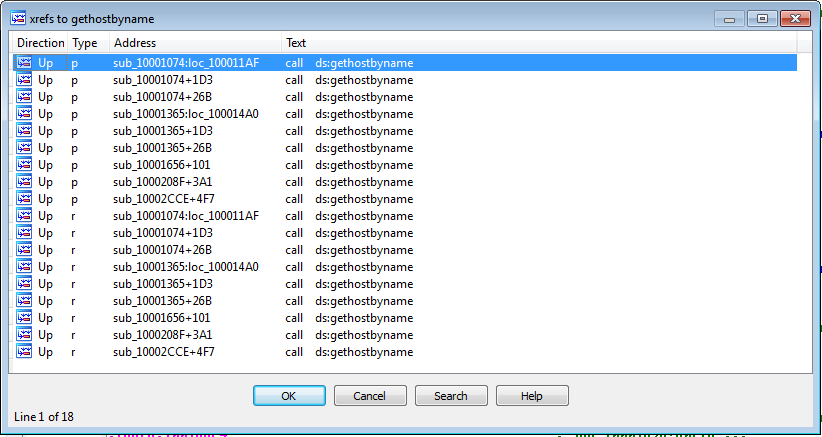
We can see that the function is called 9 different times. There are 5 different functions that call gethostbyname.
4) Focusing on the call to gethostbyname located at 0x10001757, can you figure out which DNS request will be made?
In order to find the DNS request being made by gethostbyname at 0x10001757, we need to see the arguments being pushed into the stack before the call is made:

By jumping into that offset we can see the string [This is RDO]pics.practicalmalwareanalysis.com.
So, the address of this string is going to be moved to eax. After that, the value 0xDh (13 dec) is added to eax, which will make eax point to the address where the string pics.practicalmalwareanalysis.com is.
This is the address pushed into the stack before gethostbyname is called, thus, this will be the domain that the function will resolve.
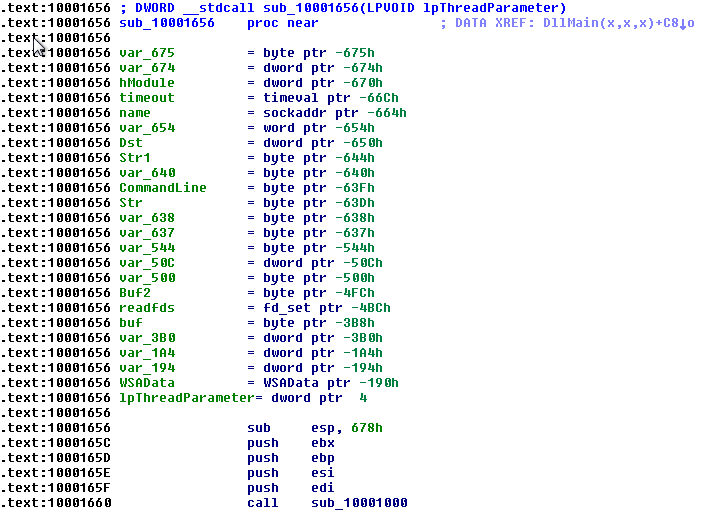
5) How many local variables has IDA Pro recognized for the subroutine at 0x10001656?
In most common conventions, local variables and parameters are referenced relative to ebp.
Arguments have positive offsets and local variables negative offsets. As we can see in the following image, IDA has recognized 23 local variables (negative offsets):
6) How many parameters has IDA Pro recognized for the subroutine at 0x10001656?
By the same logic as before, looking at the positive offsets, we can see that IDA has recognized only one parameter and automatically named it lpThreadParameter.
7) Use the Strings window to locate the string \cmd.exe /c in the disassembly. Where is it located?
Using the Strings window and filtering by “cmd.exe” we can see that this string is stored in 0x10095B34:

Using a cross-reference, we can see that this string is used in 0x1000FF58+278:

8) What is happening in the area of code that references \cmd.exe /c?
It looks like the area of code that references cmd.exe is creating a remote shell:
- We can see that several networking functions are being called, such as recv or send:
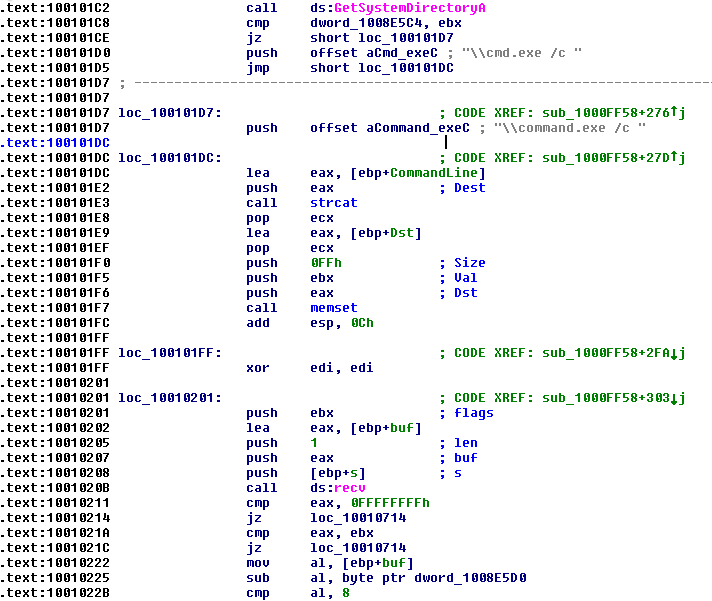
- Also, near the string \cmd.exe /c we can find other strings that hint at this functionality:
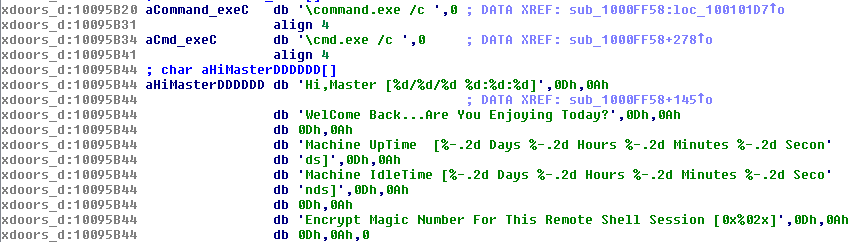
9) In the same area, at 0x100101C8, it looks like dword_1008E5C4 is a global variable that helps decide which path to take. How does the malware set dword_1008E5C4 ? (Hint: Use dword_1008E5C4 ’s cross-references.)
Using cross-references on dword_1008E5C4 we can see that this variable is referenced 3 times. The first reference is with the mov instruction, used to set it up and the other two times with the cmp instruction:

By jumping to that Address we can see that right before this mov we have a function being called (sub_10003695). Let’s go inside this function and take a look:
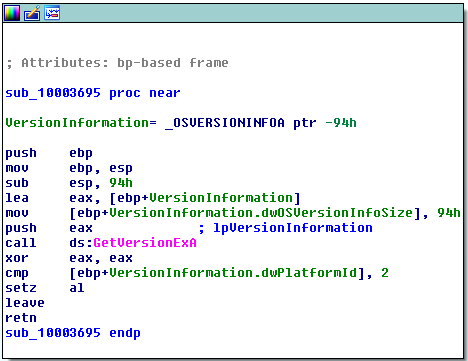
It’s a pretty straightforward function that is getting the OS Version. The returned value of this function will be stored in dword_1008E5C4.
10) A few hundred lines into the subroutine at 0x1000FF58, a series of comparisons use memcmp to compare strings. What happens if the string comparison to robotwork is successful (when memcmp returns 0)?
We can find the string comparisons at 0x10010452:
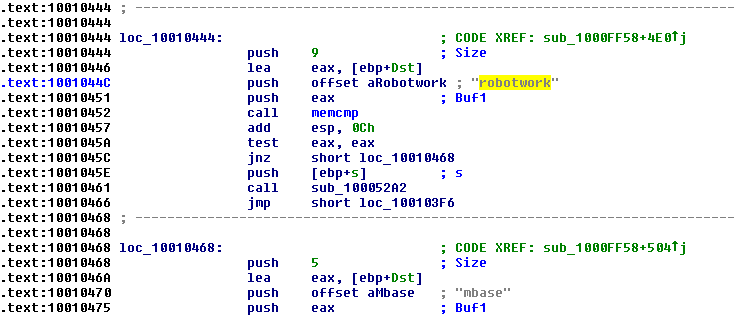
So, if the string comparison to robotwork is successful (memcmp returns 0) the test eax, eax will set the Zero Flag (ZF) to one and thus the jnz short loc_10010468 won’t take place. So, the code will go through the push instruction and the call sub_100052A2. Jumping into this function we can see that two Registry Keys are checked:
- SOFTWARE\Microsoft\Windows\CurrentVersion\WorkTime
- SOFTWARE\Microsoft\Windows\CurrentVersion\WorkTimes
These values are then sent through the Shell.
11) What does the export PSLIST do?
Depending on the provided argument, PSList can either build a list with the information related to the running processes (call sub_10006518) or get the information of a specific process (call sub_1000664C).
The flow depends on if a parameter is passed to PSList or not:
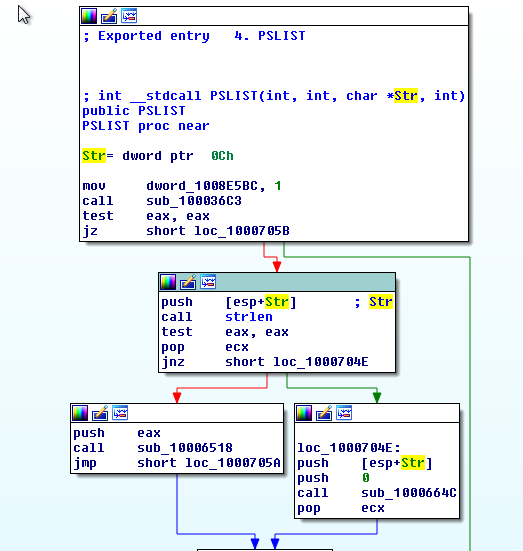
When the information of a specific process is consulted (call sub_1000664C) it is then sent back through the Remote Shell.
12) Use the graph mode to graph the cross-references from sub_10004E79 . Which API functions could be called by entering this function? Based on the API functions alone, what could you rename this function?
The API functions that can be called from these functions are:
- GetSystemDefaultLangID
- sprintf
- strlen
- send
- malloc
- free
- __imp_strlen
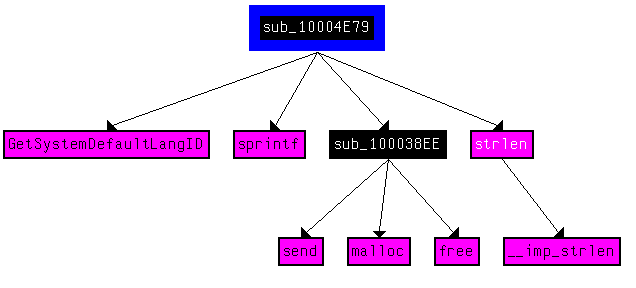
Based on this information looks like this function might send back to the Shell the System Language. So, we could rename this function to something like “GetSystemLanguage”. If this information is sent back through the remote shell (via send API Call) we could rename it to something like “SendSystemLanguage”.
13) How many Windows API functions does DllMain call directly? How many at a depth of 2?
By finding the address of DllMain and then clicking “View > Graph > User Xref chart…” and setting depth 1 we can see that DllMain calls 4 API functions directly:
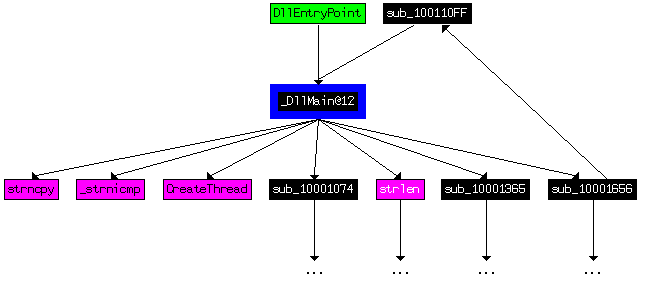
At the depth of 2, it calls 31 API functions:

With such a big number of API Calls, the graph is unreadable.
14) At 0x10001358, there is a call to Sleep (an API function that takes one parameter containing the number of milliseconds to sleep). Looking backward through the code, how long will the program sleep if this code executes?
We can see that several instructions are executed before the Sleep:
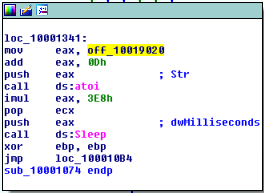
Let’s focus on how eax is set up since it is the value pushed in to the stack before the call. First, eax is set up with the content of offset_10019020. This address contains an address to the following string: “[This is CTI]30”.
After that 0xD is added to eax which will make it point to “30”. The function atoi converts the string 30 into an integer number. Then 30 will be multiplied (imul instruction) by 0x3E8h which is 30000. The result is stored in eax and this is the value pushed in the stack before sleep. Thus, we can see that the program will sleep for 30 seconds.
15) At 0x10001701 is a call to socket . What are the three parameters?
The three parameters of socket in 0x10001701 are:
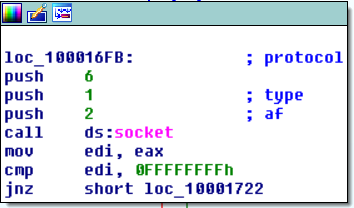
With this we can see that the address family is AF_INET, type is SOCK_STREAM and protocol is IPPROTO_TCP.
16) Using the MSDN page for socket and the named symbolic constants functionality in IDA Pro, can you make the parameters more meaningful? What are the parameters after you apply changes?
Using symbolic constants (right-click in the arguments > Symbolic constants (M) > Use Symbolic Constant) we can make the parameters more meaningful and rename them according to their values:
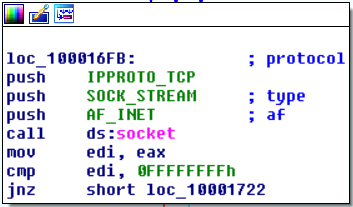
17) Search for usage of the in instruction (opcode 0xED ). This instruction is used with a magic string VMXh to perform VMware detection. Is that in use in this malware? Using the cross-references to the function that executes the in instruction, is there further evidence of VMware detection?
Before starting this exercise, a bit of research on the VMXh Magic string:
- If we are outside VMware, a privilege error occurs. If we’re inside VMware, the magic value (VMXh) is moved to register
EBX; otherwise, it is left at 0 - Based on the version values returned by
ECX, we can even determine the specific VMware product
MOV   EAX,564D5868   ; 'VMXh'
MOV   EBX,0          ; Any value but not the MAGIC VALUE
MOV   ECX,0A         ; Get VMWare version
MOV   EDX,5658       ; 'VX' (port number)
IN    EAX,DX         ; Read port
CMP   EBX,564D5868   ; Is there a reply from VMWare?
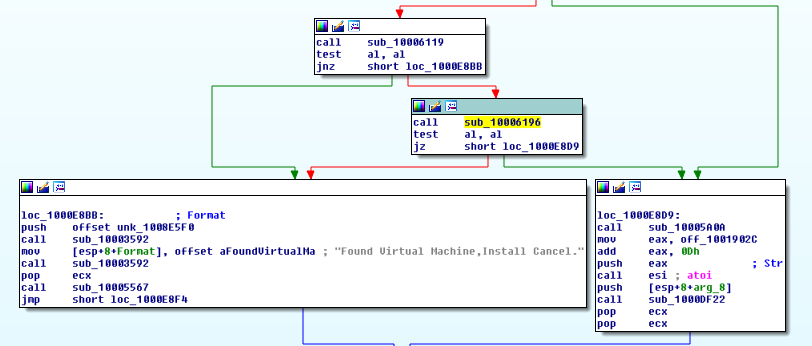
So, looking for opcode 0xED we can find it in 0x100061DB, which means that this Malware uses this technique in order to attempt to detect if it is running inside VMWare:

This instruction is called inside sub_10006196. Looking at the function that calls sub_10006196 in Graph Mode we can see an interesting String “Found Virtual Machine, Install Cancel.”
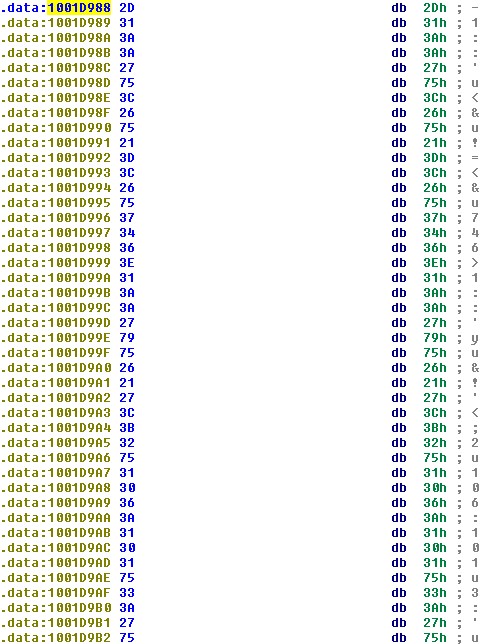
18) Jump your cursor to 0x1001D988. What do you find?
On Address 0x1001D988 we can find random data or an encrypted string.
19 If you have the IDA Python plug-in installed (included with the commercial version of IDA Pro), run Lab05-01.py, an IDA Pro Python script provided with the malware for this book. (Make sure the cursor is at 0x1001D988.) What happens after you run the script?
After running the Lab05-01.py the String at 0x1001D988 got deobfuscated:
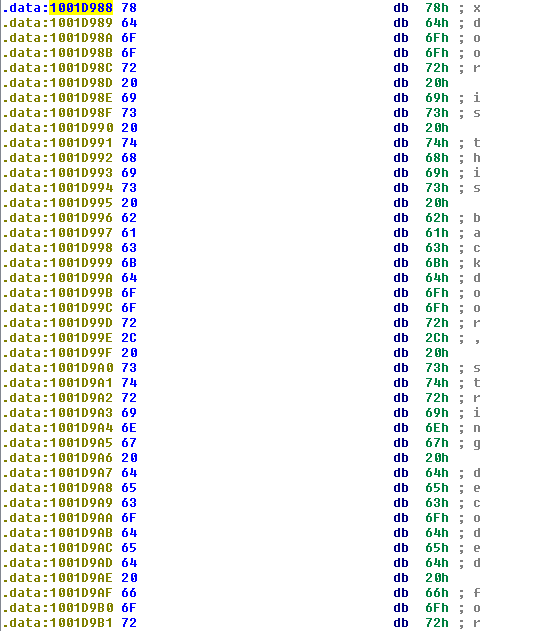
20) With the cursor in the same location, how do you turn this data into a single ASCII string?
We can convert it to a string by pressing the A key (String)
21) Open the script with a text editor. How does it work?
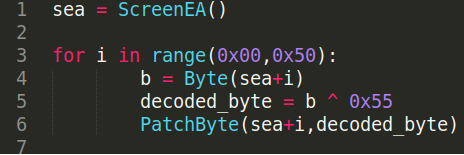
Taking a look at the script we see the variable sea taking the value of ScreenEA(). This function returns the current cursor address, thus, in this case, it will return 0x1001D988.
After this, the rest of the script is really straightforward. All it does is iterate over a cycle 80 times (the size of the “strange” string) and XORs every byte with the key 0x55 and then “patches” over the current byte with the result of the XOR operation.
Lab05-01.py’s code: