PMA Lab 7-2: Analyzing Malicious Windows Programs
Analyze the Malware found in the file Lab07-02.exe.
Lab 7-2
Analyze the Malware found in the file Lab07-02.exe.
1) How does this program achieve persistence?
The Malware starts by using OleInitialize. This function is used to initialize the COM library. After that CoCreateInstance is used. This function creates a single uninitialized object of the class associated with a specified CLSID.
The Syntax for this function is the following:
HRESULT CoCreateInstance(
  REFCLSID  rclsid,
  LPUNKNOWN pUnkOuter,
  DWORD     dwClsContext,
  REFIID    riid,
  LPVOID    *ppv
);
In this case, the disassembly is the following:
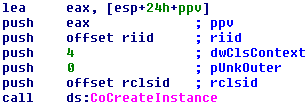
We need to check the riid and rclsid.
In order to get these values, I used an IDA Plugin that returns the identifiers of riid and rclsid. The result of the execution can be seen in the following image:

We can use Regedit in order to check the information about which code the COM Server will execute. We can use the following keys:
- HKLM\SOFTWARE\Classes\CLSID{clsid} (to check the CLSIDs)
- HKLM\SOFTWARE\Classes\Interface{riid} (to check the IIDs)
The CLSID is Internet Explorer:

The loaded interface is IWebBrowser2:

Quoting the Authors, “in order to identify what a malicious program is doing when it calls a COM function, malware analysts must determine which offset a function is stored at”.
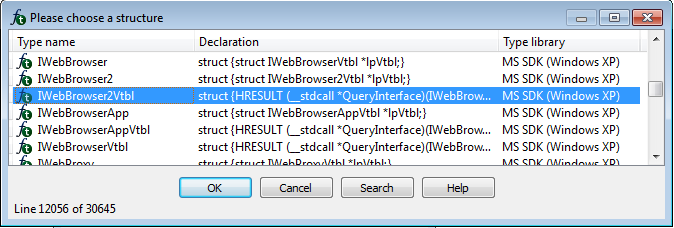
IDA stores the offsets and Structures for common interfaces. In this case, let’s add a structure named InterfaceNameVtbl. For that we need to go to the Structures Tab > Press “Insert” key > Add Standard Structure and select the IWebBrowser2Vtbl structure:
Going back to the Disassembly we can see that IDA added the comments to the call instruction:
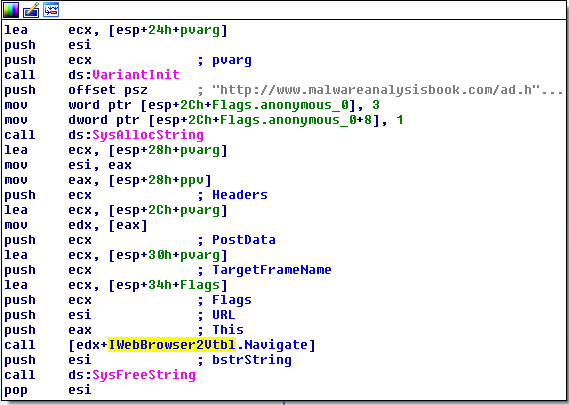
Basically, all that the Malware does is this, a simple request to http://www.malwareanalysisbook.com/ad.html. Thus, the Malware doesn’t achieve persistency.
2) What is the purpose of this program?
The purpose of this program is to open the following URL with Internet Explorer:
3) When will this program finish executing?
The Malware finishes executing immediately after the request is made.
Lab 7-3
For this lab, we obtained the malicious executable, Lab07-03.exe, and DLL, Lab07-03.dll, prior to executing. This is important to note because the Malware might change once it runs. Both files were found in the same directory on the victim machine. If you run the program, you should ensure that both files are in the same directory on the analysis machine. A visible IP string beginning with 127 (a loopback address) connects to the local machine. (In the real version of this Malware, this address connects to a remote machine, but we’ve set it to connect to localhost to protect you.)
WARNING This lab may cause considerable damage to your computer and may be difficult to remove once installed. Do not run this file without a virtual machine with a snapshot taken prior to execution.
This lab may be a bit more challenging than previous ones. You’ll need to use a combination of static and dynamic methods, and focus on the big picture in order to avoid getting bogged down by the details.
Analysis
Lab07-03.dll:
Let’s start by taking a look at Lab07-03.dll, which is pretty straightforward:

It starts by checking whether or not a specific Mutex exists or not. If it doesn’t it will be created, else the program will exit (meaning that the Mutex is being used to control that only one instance of the Malware will run at the same time):
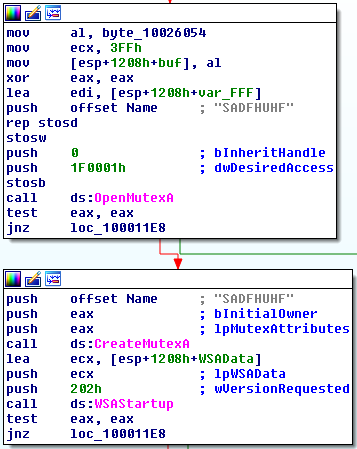
After creating the Mutex (SADFHUHF) there’s a call to WSAStartup which initiates the use of the Winsock DLL by a process. Then we can see several Networking API functions related to sockets. From these calls and respective arguments we can see that a TCP Socket is created and configured to connect back to “127.26.152.13” on port 80 (if the connection fails, the socket is closed and the program exits):
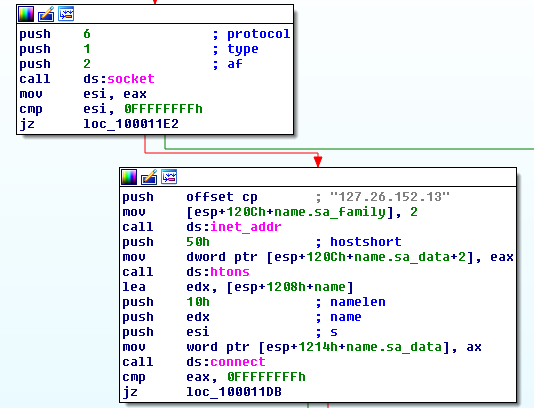
After the connection is made, the Malware will send a hello message back to its C2 and wait for a response. If it doesn’t get an answer it will send the hello message again in 60 seconds.
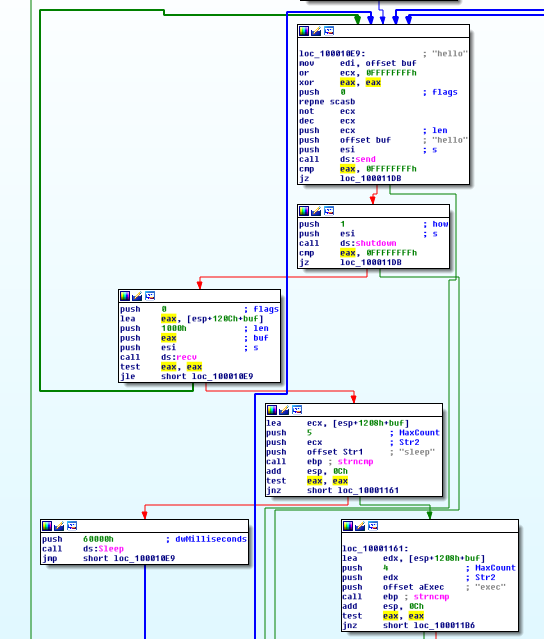
Hopefully, the Malware will get an answer from the Bot Master and this response is parsed. Basically, the Malware can interpret 3 commands:
- “sleep” - Sleep for another 60 seconds.
- “exec
” - Execute a command (via CreateProcessA). - When parsing this command only the first 4 bytes are checked: “exec”, then what is passed to CreateProcessA is the rest of the buffer.
- “q” - Exit
Thus, this DLL acts as a Backdoor that uses a Reverse Shell to wait for commands.
Lab07-03.exe
We can start theBasic Static Analysis with the execution of Strings, which give us some useful clues:
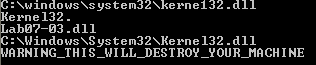
We can see the string “C:\windows\system32\kerne132.dll”, it’s probable that the Malware will attempt to disguise Lab07-03.dll as kernel32.dll.
We also see a Warning string that goes along with the Lab Warning and the mentioned IP Address (127.26.152.13).
In terms of Imports we have some clues as well regarding the Malware’s potential actions:
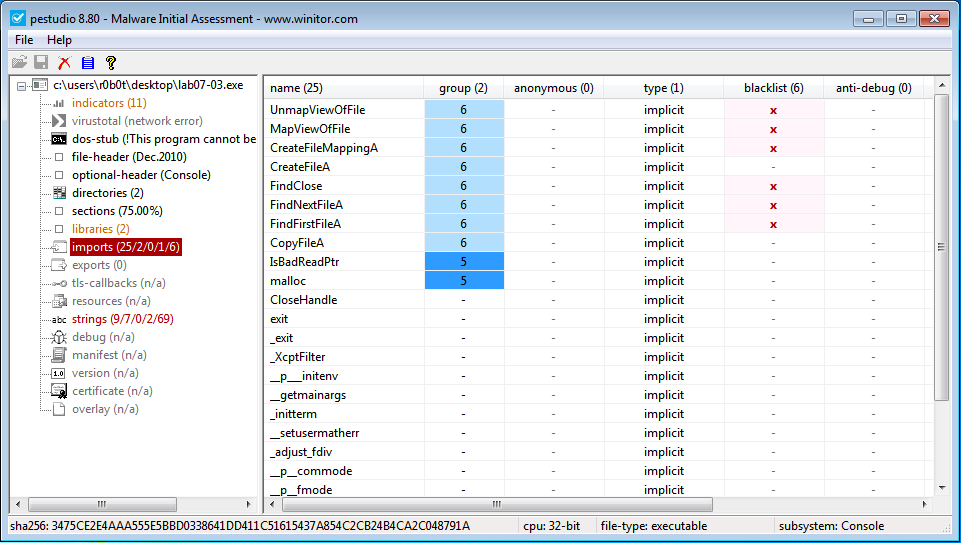
- FindFirstFileA and FindNextFileA - The Malware may search through directories.
- CreateFileA - The Malware may create or open files.
- CreateFileMappingA - Creates a handle to a file mapping that loads a file into memory and makes it accessible via memory addresses.
- MapViewOfFile - Maps a file into memory and makes the contents of the file accessible via memory addresses.
- malloc - Allocates memory blocks.
Basically, with these imports we know that something will happen in memory.
After running the file and looking at Procmon we see that not much has happened:
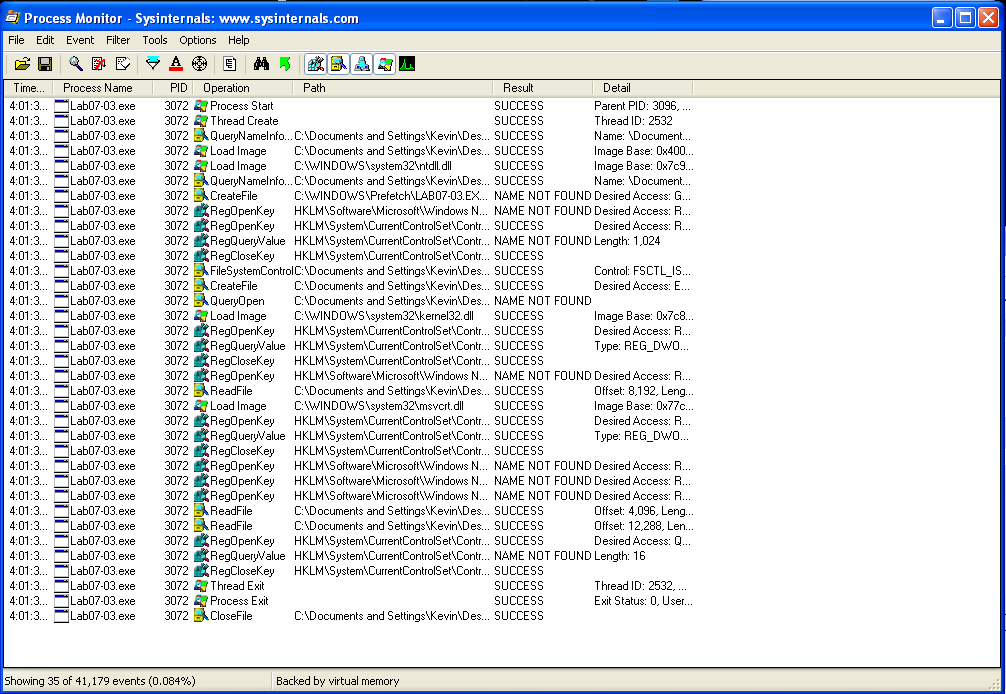
Only 35 events.
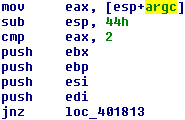
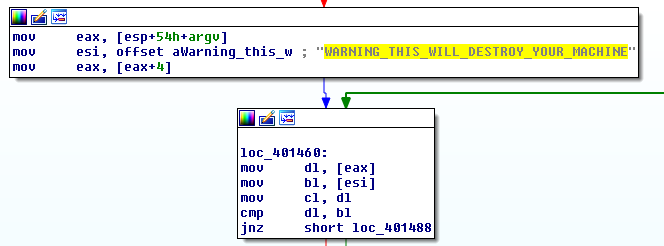
Let’s jump to IDA and start Advanced Static Analysis. It’s possible to see that this Malware will only run correctly when an argument is provided and that argument must be a specific one.
First, we can see the argument count check being made (if it fails the program jumps to the end).
And here we see eax and esi being compared. esi is a pointer to the previously seen string “WARNING_THIS_WILL_DESTROY_YOUR_MACHINE”. And eax is the argument provided on program execution:
This explains why we only obtained 35 events in ProcMon before. The Malware was incorrectly executed. As we can see, after running the Malware with the correct argument, a lot has happened:
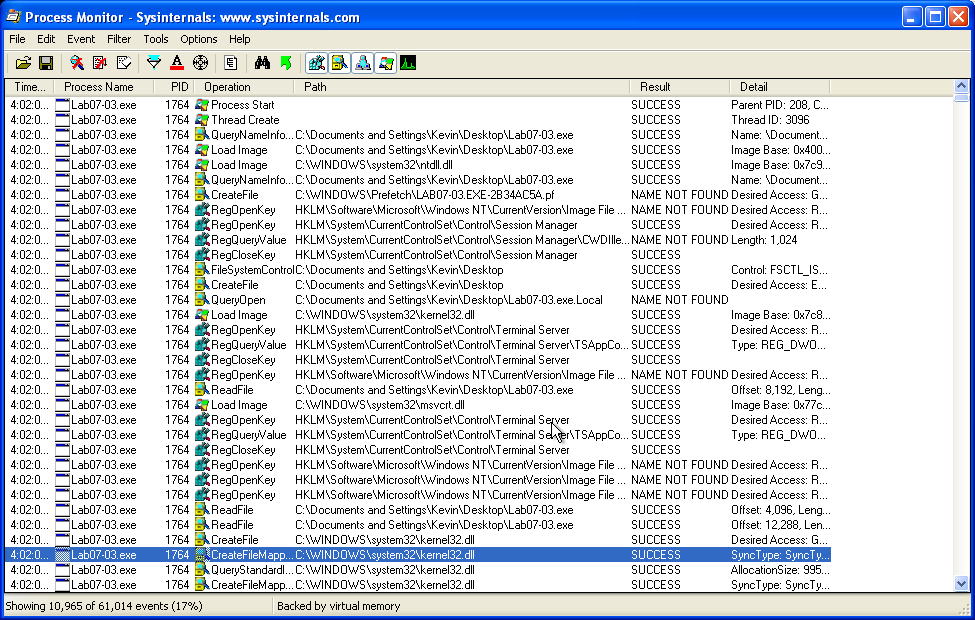
From these nearly 11000 events we can see that:
- A dll was written to disk: C:\Windows\system32\kerne123.dll
- Checking the Hash we can see that this is actually a copy of Lab07-03.dll
- We can see that several directories are being recursively scanned and that for each exe file that is found, functions like CreateFile and CreateFileMapping are called.
In the following image we can see an example of the actions executed on calc.exe:

This tells us that the file is mapped into memory and may be read or written without additional function calls.
Also, RegShot didn’t find anything suspicious other than the creation of C:\windows\system32\kerne132.dll.
So, let’s go back to IDA and continue with the Advanced Static Analysis.
After parsing the argument, Lab07-03.exe calls CreateFile, CreateFileMapping and MapViewOfFile in order to open both C:\windows\system32\kernel32.dll, and Lab07-03.dll:
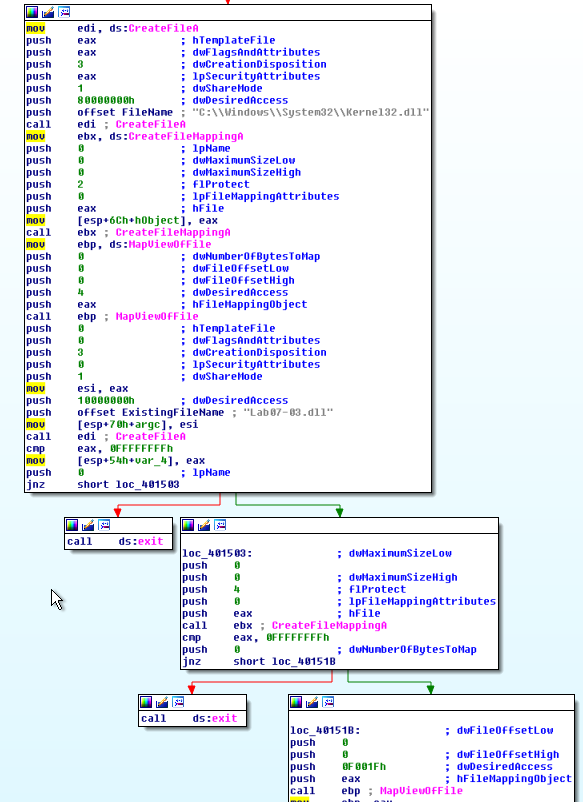
Then we see calls to sub_401040 and sub_401070. Both of these functions call sub_401000. Neither of these 3 functions call any API functions and they seem to be performing arithmetic operations.
After scrolling down for a bit, we see these instructions:
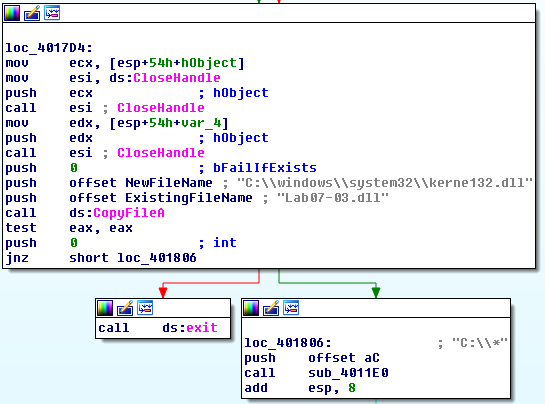
We can see Lab07-03.dll being copied to C:\windows\system32\kernel32.dll and also a call to sub_4011E0 which takes the string “C:\*” as an argument
Inside sub_4011E0 we see the calls to FindFirstFileA and FindNextFileA.
In this function we see some interesting parts such as this one:
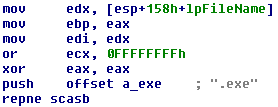
We can see repne scasb being used with the “.exe” string. A little bit of theory on these instructions:
The scas instruction is used to scan a string (SCAS = SCan A String) in this case a byte (scasb). It compares the content of the accumulator (AL, AX, or EAX) against the current value pointed at by ES:[EDI].

And when used together with the repne prefix (REPeat while Not Equal), SCAS scans the string searching for the first string element which is equal to the value in the accumulator.
Basically it will iterate over the string at edi ([esp+158h+lpFileName]) until it finds eax ("".exe”). This is the part looking for the exe files.
We see similar code to look for directories which then ends up calling sub_4011E0 (current function) again which makes sense since the function is scanning C:\ recursively. With this, we can rename sub_4011E0 to search_exe_recursively.
After all these operations are made and an exe file is found, sub_40140C is called, taking as an argument that same exe (lpFileName):
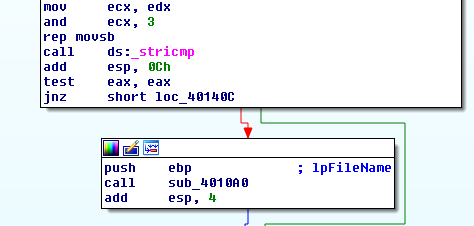
Inside sub_40140C we see that the provided argument (lpFileName) is opened:
-
CreateFileA - Executed with read/write permissions
-
CreateFileMappingA - Executed with permissions to be mapped for read-only, copy-on-write, or read/write access.
-
MapViewOfFile - Executed with FILE_MAP_ALL_ACCESS: A read/write view of the file is mapped.
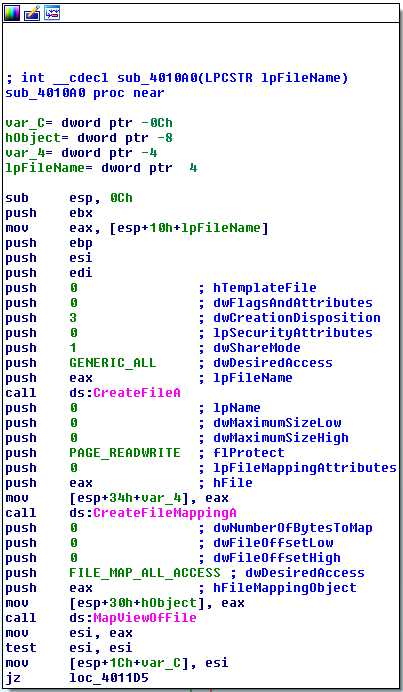
With this, we know that the exe can be fully manipulated. After scrolling a little bit in this function we see another string comparison with one of the parameters being kernel32.dll:
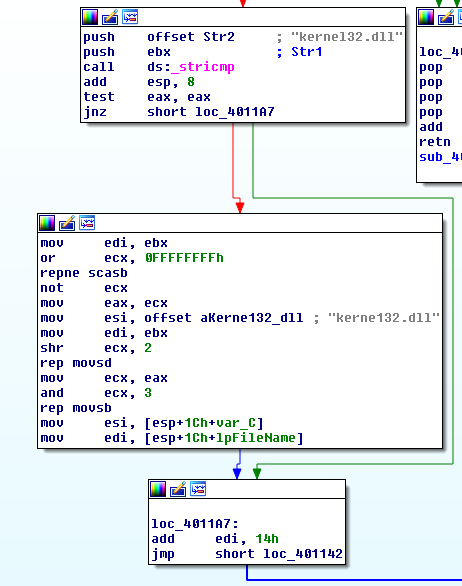
If these strings match the code jumps to the middle code block (see the image above) and if they don’t, the code will jump to the block at the bottom that then jumps to the top (iterating in a loop).
Looking at the code block in the middle we see the instruction repne scasb that will search for kernel32.dll and then an instruction rep movsd (Move doubleword at address esi to edi).
In this case, esi contains a pointer to offset dword_403010:
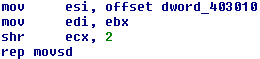
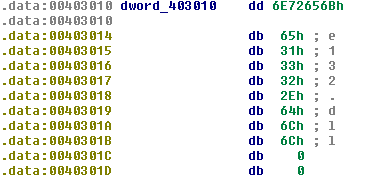
Initially IDA Pro doesn’t recognize the data as a string but we can see in the final part “.dll” that this is indeed a string and can be converted with the “A key”
- Before:
-
After:

So, in this case, esi contains a pointer to the string kerne132.dll and the edi register contains a pointer to the string kernel32.dll. Basically, rep movsd will override kernel32.dll with kerne132.dll.
Essentially, this will end up backdooring every exe and make them load kerne132.dll instead of the legit kernel32.dll.
With this, we can rename sub_40140C to backdoor_exe.
Let’s go back to Basic Dynamic Analysis and see this in action.
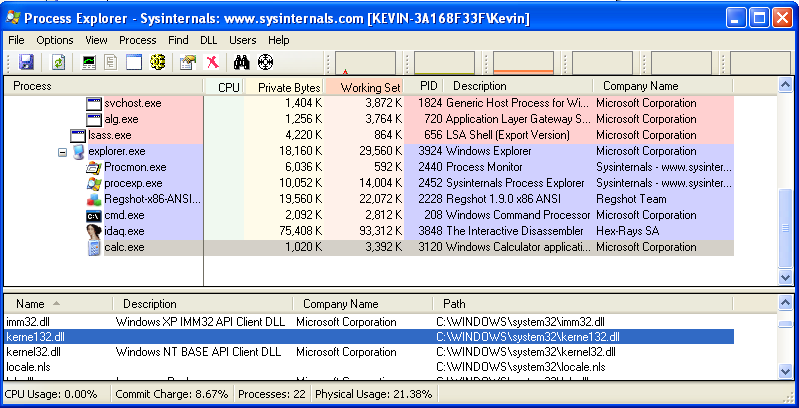
After opening calc.exe, we can confirm the findings in Advanced Static Analysis and see that it is now importing kerne132.dll:
Since the file was changed its obvious that by calculating the SHA256 of a legit calc.exe (copied before Malware execution) and the backdoored calc.exe (after Malware execution) they will be different:

Also, looking at pestudio we can see in the tab libraries in the bottom window that the file is loading kerne132.dll while in the top one its loading kernel32.dll:
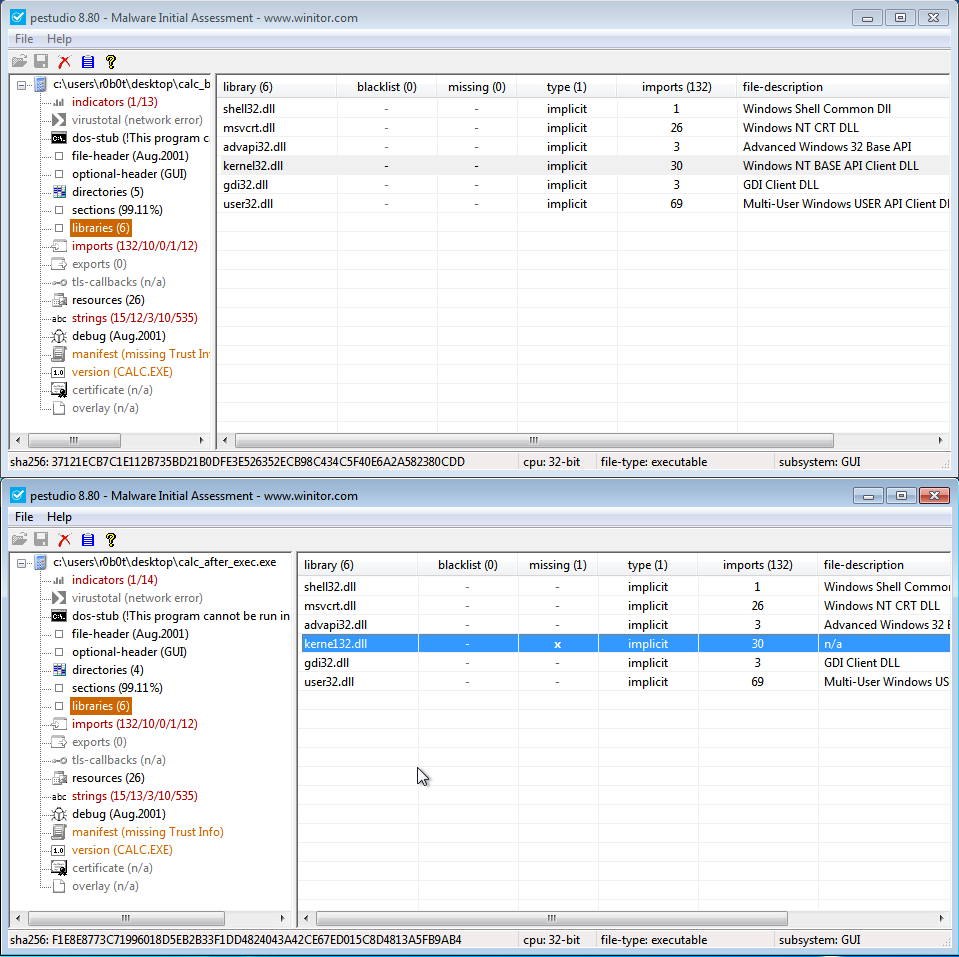
Thus, all exe files in the system were backdoored and will load kerne132.dll.
This sums it up for the Analysis and now the Lab questions will be answered.
Questions:
1) How does this program achieve persistence to ensure that it continues running when the computer is restarted?
Every exe file in the System was backdoored and will load C:\windows\system32\kerne132.dll instead of the legit kernel32.dll.
2) What are two good host-based signatures for this Malware?
Two good host-based signatures would be:
- The Mutex: SADFHUHF
- The File: C:\windows\system32\kerne132.dll
- SHA256: 20c40129b8e7c5d676c97a7c20c530740bec931e3744a94931217bce19c6f9b7
3) What is the purpose of this program?
The purpose of this program is to copy Lab07-03.dll to C:\windows\system32\kerne132.dll and then backdoor every single .exe in Disk C:, making them load this Dll.
4) How could you remove this Malware once it is installed?
It’s pretty complicated to remove this Malware since it backdoored every single .exe in C:\* (recursively). The best option would be to revert to a backup or format the computer.
Another (more advanced) option would be to perform the same actions as this Malware did but in reverse (swap back kerne132.dll with kernel32.dll) on all exe files.