PMA Lab 9-1: OllyDbg
Analyze the Malware found in the file Lab09-01.exe using OllyDbg and IDA Pro to answer the following questions. This Malware was initially analyzed in the Chapter 3 labs using basic static and dynamic
Lab 9-1
Analyze the Malware found in the file Lab09-01.exe using OllyDbg and IDA Pro to answer the following questions. This Malware was initially analyzed in the Chapter 3 labs using basic static and dynamic analysis techniques.
Analysis
Let’s start with Basic Static Analysis.
From the Imports, we can start to suspect some of the functionalities of the Malware:
- The Malware may dynamically resolve and import external resources (GetProcAddress and LoadLibraryA)
- The Malware may have the ability to use services. It will most likely install itself as a Service. The DeleteService Import may hint that this Malware has an option to uninstall itself. (OpenSCManagerA, OpenServiceA, ChangeServiceHandle, ChangeServiceConfigA, CreateServiceA and DeleteService)
- There are a lot of Imports that give the Malware the ability to operate with files. (CopyFileA, WriteFile, ReadFile, CreateFileA, DeleteFileA, etc.)
- It’s very likely that this Malware can create a Reverse Shell to a C2. (socket, connect, send, recv, etc.)
- The Malware may use the Registry. (RegOpenKeyExA, RegCreateKeyExA, RegDeleteValueA, RegSetValueExA, etc.)
- Also, the Malware may allocate memory and use it in some fashion. (VirtualAlloc, HeapAlloc, VirtualFree, HeapFree, etc.)
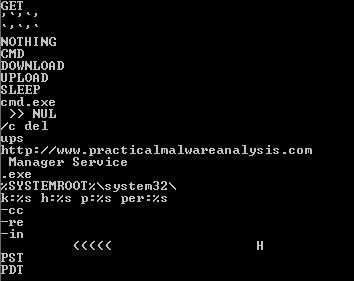
In terms of strings, this Malware has some interesting strings as well:
-
From Top to Bottom we can see what seem to be commands: GET, NOTHING, CMD, DOWNLOAD, UPLOAD, and SLEEP.
-
Possibly the Malware may delete files via the command line (maybe itself): cmd.exe and /c del
-
We see an URL: http://www.practicalmalwareanalysis.com
-
And we also see some possible flags like -cc, -re or -in that may be used in order to make the Malware run properly.
Basic Dynamic Analysis:
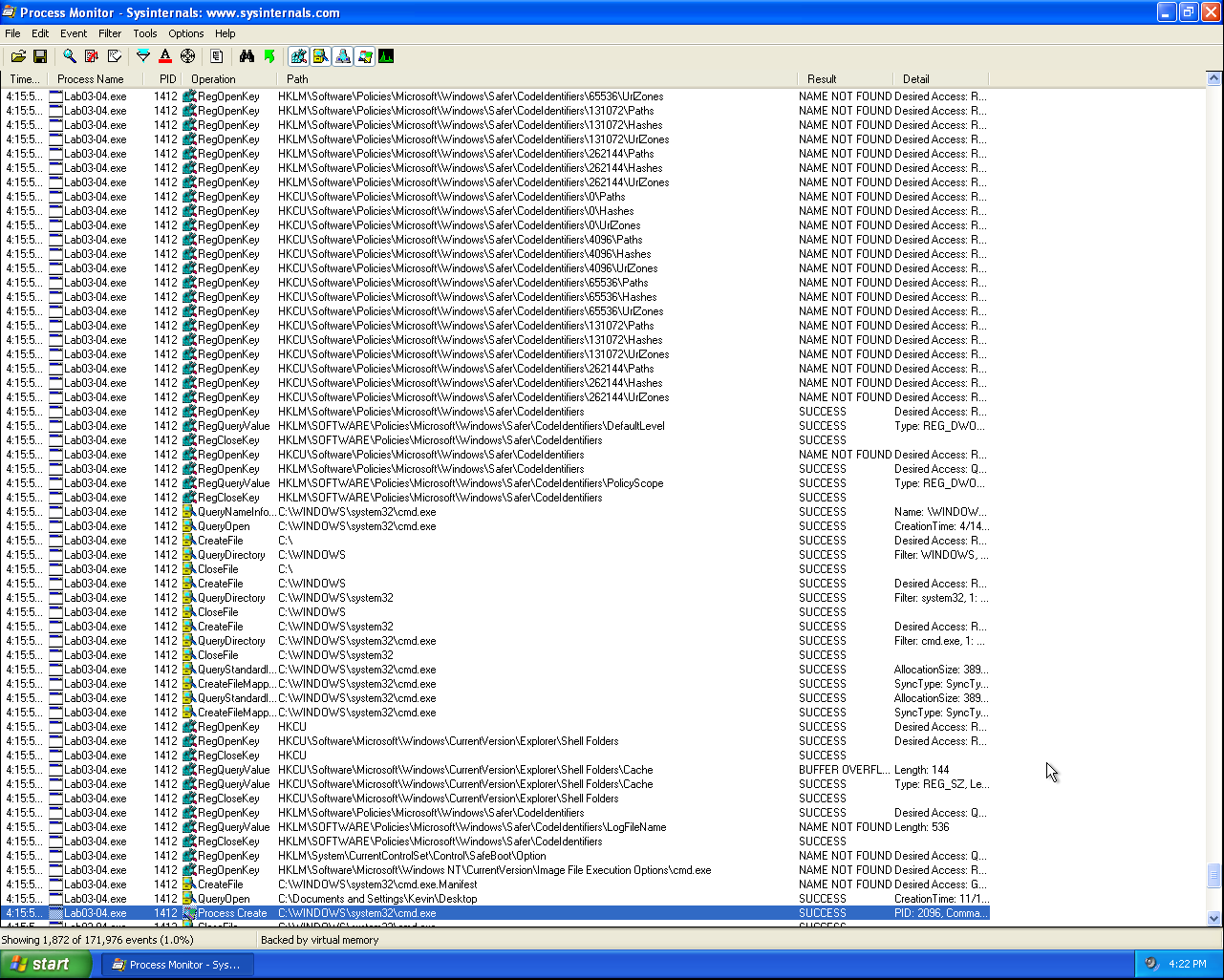
Apparently, when executed, the Malware does nothing and deletes itself. By taking a closer look with Process Monitor it’s possible to see several Registry values being checked:
Also, it’s possible to see that the Malware invokes cmd.exe in order to delete itself:
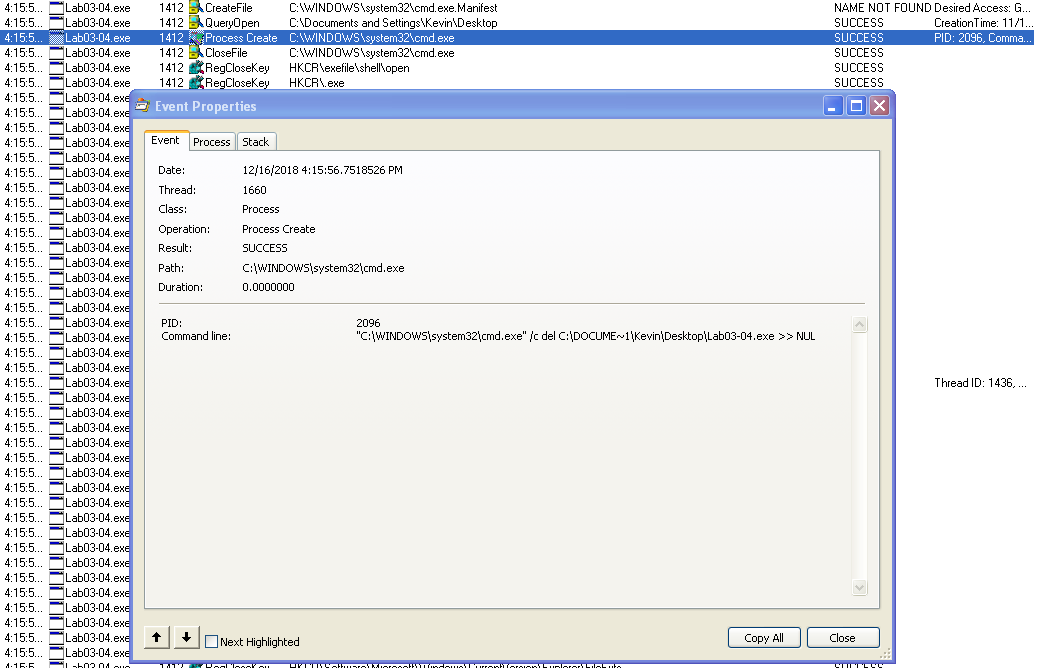
It’s very likely that the Malware didn’t find all the requirements in order to perform its real actions, so let’s jump to Advanced Static Analysis.
Advanced Static Analysis:
After opening the file in IDA, we immediately see argc being checked:
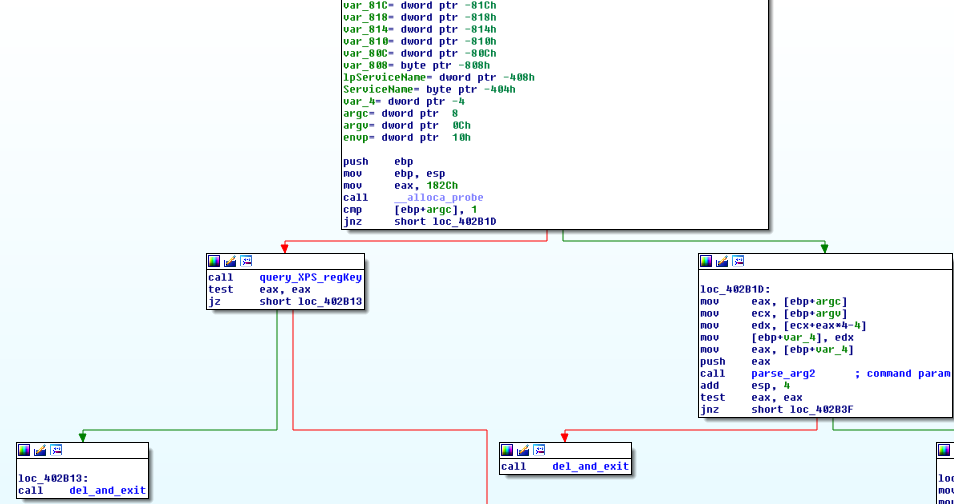
If only one argument is passed, the program flow jumps to a function that checks for a specific Registry Key (sub_401000):
- HKLM\SOFTWARE\Microsoft \XPS
This function is going to be renamed query_XPS_regKey
Depending on if this Registry Key exists or not, the Malware may or may not delete itself “via cmd.exe /c del”. The function that deletes the Malware and exits is going to be renamed del_and_exit.
If the Key exists, the Malware won’t delete itself which means that probably is a Registry Key created by the Malware. Then a call to sub_402360 is made. Let’s come back to this function once we have seen how to install the Malware.
On the other hand, if more than one argument is passed to the program, the last argument is passed as a parameter to a function that performs several arithmetic operations on the said argument (sub_402510).
From the following instructions, we can see how the Malware gets the last argument and uses it as a parameter to sub_402510:
mov eax, [ebp+argc] ; pass the arg counter to eax
mov ecx, [ebp+argv] ; pass the array of args to ecx
mov edx, [ecx+eax*4-4] ; use arg counter (-4) as index in the array
mov [ebp+var_4], edx ; store the last arg in var_4
mov eax, [ebp+var_4]
push eax
call parse_arg2 ; eax (var_4) is the argument passed to parse_arg2
Let’s use Advanced Dynamic Analysis in order to understand it, as it is easier with the Malware running. Depending on the result of this function the Malware will either continue to execute or jump to del_and_exit.
Inside sub_402510, the Malware is checking if the size of the argument provided is 4 bytes long:
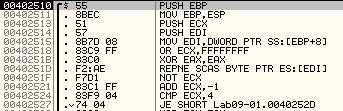
If the size is 4 bytes it jumps to 0040252D, else jumps to 004025A0 (end of the function and return 0).
At 0040252D, it starts checking the characters one by one. Starts by checking if the first char is “a” (0x61). If it’s not, it will jump to the end and return 0, or it will repeat for the following characters.
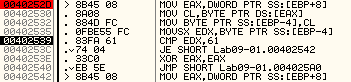
After the first character, things get complicated with lots of arithmetic operations. For each check that fails the Malware returns 0 and only if it goes all the way, it will return one. All in all, this function is checking for a specific 4-byte key.
So, we can name sub_402510 as check_key.
Also, we could bypass this check during Advanced Dynamic Analysis, but it’s more practical to patch the file and forget about this function.
In my opinion, the easier way to patch this file is to make sub_402510/check_key to return 1 every time. And we can do this simply by overwriting every xor eax, eax (2 bytes: 33 C0) with mov al, 1 (2 bytes: B0 01) and this way we don’t need to worry about padding. The new check_key will look like this:
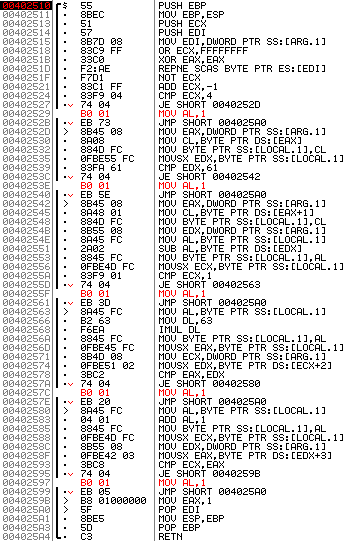
This way, the 5 checks will return 1. Let’s save the changes and go back to Advanced Static Analysis.
After the Malware executes check_key, we can see several calls to mbscmp (string compare) being made:
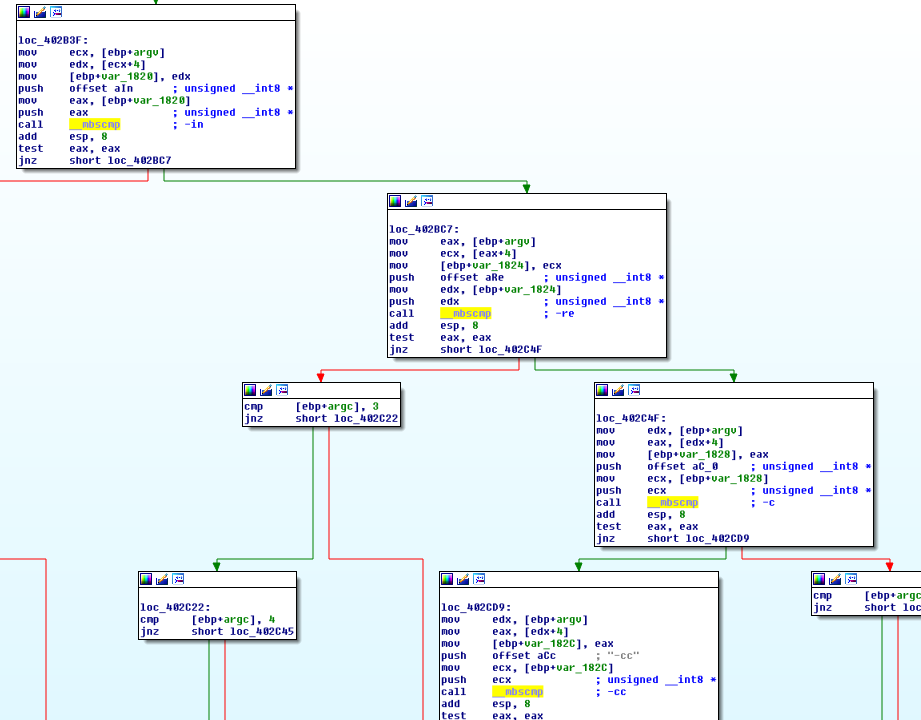
These comparisons include strings like: -in, -re, -c and -cc. Next to each mbscmp call there’s a comment with the flag being compared.
Let’s try to understand the flow of the program after each successful comparison in order to label each flag correspondingly.
The first flag being compared is -in.
After this argument is used the Malware checks if it has been executed with 3 or 4 arguments.
Execution: Lab09-01.exe -in Key
The Malware will execute sub_4025B0. This function calls GetModuleFileNameA and splitpath. It will return 1 if it fails or 0 if it’s successful. This function was renamed get_filename. If the function is successful, the function sub_402600 is called. This function is responsible for installing the Malware as a Service if it doesn’t exist. Once again executes get_filename in order to obtain the filename and copies the file to C:\windows\system32.
This is the BinaryPath of the Service. Also, the service will be created with the filename without “.exe” concatenated with ” Manager Service”.
In this case, the Service will be named “Lab09-01-patched Manager Service”.
Right before exiting this function, we see a URL being passed to a function:
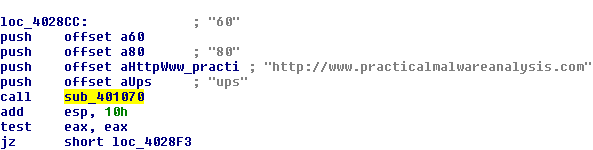
In this function we have several repne scasb and rep movsd instructions and they are used on all the arguments. This means that it is iterating over the strings and then copying them. After these string operations RegCreateKeyExA is used to create the following Registry key:
- HKLM\SOFTWARE\Microsoft \XPS
With this, we rename sub_401070 to create_XPS_regKey.
Instead of trying to understand the required arguments through Disassembly, let’s run the program with the -in flag:
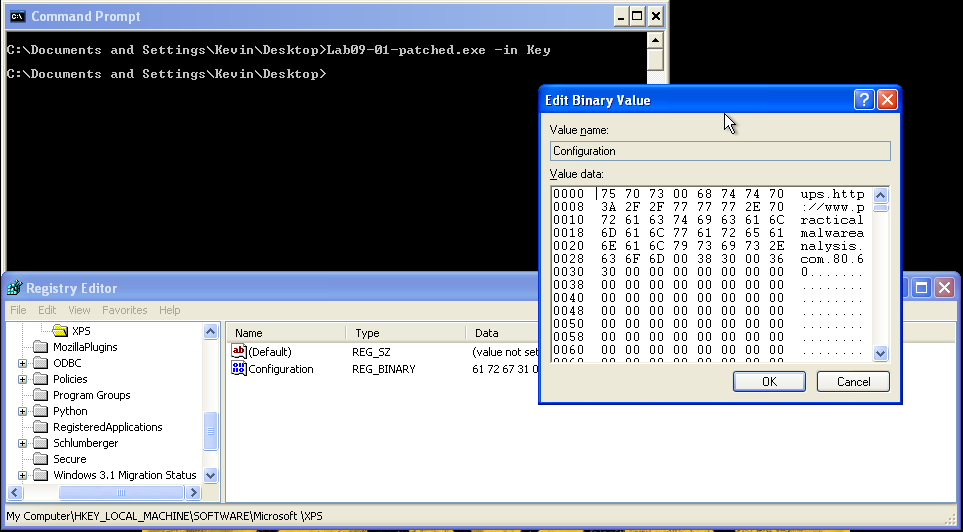
After running the Malware with the -in flag, we can see that the Registry Key is created and that the value of Configuration has the strings that were passed to create_XPS_regKey. Function sub_402600 can be named install_malware.
Execution: Lab09-01.exe -in arg1 Key
The same with 3 arguments, only this time the name of the service changes for “arg1 Manager Service”.
The next flag to be compared is -re.
Just like with -in, when this argument is used the Malware checks if it has been executed with 3 or 4 arguments.
Execution: Lab09-01.exe -re Key
The Malware will execute sub_402900. Among several API calls, this function calls DeleteService and DeleteFile which means that it is a built-in functionality to remove the Malware from the System.
After that, the Malware calls create_XPS_regKey in order to check whether or not HKLM\SOFTWARE\Microsoft \XPS key exists. If it doesn’t exist the function will exit, otherwise, it will call sub_401210. This function deletes the HKLM\SOFTWARE\Microsoft \XPS\Configuration key. The key HKLM\SOFTWARE\Microsoft \XPS remains on the system.
We can rename sub_401210 as delete_XPSconfig_regKey and sub_402900 as uninstall_malware.
Execution: Lab09-01.exe -re arg1 Key
The same with 3 arguments, only this time the name of the service changes for “arg1 Manager Service”.
The third flag to be compared is -c.
When using this flag, the Malware checks if it has 7 arguments. For example:
- Lab09-01.exe -c arg1 arg2 arg3 arg4 Key
If this check fails, the Malware jumps to del_and_exit. If it doesn’t, the Malware will execute sub_401070 and use arg1, arg2, arg3, and arg4 as parameters:
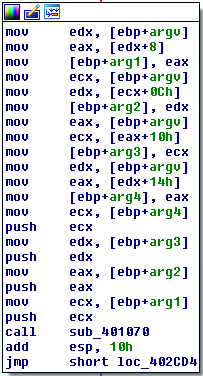
As we’ve seen before, sub_401070 is create_XPS_regKey and thus the four arguments are custom arguments meaning that the Malware has a flag to change the current configuration (-c).
After running the Malware with the -c flag and 4 extra arguments we can see that the value of the Key HKLM\SOFTWARE\Microsoft \XPS\Configuration has changed and contains the new strings:
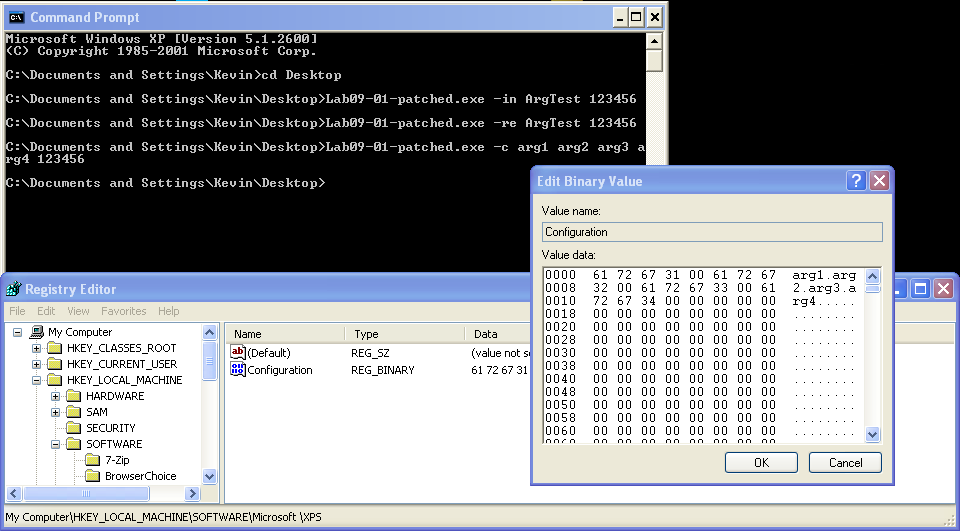
Finally, we have the -cc flag.
After the second argument failed the comparisons with -in, -re and -c, it is checked against the string -cc. If the strings don’t match, the Malware will call del_and_exit. Else, the Malware checks once again if the number of arguments is 3, if not, it will jump to del_and_exit.
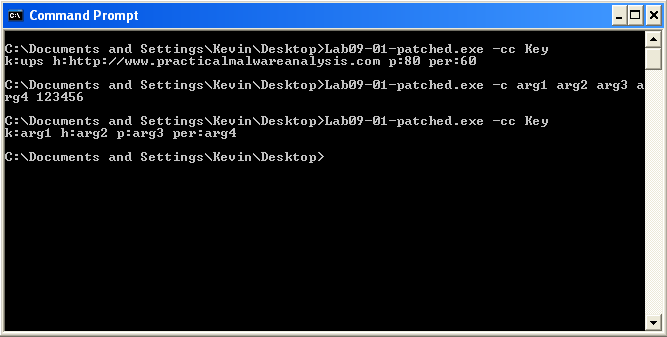
Under normal conditions, the Malware will reach sub_401280. This function is getting the Configuration value set at HKLM\SOFTWARE\Microsoft \XPS\Configuration. Let’s rename this function to get_XPS_config.
After running the Malware we can see that it printed the Malware configuration values:
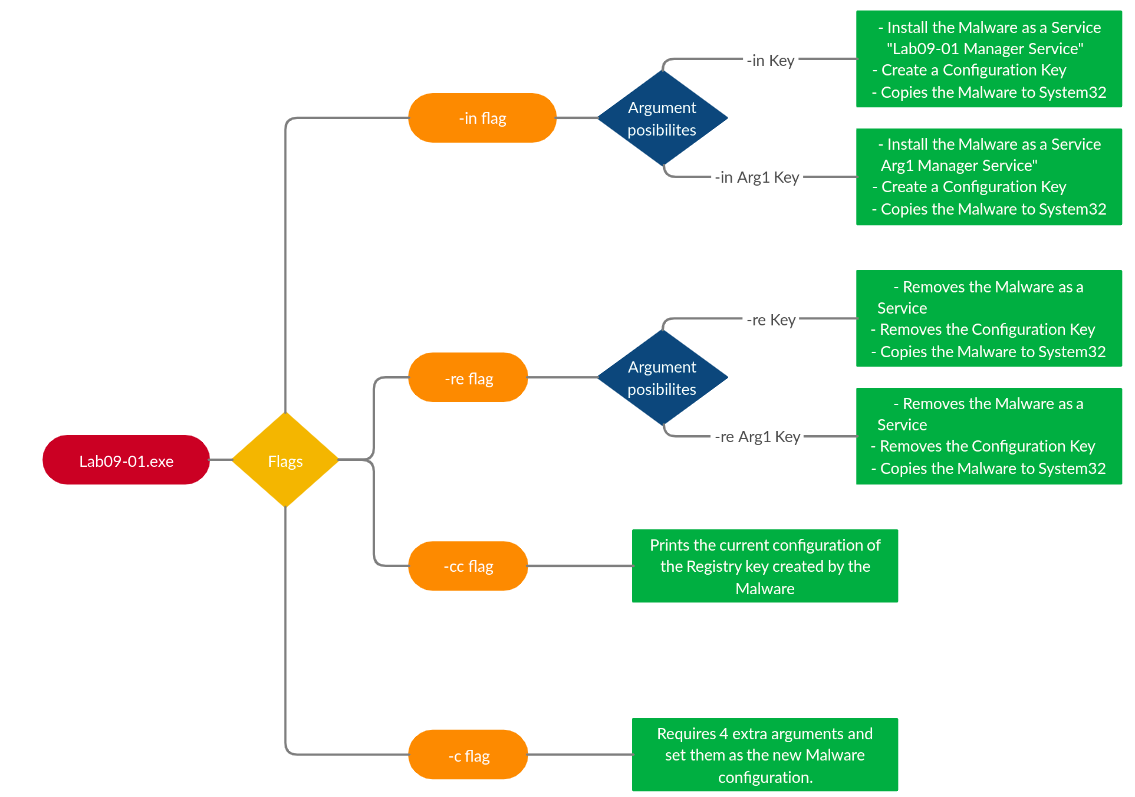
In sum, these are the actions of the flags:
After analyzing all the flags of the Malware and understanding how it can be installed, let’s go back to sub_402360.
By now this function is way easier to understand. It starts by calling get_XPS_config and if it is successful it will call sub_402020:
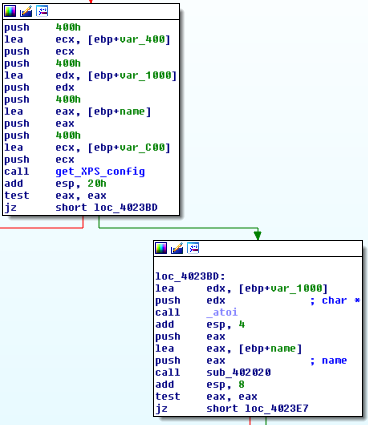
After taking the first glimpse at sub_402020 we see what seem to be commands that the Malware can interpret:
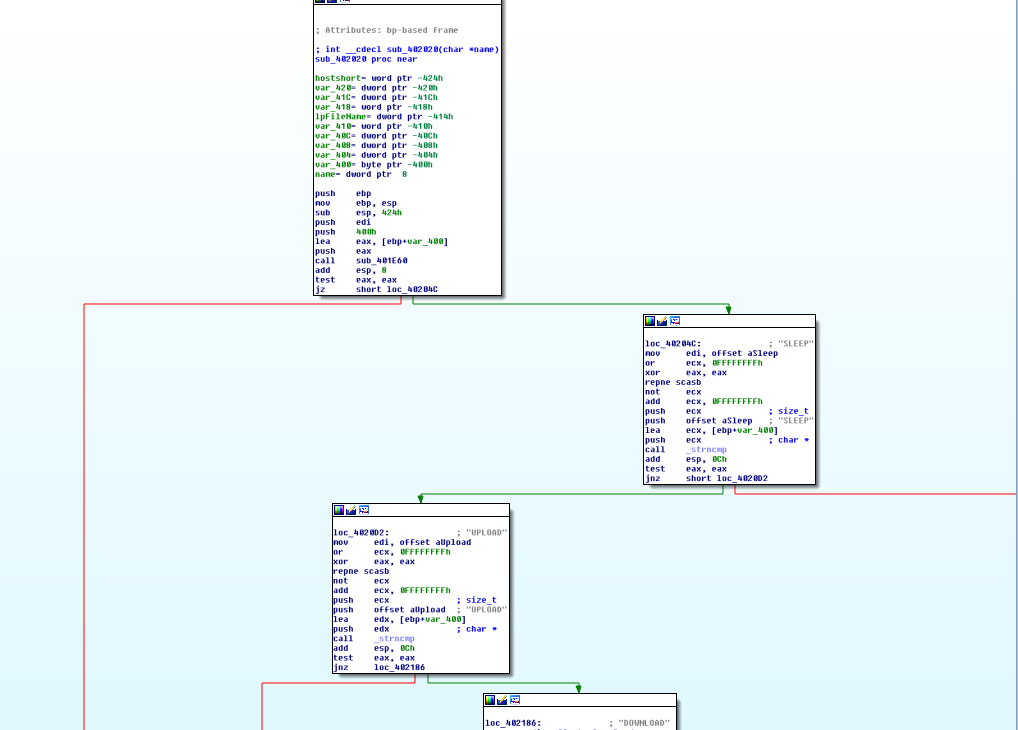
In total it’s possible to see 5 Commands:
- SLEEP - Sleeps for 60 seconds.
- UPLOAD - Downloads a file from the C2.
- DOWNLOAD - Upload a file to the C2.
- CMD - Executes a command and sends the output to the C2.
- NOTHING - Like the command name hints, does nothing.
The commands UPLOAD and DOWNLOAD actually do the opposite. For instance, UPLOAD sets up the Reverse Shell and calls CreateFileA and then WriteFile, which writes to the file the data on the buffer that contains the data read via the network.
This means that probably the names of these commands are seen as the perspective of the operator (e.g “UPLOAD fileX” will actually make the Malware download said file).
I tried to play around with the network functionality but it wasn’t possible since the Malware is coded to make requests to random files. In the following image we can see some requests being made to “our C2” (redirected with ApateDNS):
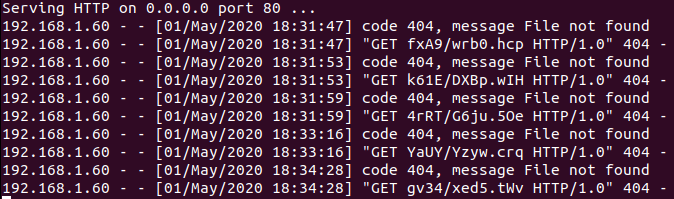
Although there is a pattern aaaa/aaa.aaa for now it wasn’t possible to predict the file and sync it with the C2 in order to serve the file. However, a future challenge can be to set up a C2 that given a request will reply with a 200 OK and the content that the Malware needs in order to execute commands.
Questions:
1) How can you get this Malware to install itself?
The Malware can be installed with the -in command.
2) What are the command-line options for this program? What is the password requirement?
This malware has 4 command line options: -in to install the Malware, -re to remove it, -cc prints the current Malware configuration and -c sets up a new configuration.
In terms of password requirement, the Malware takes as the last parameter a Password that is 4 characters long.
3) How can you use OllyDbg to permanently patch this Malware, so that it doesn’t require the special command-line password?
Function sub_402510 got patched in order to make it return 1 every time. This was done by simply overwriting every xor eax, eax (2 bytes: 33 C0) with mov al, 1 (2 bytes: B0 01):
4) What are the host-based indicators of this Malware?
The Malware creates a service that uses the filename without the extension, concatenated with Manager Service:

This Malware also copies itself to C:\Windows\system32. Finally, it also creates a Registry Key that contains the Malware configuration:
- HKLM\SOFTWARE\Microsoft\XPS\Configuration
5) What are the different actions this Malware can be instructed to take via the network?
This Malware can be instructed to DOWNLOAD and UPLOAD files to/from the C2. It also can execute commands (CMD) and send back the output, can be told to SLEEP and finally, it can be told to do NOTHING.
6) Are there any useful network-based signatures for this Malware?
With the default config, the Malware contacts https://www.practicalmalwareanalysis.com.
These are simple GET requests to random pages with a vague pattern aaaa/aaaa.aaa.