PMA Lab 11-1: Malware Behaviour
Analyze the Malware found in Lab11-01.exe.
Lab 11-1
Analyze the Malware found in Lab11-01.exe.
Analysis:
Starting with Basic Static Analysis, looking at the Imports, we can start to suspect some of the functionalities of this Malware:
- The Malware may dynamically resolve and import external resources (GetProcAddress and LoadLibraryA)
- The Malware is likely to use Resources (FindResourceA, FreeResource, LoadResource, LockResource, and SizeofResource)
- There are a lot of Imports that give the Malware the ability to operate with files. (WriteFile, CreateFileA, ReadFile, etc.)
- The Malware may use the Registry. (RegCreateKeyExA and RegSetValueExA)
- Also, the Malware may allocate memory and use it in some fashion. (VirtualAlloc, HeapAlloc, VirtualFree, HeapFree, etc.)
In terms of strings, this Malware has some interesting strings as well:
- First, we see the string gina.dll, which tips us off at a possible name to impersonate msgina.dll in a GINA Interception technique.
- The possible filename msutil32.sys is interesting and should be investigated in Dynamic analysis.
As we’ve seen, this Malware has capabilities of using the Resources. Using Resource Hacker, we can see that the Malware has a PE File in its .rsrc section, which is a DLL file:
- SHA256: f8a4f61bccd5bab1cad0ab9e57f6f3092a8bd4dd0adfcd4853e89ba96afc93f9
In terms of Imports and Strings they are quite similar to the .exe file.
This DLL has an export named anonymous which should be investigated later in the analysis.
Let’s move on to Dynamic Analysis and see what happens in the System after executing Lab11-01.exe.
After executing the Malware we can see that two important actions happening.
First, the creation of a file called msgina.dll in the same directory from which the Malware was launched. This DLL is the one that was stored in the .rsrc section.
Then, we see that the Malware configured the following Registry Key and Value in order to make Winlogon load it:
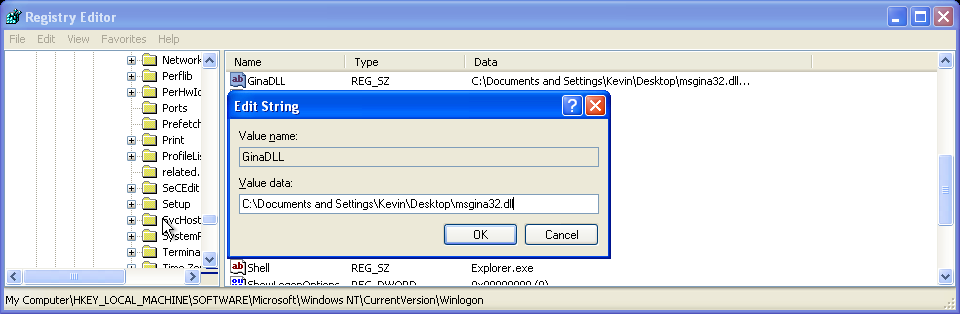
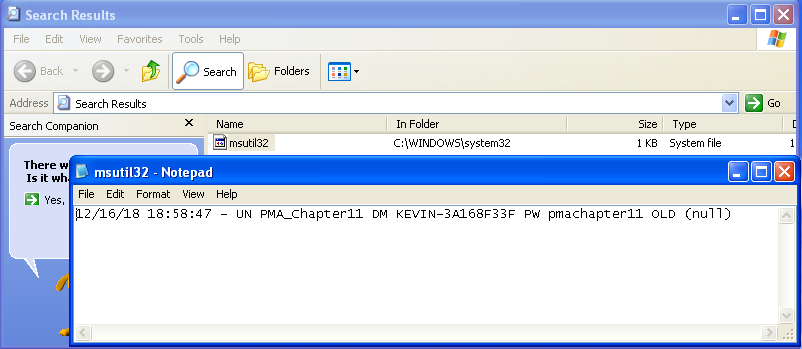
After this, we know for sure that this Malware is a GINA Interceptor and that stores the passwords in the filename that we’ve seen in the Strings. The following screenshot was taken after rebooting the machine and login in (the user and password have been edited in notepad prior to the screenshot):
In terms of Advanced Static Analysis and Advanced Dynamic Analysis, not much can be added to the analysis regarding the exe. The function main is pretty straightforward and drops the DLL to disk and configures the GinaDLL Key in Winlogon.
Looking at the DLL, we see in the Exports that this is clearly a GINA Interceptor due to the amount of the exports starting with the Wlx string.
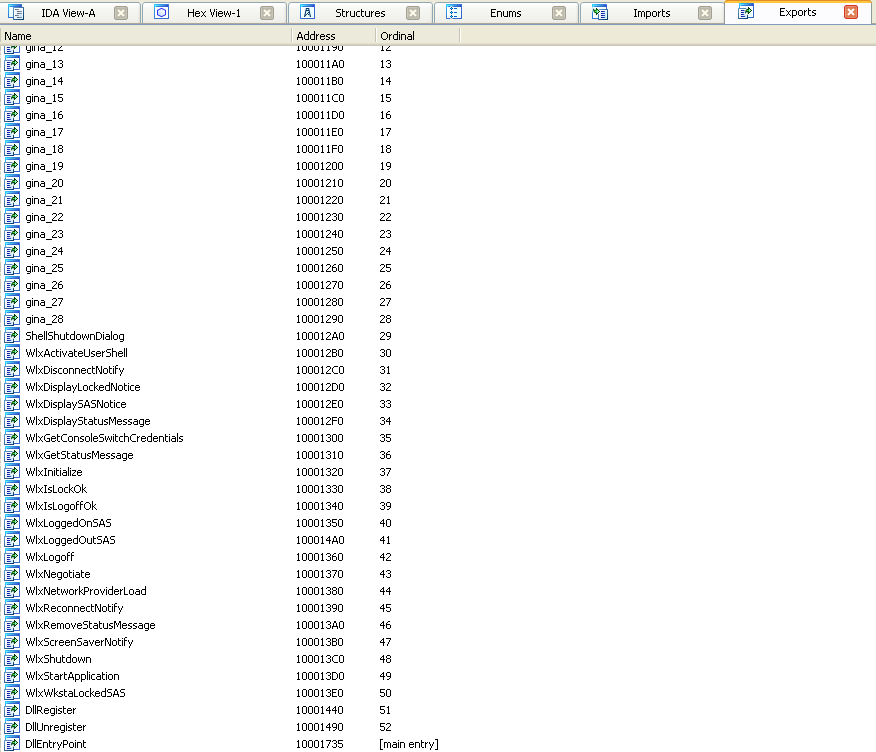
Looking at these Exports, we can see that the majority of them are just pushing the function name to a function that calls GetProcAddress (sub_10001000) and then jumps to eax the returned address.
However, there is one different function, WlxLoggedOutSAS.
This function is similar to the others (uses GetProcAddress to find the address of the intended library) but in between the sub_10001000 call and the call to the real WlxLoggedOutSAS and after the call being made, there’s more code.
After the call to the real WlxLoggedOutSAS is made, we can see a string format being passed to sub_10001570:
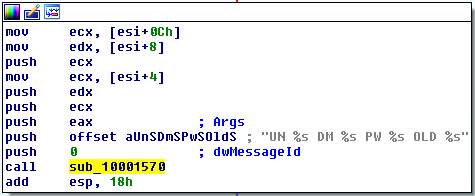
At the beginning of this function we see that a file named msutil32.sys is being opened and that another string format (with a date and time) is being passed to a fwprintf function:
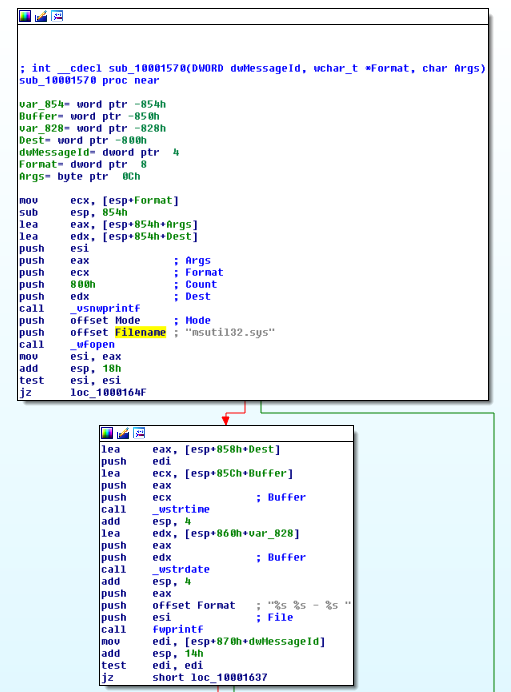
This is how the Malware operates in order to steal user credentials. When calling the WlxLoggedOutSAS, it writes the user credentials to the file.
Questions:
1) What does the Malware drop to disk?
The Malware drops to Disk a DLL file.
2) How does the Malware achieve persistence?
The Malware achieves persistency by creating the following Registry Key with the DLL path as value:
- HKLM\SOFTWARE\Microsoft\Windows NT\CurrentVersion\Winlogon\GinaDLL
This way the Malware achieves persistency making Winlogon load this DLL during the login process.
3) How does the Malware steal user credentials?
The Malware steals credentials by intercepting Microsoft’s Graphical Identification and Authentication system.
4) What does the Malware do with stolen credentials?
The credentials are stored in a file named C:\Windows\system32\msutil32.sys
5) How can you use this Malware to get user credentials from your test environment?
After rebooting the machine and logging back in, we can see that the username and passwords were stored in the msutil32.sys file:
Although we might think that this is happening during the login process, we can see in IDA that it really happens during the Logout Process (export **WlxLoggedOutSAS **of msgina32.dll).