PMA Lab 11-2: Malware Behaviour
Analyze the malware found in Lab11-02.dll. Assume that a suspicious file named Lab11-02.ini was also found with this malware.
Lab 11-2
Analyze the malware found in Lab11-02.dll. Assume that a suspicious file named Lab11-02.ini was also found with this malware.
Analysis:
Starting with Basic Static Analysis, looking at the Imports, we can start to suspect some of the functionalities of this Malware:
- The Malware may dynamically resolve and import external resources (GetProcAddress, and LoadLibraryA)
- There are a lot of Imports that give the Malware the ability to operate with files. (CopyFileA, CreateFileA, ReadFile, etc.)
- The Malware may use the Registry. (RegCreateKeyExA, and RegSetValueExA)
- The Malware may perform interesting actions in memory (malloc, memset, and memcpy)
- The Malware will most likely look for a specific Thread and affect perform any action on it (Thread32Next, Thread32First, ResumeThread, SuspendThread, GetCurrentThreadId, etc.)
Looking at the strings, we can see some interesting ones:
- For instance, the string AppInit_DLLs gives us a clue on how this Malware may achieve persistency on the system.
- Interesting strings like OUTLOOK.EXE, THEBAT.EXE, and MSIMN.EXE gives us a clue at possible host-based indicators of the presence of this Malware. Also, the string Lab11-02.ini hints that this file will be used by the Malware.
- Finally, strings like wsock32.dll, and send hints that this Malware will probably use Sockets to communicate to a Command and Control. Since send is not in the Imports list and wsock32.dll is not one of the Imported libraries, the Malware will most likely dynamically resolve and import this function.
As it is usual in DLL files, this Malware has an Export function. This function is called installer and hint at a possible function used to install the Malware in the System.
Looking at Lab11-02.ini, we can see that it contains unreadable data that will very likely be used by the Malware.
Moving on to Basic Dynamic Analysis and executing the Malware with rundll32.exe, as we expected when looking at the strings, we can see that the Malware achieves persistency by using the AppInit_DLLs Registry Key. This way the DLL will be loaded by every process that loads User32.dll, which is very common:
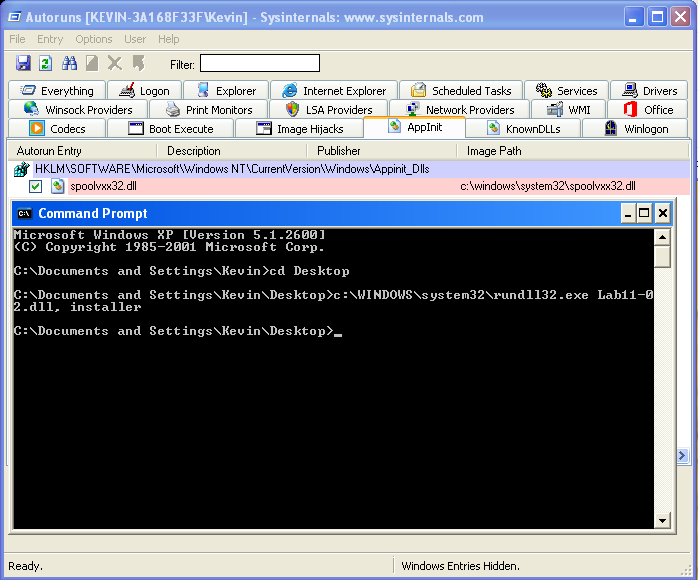
As we can see, the DLL in the Path is C:\windows\system32\spoolvxx32.dll, which by calculating the hashes, is the same as Lab11-02.dll.
Moving on to Advanced Static Analysis, we can take a look at the Installer export. All this function does is, as the name hints, install the DLL (achieve persistency via AppInit_DLLs). For that the Malware creates the following Registry Key and copies itself to system32:
- KEY: HKLM\SOFTWARE\Microsoft\Windows NET\CurrentVersion\Windows\App_Init_DLLs
- VALUE: C:\Windows\system32\spoolvxx32.dll
The spoolvxx32.dll is a copy of Lab11-02.dll:
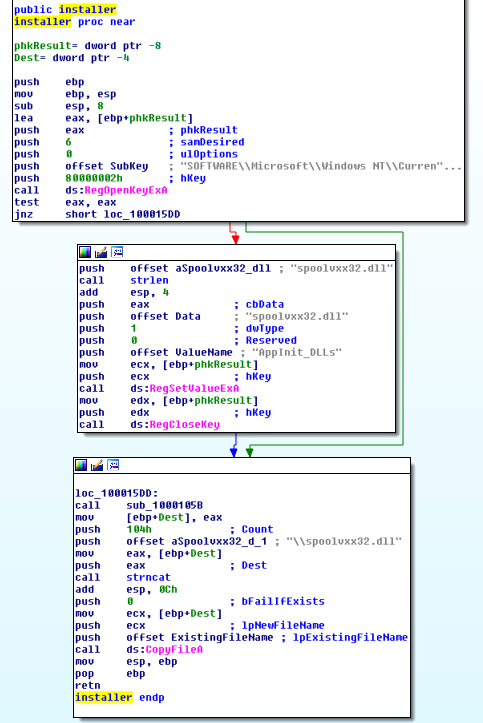
This is how the Malware achieves persistence, using the AppInit_DLLs Registry Key. This way the DLL will be loaded by every process that loads User32.dll. Now let’s take a look at the DLL Main to see what happens when it is loaded by another process.
First, the Malware uses CreateFile with GENERIC_READ access in a file (C:\WINDOWS\system32\Lab11-02.ini). This file path is created dynamically with calls like GetSystemDirectory, and strncat.
However, the file doesn’t exist and thus the Malware will jump to the end of the code:
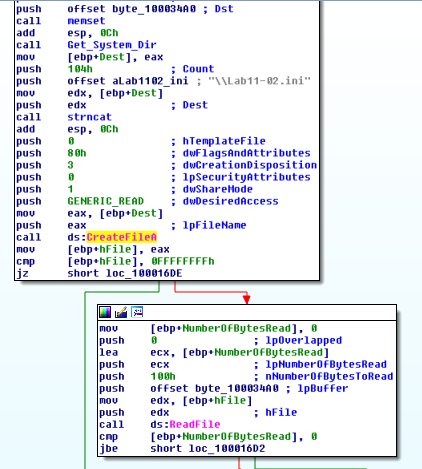
This can be interpreted with IDA and proved with Olly in Advanced Dynamic Analysis.
If the file exists, however, this same file will be read (ReadFile) and then a function will be called sub_100010B3. This function has one argument which is the buffer that received the data read from the file:
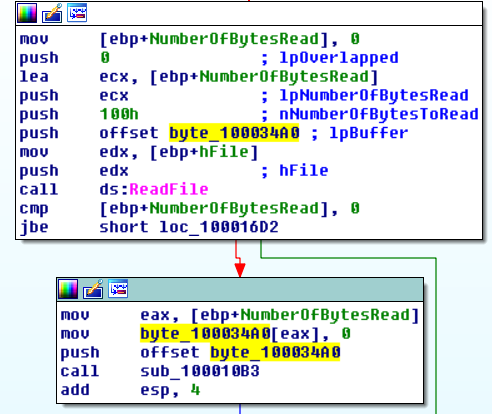
Inside this function, we can observe a look with another function performing arithmetic operations which means that this function is probably a decoding stub. As we’ve seen before, Lab11-02.ini had unreadable data and will probably be decoded into memory. Let’s jump to Olly in order to see this happen, but first let’s manually copy the file to C:\Windows\system32.
As expected, after copying the file Lab11-02.ini to the previously mentioned location, the code execution arrives at the ReadFile call. After executing the call, we can see the read data in the Memory Dump:
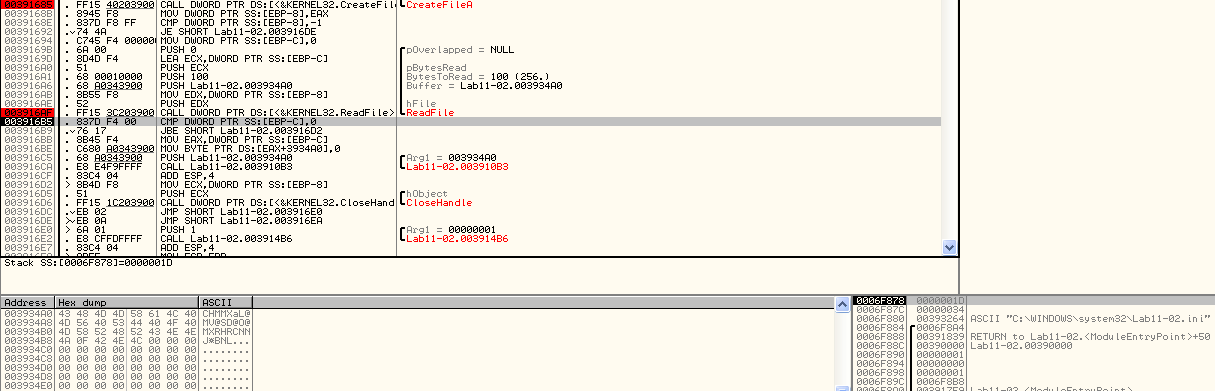
Looking at the same Address, after executing sub_100010B3, we can see that the Data in memory was decoded:
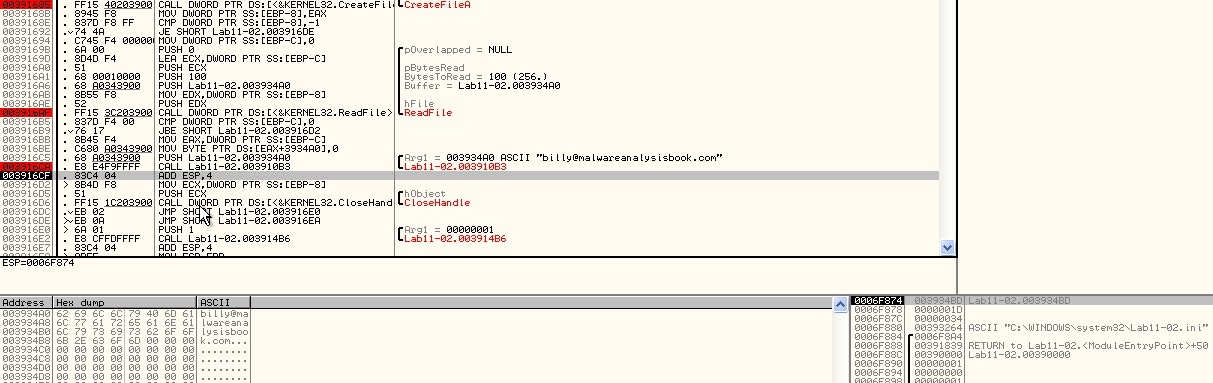
At this point, the Malware has decoded an E-mail Address and will probably use it in some fashion. After this, we get to sub_100014B6,
Inside this function we can see that the Malware is checking if it’s running into one of 3 programs:
- THEBAT.EXE
- MSIMN.EXE
- OUTLOOK.EXE
This can be seen in the following image where after a memcmp function is executed with the parameters THEBAT.EXE and LOADDLL.EXE (Olly’s dummy program used to load DLLs):
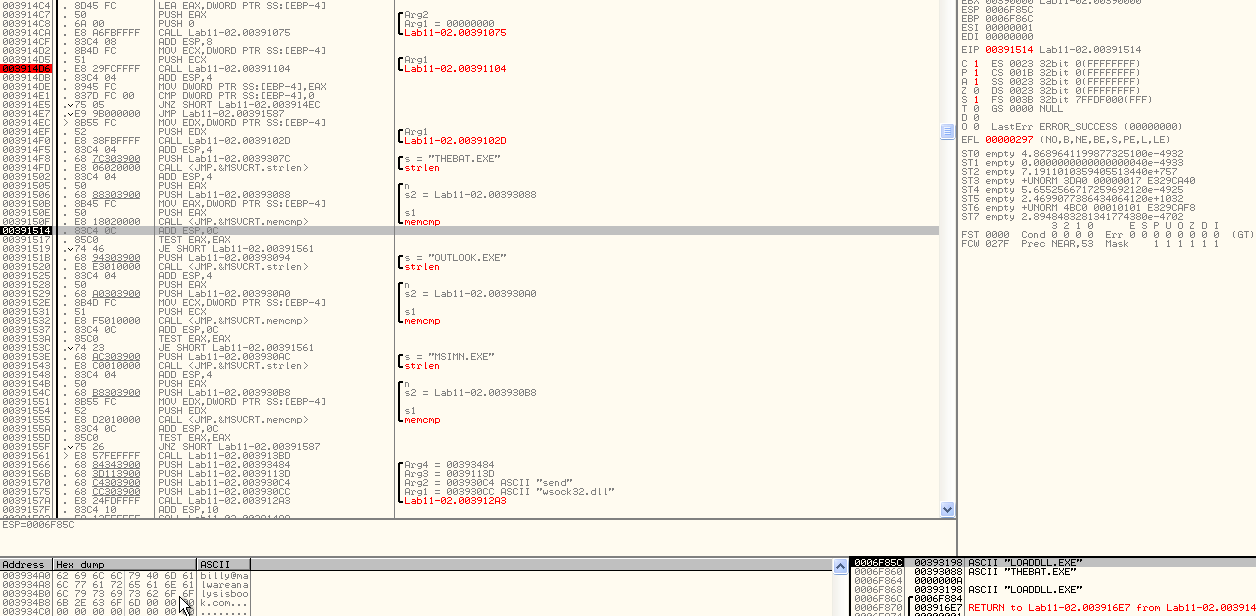
If none of these programs are being executed the program will exit.
If a process with any of the previously mentioned names, is the one loading spoolvxx32.dll (via AppInit_DLL), function 003912A3 is called:

Looking at the arguments of this function, we have wsock32.dll and send being used as arguments number 1 and number 2. Argument number 3 and 4 are Addresses.
Inside looking at the arguments pushed into the stack and the calls in sub_100012A3, we can see that the Malware is looking for the Address of the send function:
- GetModuleHandle to winsock32.dll
- LoadLibrary
- GetProcAddress of the second argument (send)
The return of GetProcAddress (Address of send) will be passed to sub_10001203. Inside sub_10001203 we can see the Malware changing the Memory Protection on a region of memory using VirtualProtect:
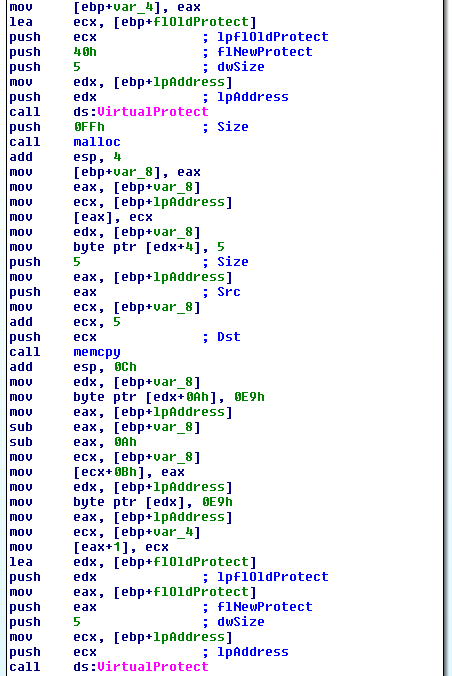
First, it calls VirtualProtect with the flNewProtect value 0x40 in order to enable write access to that region of memory:
PAGE_EXECUTE_READWRITE (0x40)
Enables execute, read-only, or read/write access to the committed region of pages. Windows Server 2003 and Windows XP: This attribute is not supported by the CreateFileMapping function until Windows XP with SP2 and Windows Server 2003 with SP1.
Then memcpy is called, so we know that something will be copied into memory, and finally, VirtualProtect is called again, but this time with flNewProtect value of 0x10 in order to restore the original memory-protection settings.
PAGE_EXECUTE (0x10)
Enables execute access to the committed region of pages. An attempt to write to the committed region results in an access violation. This flag is not supported by the CreateFileMapping function.
At this point, we know that a region of memory will be edited and marked as executable.
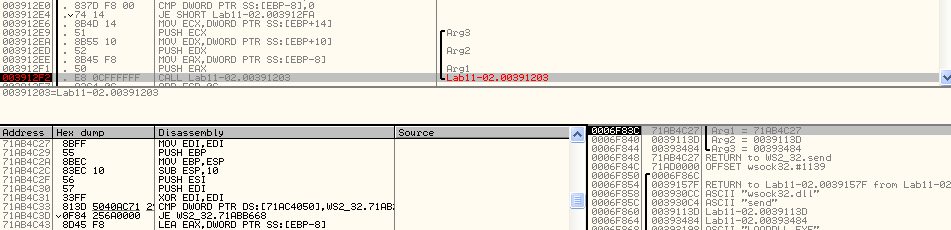
In the following image, we have Ollydbg right before the call to sub_00391203. Last argument being pushed into the stack is the address to send (0x71AB4C27 - followed in Dump):
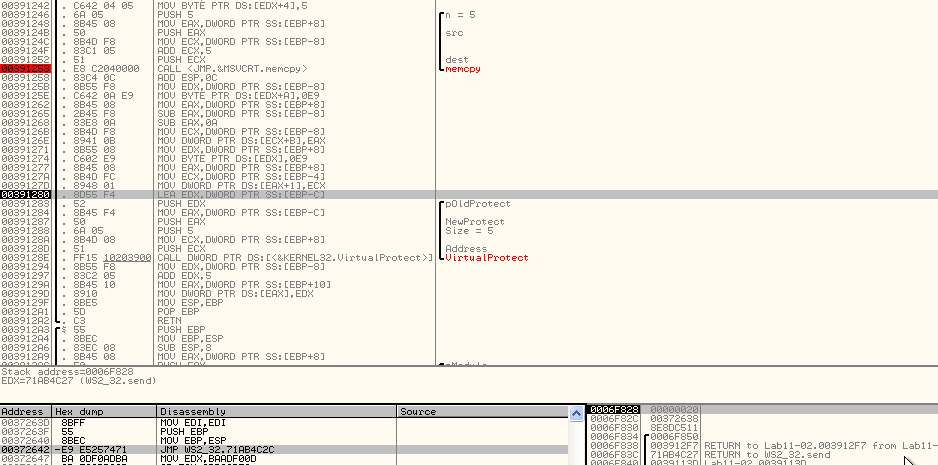
The memcpy call is copying the first 5 bytes of send to the Address 0x0037263D. In this memory region. some of the instructions after the memcpy call, another jump instruction is placed (jmp 71AB4C2C):
Then, as expected the first bytes of send were patched with a jump (jmp 0039113D):
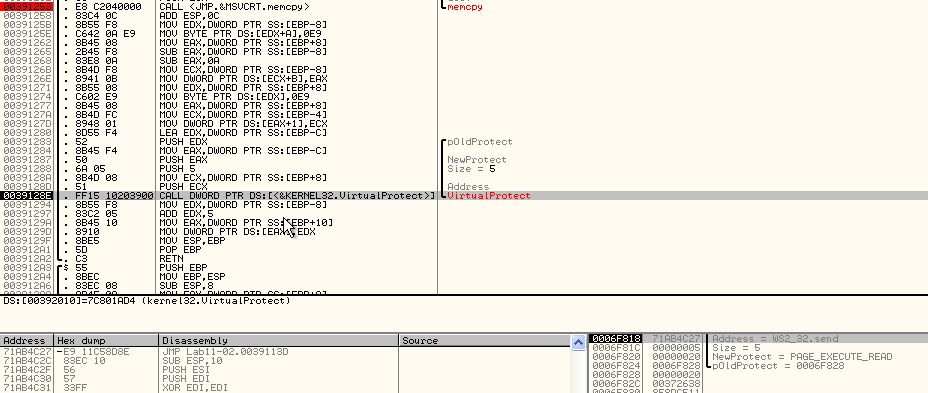
Address 0039113D is the second argument pushed to sub_100012A3 (there is a slight change in the addresses between Olly and IDA images: sub_1000113D in IDA Pro and 0x0039113D in OllyDbg).
Thus, we can see that function send is being hooked in order to execute sub_0039113D every time it is called (jump instruction). The reason the first 5 bytes of send were copied to 0x0037263D is that it has to maintain the stack aligned when the execution gets back to send after the hook function was executed.
Taking a look at sub_0039113D (the function executed by the hook), we can see the build-up of a string with the RCPT TO command with the decoded E-mail, meaning that the Malware will send e-mails to this account.
At the end of this function we have two calls to the address at 00393484 (marked with breakpoints for easier identification):
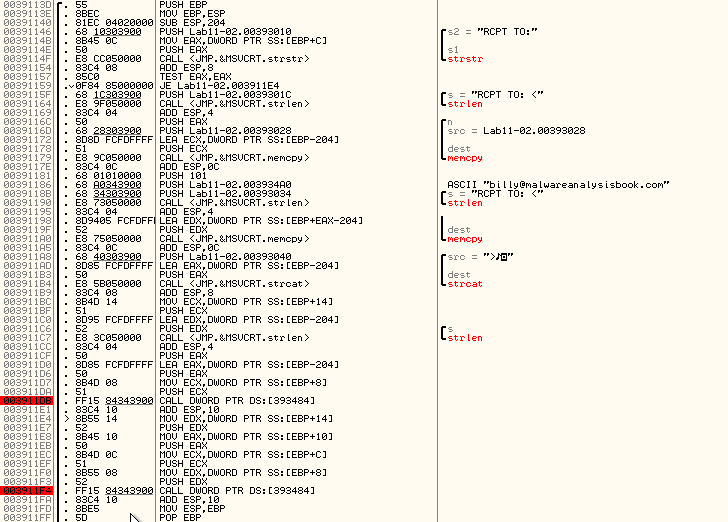
As we know, 00393484 is the last argument of sub_003912A3. In this Address we have the following content:

For some reason, the Opcodes (3D263700) got interpreted into “cmp EAX, 3726”. However, sub_0039113D has a call to the address at 00393484, which has the value of 3D263700. As we’ve seen before, 0x0037263D contains the prelude of send and the jump back to send function.
Thus, the hook is working as follows:
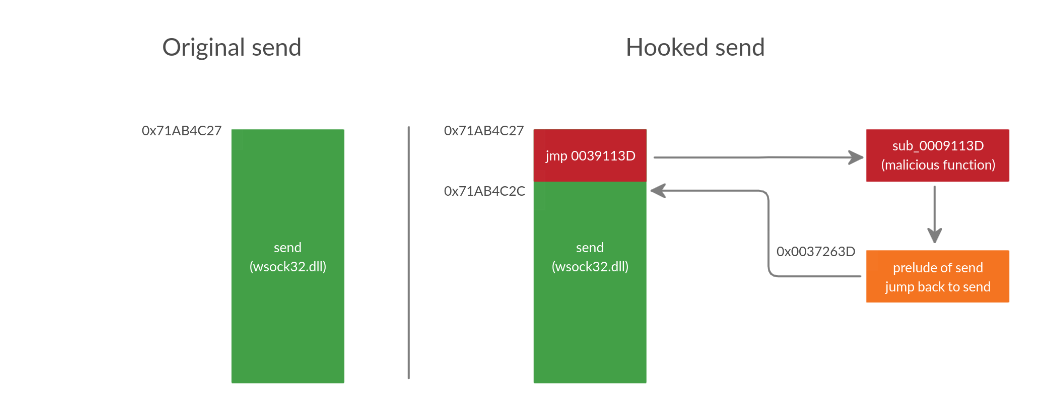
With this, function sub_100012A3 can be renamed to install_hook. This function is called in between sub_100013BD and sub_10001499.
The purpose of these last two functions is:
- sub_100013BD - Pause all Threads of the current process
- sub_10001499 - Resume all Threads of the current process
Remember that spoolvxx32.dll is being loaded into every process loading User32.dll (persistency via AppInit_DLLs) and there’s a check in the code to see if it’s running inside Outlook, Outlook Express or The Bat! E-Mail Client.
Thus, the Malware stops all threads of these programs, installs the hook in send function (install_hook), and then resumes all Threads.
Basically, the purpose of the Malware is to hook the send function inside one of the following mail programs: Outlook, Outlook Express or The Bat! E-Mail Client
Going back to Dynamic analysis we can see the Malware’s final job in action:
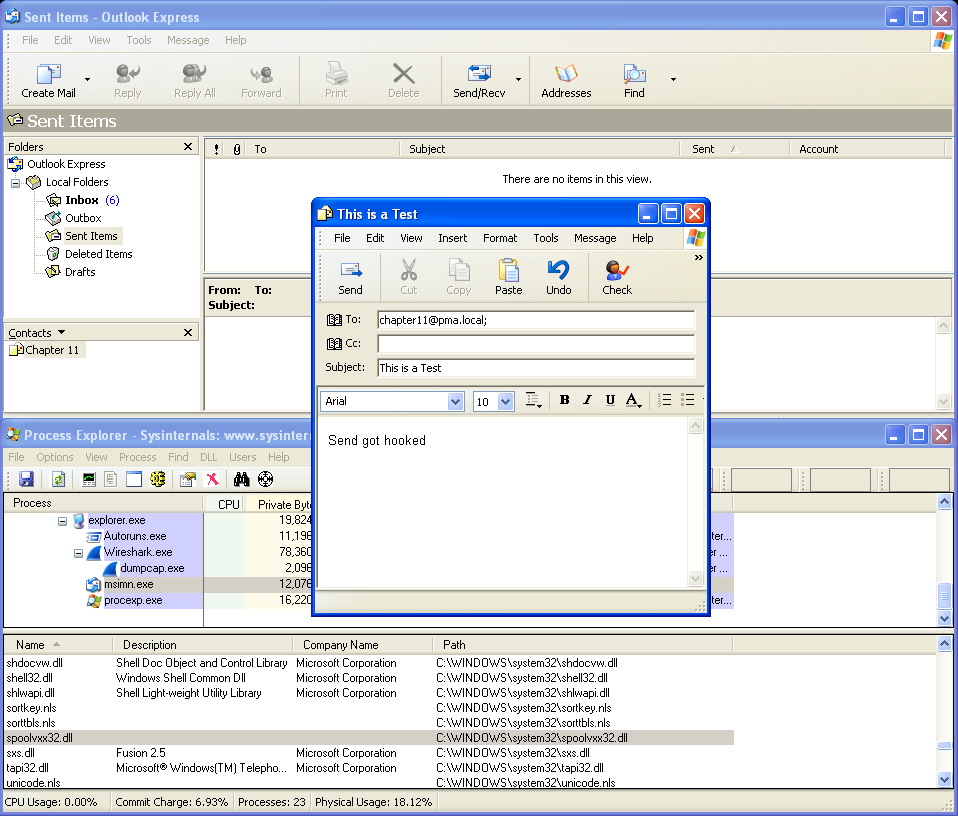
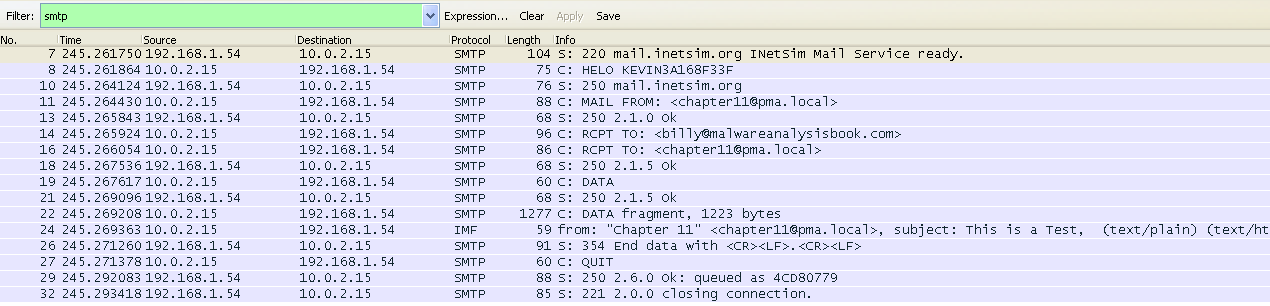
We know that the Malware is going to hook send and is looking for a specific process (in this case let’s use Outlook Express - msimn.exe). Since send is the hooked function, we need to generate traffic in order to see what happens. By setting up an SMTP server with InetSIM and sending an E-mail, we can see that not only the E-mail was sent to the desired recipient, it also was sent to [email protected]:
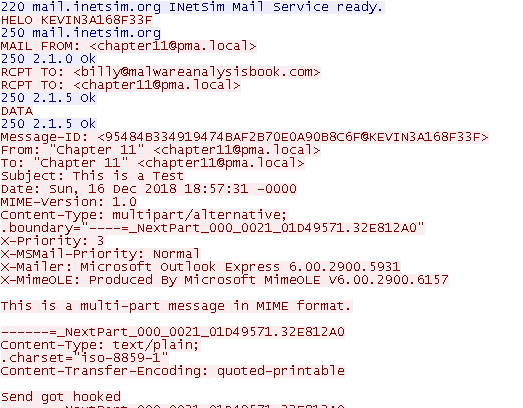
Thus, we can conclude that the objective of the Malware is to steal all outgoing e-mails.
Questions:
1) What are the exports for this DLL malware?
The Malware has one export named installer.
2) What happens after you attempt to install this Malware using rundll32.exe?
After installing the Malware with rundll32.exe and the export name, the Malware copies itself to C:\Windows\system32\spoolvxx32.dll.
Then, it achieves persistency by using the AppInit_DLLs Registry Key. The configuration Value of the Key is C:\windows\system32\spoolvxx32.dll.
It also attempts to read Lab11-02.ini from C:\Windows\system32, however, the Malware doesn’t copy the file to that location prior to the function that attempts to read the file.
3) Where must Lab11-02.ini reside in order for the Malware to install properly?
Lab11-02.ini has to be placed in C:\Windows\system32\
4) How is this malware installed for persistence?
This Malware achieves persistency via AppInit_DLLs.
5) What user-space rootkit technique does this Malware employ?
This Malware uses an inline hook on the send function of wsock32.dll.
6) What does the hooking code do?
The Hooking code will make this Malware to send e-mails to [email protected]
7) Which process(es) does this Malware attack and why?
This Malware is attempting to target thebat.exe, outlook.exe, or msimn.exe. If one of these processes is running, the Malware will install the hook.
8) What is the significance of the .ini file?
The .ini file contains an encoded E-mail Address. The e-mail is decoded with function sub_100010B3. The decoded string is [email protected]
9) How can you dynamically capture this Malwares activity with Wireshark?
Since this Malware will be sending E-mails, we can use Wireshark in order to filter Simple Mail Transfer Protocol (SMTP) traffic: