PMA Lab 11-3: Malware Behaviour
Analyze the malware found in Lab11-03.exe and Lab11-03.dll. Make sure that both files are in the same directory during analysis.
Lab 11-3
Analyze the malware found in Lab11-03.exe and Lab11-03.dll. Make sure that both files are in the same directory during analysis.
Analysis:
Starting with Basic Static Analysis, looking at the Imports, we can start to suspect some of the functionalities of Lab11-03.exe:
- The Malware may dynamically resolve and import external resources (GetProcAddress, and LoadLibraryA)
- There are a lot of Imports that give the Malware the ability to operate with files. (CopyFileA, CreateFileA, WriteFile, etc.)
- Another interesting Import is GetCommandLineA, which retrieves the command-line string for the current process, meaning that the Malware may have a specific way to be executed (e.g. Filename or command as argument).
- The Malware can read data from a specific file, and also may write data to the file (MapViewOfFile)
- Also, the Malware may allocate memory and use it in some fashion. (VirtualAlloc, HeapAlloc, VirtualFree, HeapFree, etc.)
Looking at the strings, we can see some interesting ones:
- Path C:\Windows\System32\inet_epar32.dll looks interesting
- Strings like “.cmd”, “.bat”, “.exe”, and “.com” are interesting too because they are the extensions of Windows executable files.
- The strings net start cisvc and cisvc.exe are interesting and hint that the Malware may install itself as a Service. Although the Malware doesn’t import CreateServiceA directly, it may load it dynamically, and thus, this should be investigated in the next phase of analysis.
- Finally, the string “command.com” is also promising.
Now, Static Analysis of Lab11-03.dll, in terms of Imports:
-
The Malware probably attempts to control that only one instance is running at the same time (CreateMutexA and OpenMutexA)
-
The Malware has imports that hint at a Keylogger functionality (**GetAsyncKeyState **and GetForegroundWindow)
-
The Malware may copy the text of the specified window’s title bar into a buffer (GetWindowTextA)
-
The Malware may dynamically resolve and import external resources (GetProcAddress, and LoadLibraryA)
In terms of Strings, Lab11-03.dll has only one string that stands out:
- The file path C:\WINDOWS\System32\kernel64x.dll
The DLL has an Export that should be analyzed later: zzz69806582
Moving on to Dynamic Analysis, after running Lab11-03.exe, we can see a Command line with the text “The Indexing Service service is starting”.
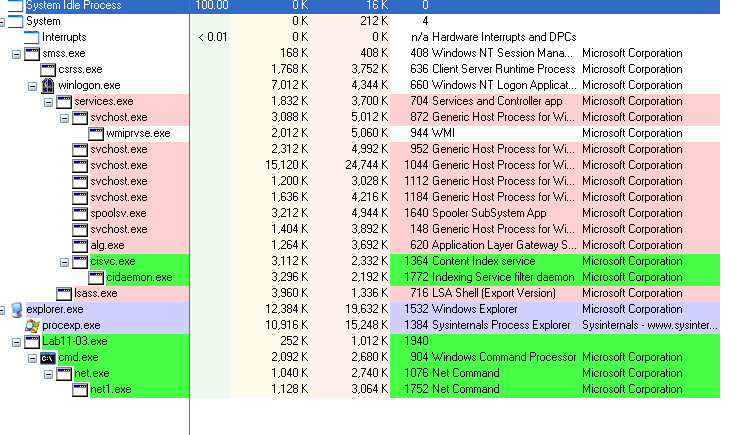
Monitoring Process Explorer we can see that Lab11-03.exe launched cmd.exe and then net.exe, meaning that it indeed started a Service. We can also see a process named cisvc.exe being executed at the same time. cisvc.exe is the Content Index Service catalogs and tracks files on the hard drive and indexes them for faster search results:
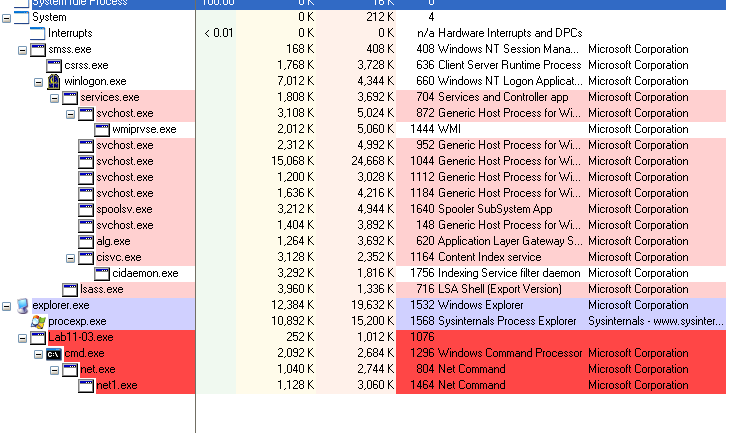
After launching the service, Lab11-03.exe is terminated:
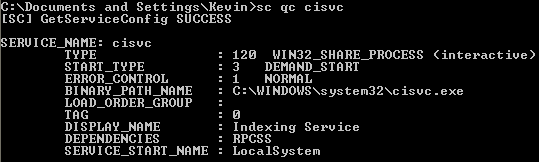
One interesting thing to note is that the Malware achieves persistence by Backdooring cisvc.exe but this service is not set to be automatically started by the System:
Proceeding with the analysis, two interesting files were created by Lab11-03.exe:
- C:\WINDOWS\System32\inet_epar32.dll
- C:\WINDOWS\System32\kernel64x.dll
The first file is a copy of Lab11-03.dll. And while inspecting the second file with PEStudio, it’s possible to see that it is not a PE File and has data written to it. After opening the file in Notepad it was possible to see file paths and window’s title bar strings written to the file as well as pressed characters:
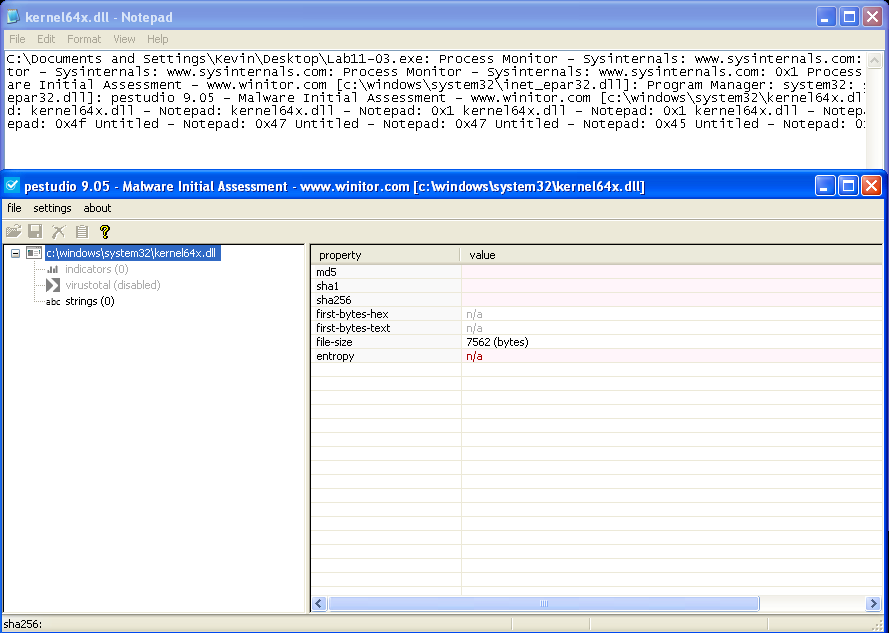
If we inspect the content of the file we can see that it is indeed a Keylogger and the letters that were typed, are being written to kernel64x.dll as Hexadecimal bytes along with the Window Bar title and the process path.
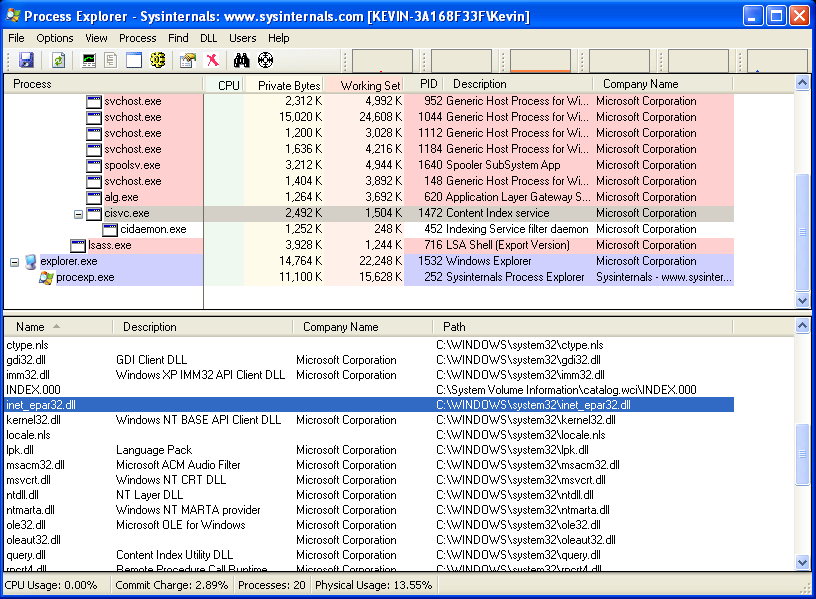
Going back to Process Explorer, and inspecting cisvc.exe we can see that the DLL inet_epar32.dll is loaded by this process:
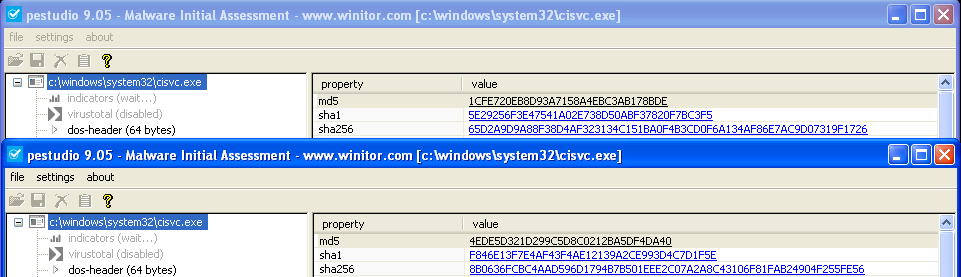
By calculating the hashes of cisvc.exe before and after the execution of Lab11-03.exe we can conclude that cisvc.exe was edited by Lab11-03.exe:
Moving on to Advanced Static Analysis and Advanced Dynamic Analysis, we can see in IDA that Lab11-03.exe starts by copying Lab11-03.dll to C:\WINDOWS\System32\inet_epar32.dll.
Then function sub_401070 is called and as a parameter, it receives the file path C:\WINDOWS\System32\cisvc.exe.
sub_401070, starts with three interesting calls with the following parameters (view of parameters pushed into the stack):
- CreateFile:

- CreateFileMappingA:

- MapViewOfFile

These calls are performed on C:\WINDOWS\System32\cisvc.exe. Looking at the page protection of the file mapping object, we can see that the view will be mapped for read-only, copy-on-write, or read/write access. Thus, we can suspect what will happen next based on this call and the results of Basic Dynamic Analysis.
After these calls, sub_401000 is executed with the parameters .text and 3 (number of sections in cisvc.exe). We can see inside sub_40100 that the second parameter (3) is being compared with an iterator and the string .text is being compared with the first parameter of passed with the call with _strcmpi. If this comparison fails, it will return Null, the handles are closed and the view of cisvc.exe is unmapped. On the other hand, if the comparisons are successful, the function will return the BaseAddress of the .text section.
Looking at the following instructions, we can see that several Arithmetic operations are executed:
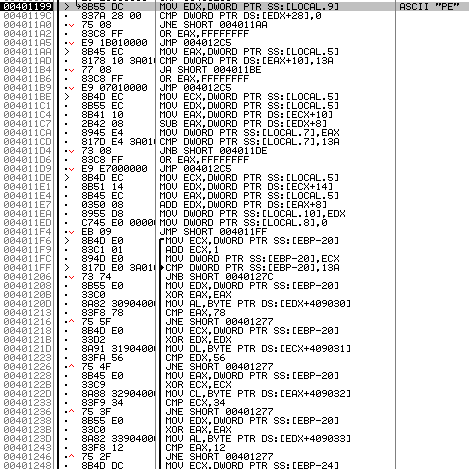
However, there’s no need to go into too much detail on these instructions. We know already from Basic Dynamic Analysis that cisvc.exe will be edited in order for it to load C:\WINDOWS\System32\inet_epar32.dll and we see memory references to the DLL and the Export:

Now, let’s analyze Lab11-03.dll (C:\WINDOWS\System32\inet_epar32.dll).
Analyzing the export zzz69806582, we can see it starts by creating a Thread:
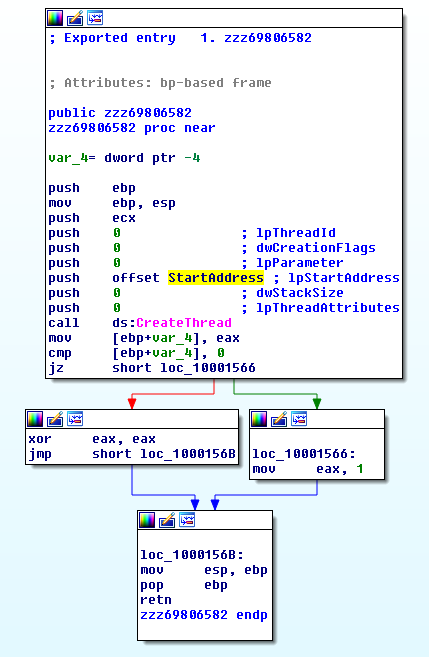
Let’s take a look at the Starting Address of the Thread (offset StartAddress). It starts by checking if the Mutex MZ exists and if it does, the code exists, else, the Mutex is created in order to guarantee that that is the only instance of the Malware running and proceeds with the execution.
After that we can see the file C:\WINDOWS\System32\kernel64x.dll is created. After that, sub_10001380 is called. After having a quick look at this function we can see that this is responsible for the Keylogging functionality and can be broken down to several parts:
- It starts by executing sub_10001030 which is where the keystroke logging code resides (function renamed to keystroke_logging). This Keylogger uses the Polling technique:
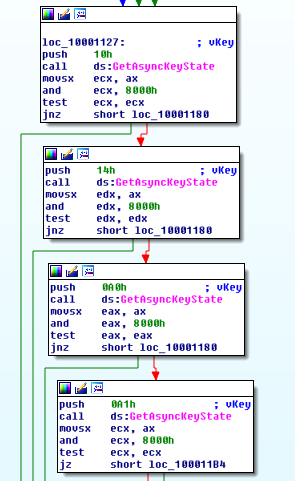
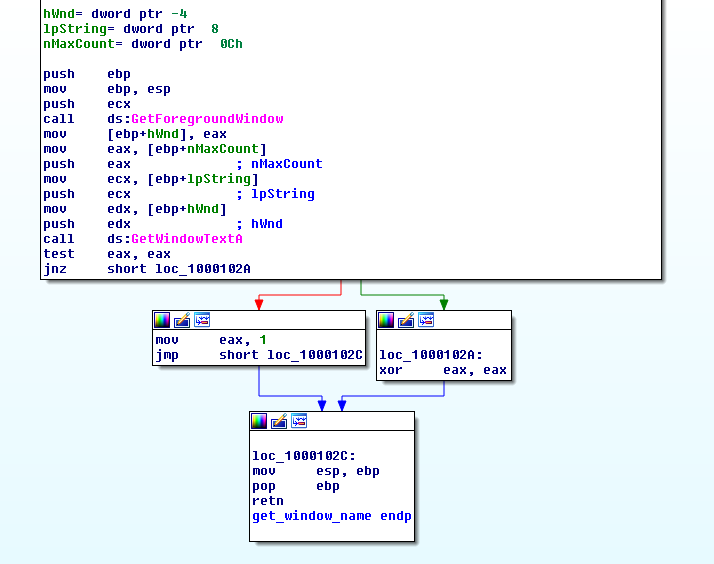
- Inside sub_10001030 there’s a call to sub_10001000. This function is responsible for getting the Window Bar Title of the window (function renamed to get_window_name):
- Back to sub_10001380, after keystroke_logging has been executed the data is written to the file:
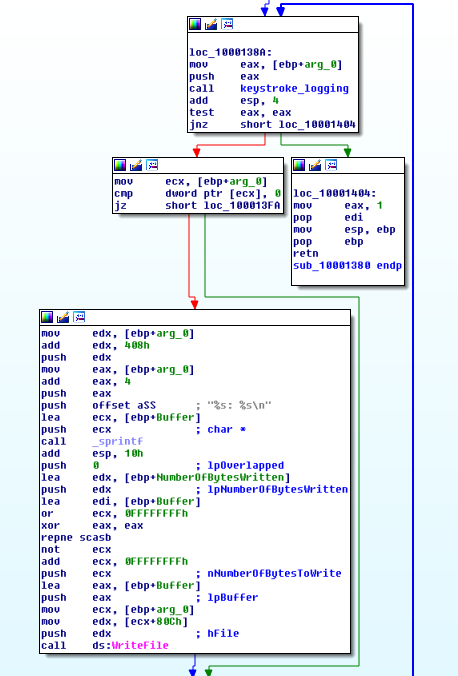
As expected, this code is running on a loop.
This sums up the functionality of the Malware functionality.
Questions:
1) What interesting analysis leads can you discover using basic static analysis?
From Basic Static Analysis it was possible to hint at a Keylogger functionality because of Imports like **GetAsyncKeyState **and GetForegroundWindow.
In terms of strings, it was possible to suspect the usage of the cisvc Service (string net start cisvc) and file paths like C:\WINDOWS\System32\kernel64x.dll and C:\Windows\System32\inet_epar32.dll
2) What happens when you run this malware?
By executing the .exe file, Lab11-03.dll is copied to C:\Windows\System32\inet_epar32.dll, C:\WINDOWS\System32\cisvc.exe is backdoored in order to load this DLL. Finally, the Content Index Service (net start cisvc) is started.
As mentioned before, cisvc.exe was backdoored and is now loading the DLL C:\Windows\System32\inet_epar32.dll (Lab11-03.dll), which is a Keylogger. This DLL starts by guaranteeing that only one instance of this program is running and then creates C:\WINDOWS\System32\kernel64x.dll. This is the file where the keystrokes will be logged.
3) How does Lab11-03.exe persistently install Lab11-03.dll?
The Malware backdoors C:\WINDOWS\System32\cisvc.exe making it load inet_epar32.dll (Lab11-03.dl).
4) Which Windows system file does the malware infect?
The Malware infects C:\WINDOWS\System32\cisvc.exe.
5) What does Lab11-03.dll do?
Lab11-03.dll is a Keylogger that uses the Polling technique.
6) Where does the malware store the data it collects?
The keystrokes are logged to C:\WINDOWS\System32\kernel64x.dll.