PMA Lab 13-1: Data Encoding
Analyze the malware found in the file Lab13-01.exe.
Lab 13-1
Analyze the malware found in the file Lab13-01.exe.
Analysis:
Looking at the Imports, we can start to suspect some of the functionalities of this Malware:
- The Malware will likely use a Resource (LoadResource, FindResourceA, LockResourceA, and SizeofResource)
- The Malware will likely communicate to a Command and Control server (InternetOpenA, InternetOpenUrlA, InternetReadFile, and InternetCloseHandle. Also, gethostvalue, WSAStartup, and WSACleanup)
- The Malware may dynamically resolve and import external resources (GetProcAddress and LoadLibraryA)
- The Malware may allocate memory and use it in some fashion. (VirtualAlloc, HeapAlloc, VirtualFree, HeapFree, etc.)
- The Malware may wait until fully show its intent (Sleep)
In terms of strings, this Malware has some interesting strings as well:
- We can see a Base64-indexing string, therefore, we can expect the Malware to make use of Base64.
- Two interesting strings are: “Mozilla/4.0” and “http://%s/%s/”. We can expect the Malware to build the URL to where it will connect dynamically (probably by decoding some Base64 string) and use the first string as a User-Agent.
Checking out the Resources, we can see that the Malware has indeed an interesting resource that is very likely to be used:
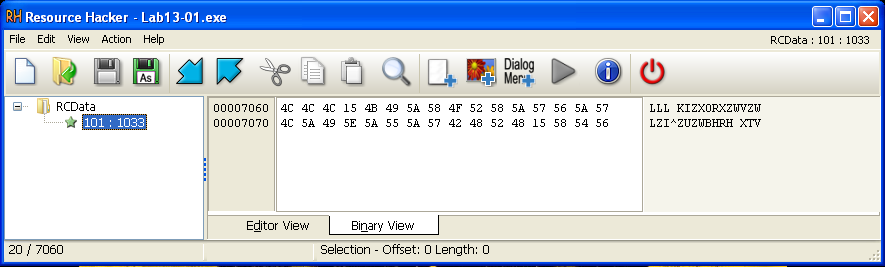
It’s possible to see the purpose of this resource during Advanced Static Analysis.
Advancing to Basic Dynamic Analysis, we can see that after we execute the Malware, nothing strange happens in terms of Processes. Lab13-01.exe keeps on executing, and in the background, we can observe some network connections:

The Malware is attempting to connect to http://www.practicalmalwareanalysis.com/S0VWSU4tM0ExNjhG/
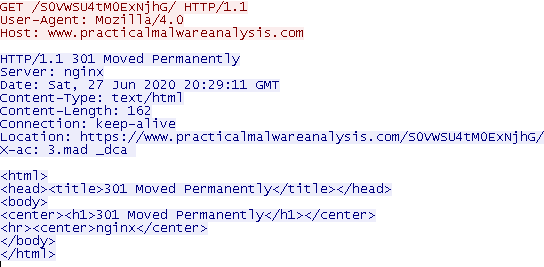
With the information that we obtained in Basic Static Analysis and by looking at the URI string, we can suspect that this string is encoded with Base64. After attempting to decode it, the string “KEVIN-3A168F” (part of the machine’s hostname - first 12 chars) was obtained.
Since anything else happened during this phase of the analysis, let’s move on to Advanced Static Analysis.
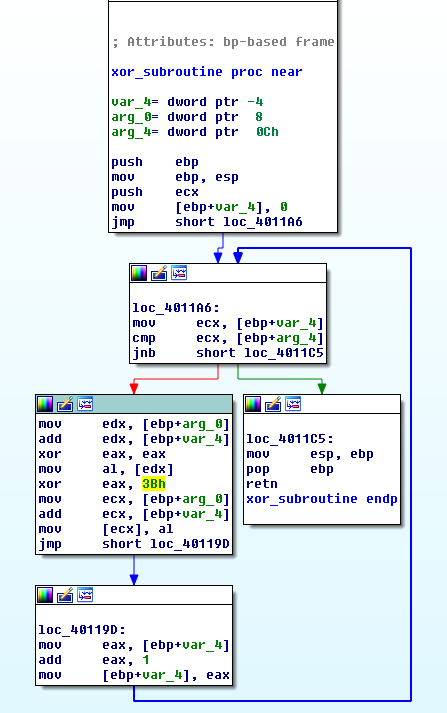
Opening the program in IDA, we can see a call to sub_401300. In this function, a resource is loaded, and sub_401190 is called. sub_401190 clearly looks like an XOR decode subroutine with the key 3B.
As we’ve seen during Basic Static Analysis, Lab13-01.exe contains a resource named RCData with the following Hex content:
- 4C 4C 4C 15 4B 49 5A 58 4F 52 58 5A 57 56 5A 57 4C 5A 49 5E 5A 55 5A 57 42 48 52 48 15 58 54 56
With a simple Python script we can attempt to decode this String with the Key 3B:
encoded = ("\x4C\x4C\x4C\x15\x4B\x49\x5A\x58\x4F\x52\x58\x5A\x57\x56\x5A\x57\x4C\x5A\x49\x5E\x5A\x55\x5A\x57\x42\x48\x52\x48\x15\x58\x54\x56")
decoded = []
k = 0x3B #key


for x in bytearray(encoded):
	byte = x ^ k
	decoded.append("%02x" % byte)

decoded ="".join(decoded).decode("hex")
print decoded
After executing the string, the decoded string is: www.practicalmalwareanalysis.com
That’s the server that was being requested during Basic Dynamic Analysis. Function sub_401300 can be renamed to decode_C2, and sub_401190 to xor_decode_subroutine
After executing decode_C2, the program initiates the use of the Winsock DLL by calling WSAStartup. It then Sleeps for half a second, and call sub_4011C9.
This function starts by loading the User-Agent string (Mozilla/4.0) and getting the machine’s hostname with gethostname, followed by a strncpy that is getting the first 12 bytes of the hostname, which is then pushed into sub_4010B1.
This function takes two parameters, a String (hostname), and an int. Inside sub_4010B1, there are a lot of arithmetic operations being executed in a loop, and instead of going through the details of this function we can use Olly in order to analyze it:

As we can see in the Stack, this function is returning the hostname encoded in Base64.
This string is then used with a string format, and the decoded resource (www.practicalmalwareanalysis.com):
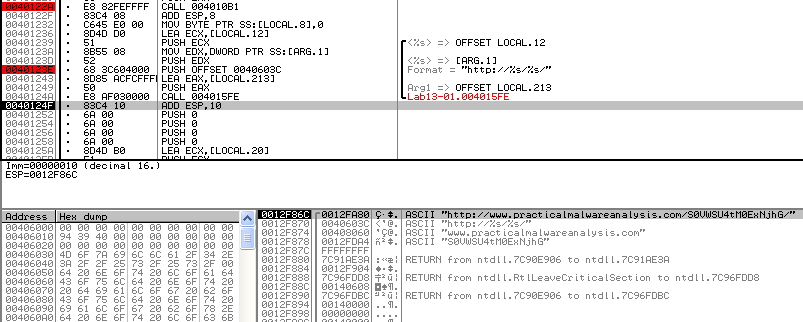
Then, after building the URL, the Malware calls InternetOpenURLA:
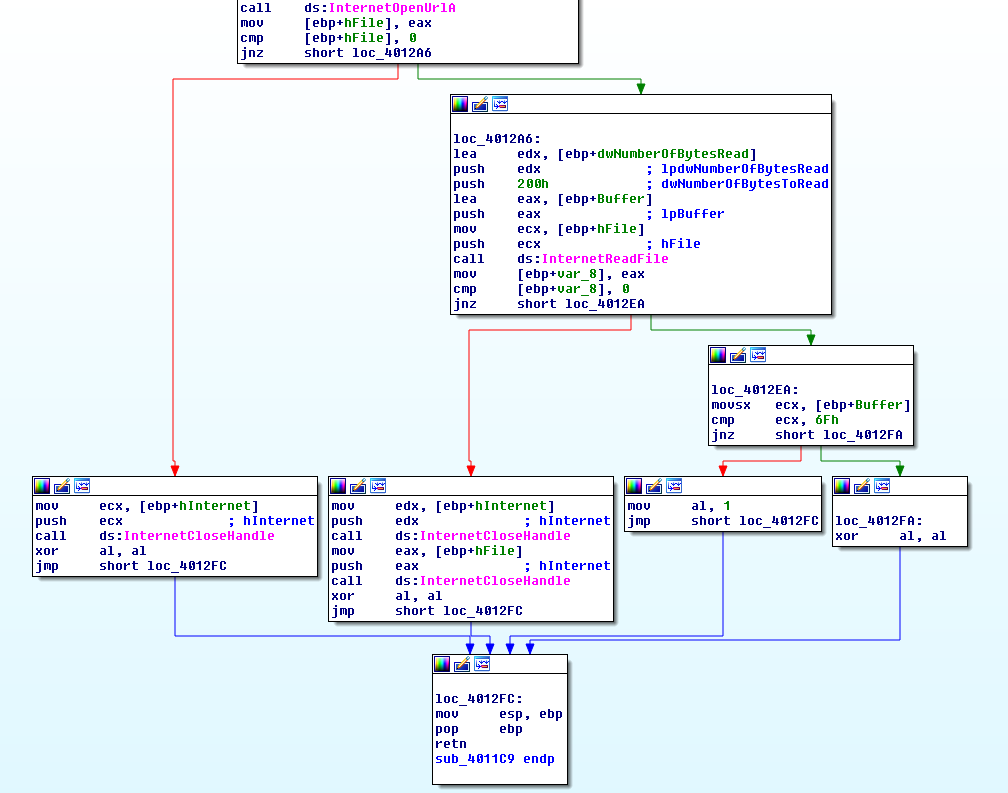
Upon a successful connection, the Malware will call InternetReadFile. If successful, it will return TRUE, and then parse if the buffer read is 6F (likely a command), if the C2 responded with the 6F, sub_4011C9 will return 1. If there was an error connecting to the C2, or the returned message is not 6F, sub_4011C9 will return 0.
Back to the main function, the program sleeps for 30 seconds and then checks the return value of sub_4011C9. If it is zero the program will follow the loop back to loc_40142E, else it will call WSACleanup and then exits:
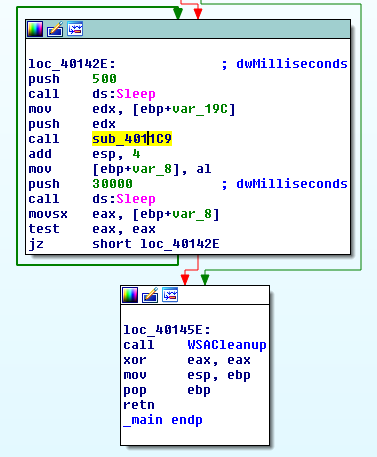
Interestingly, the Malware exists when receives the message 6F, however, while it is running, it doesn’t execute anything special.
Questions:
1) Compare the strings in the malware (from the output of the strings command) with the information available via dynamic analysis. Based on this comparison, which elements might be encoded?
There are two Strings that are known to be encoded, the domain and URI path that is being requested. The first string (domain) is xor encoded in the Resources Section, and the other is encoded with Base64, during runtime, after calling gethostname. Thus, its normal these strings don’t show up in the output of the strings command.
2) Use IDA Pro to look for potential encoding by searching for the string xor. What type of encoding do you find?
After searching for the string xor, we can see one interesting xor instruction: xor eax, 3Bh
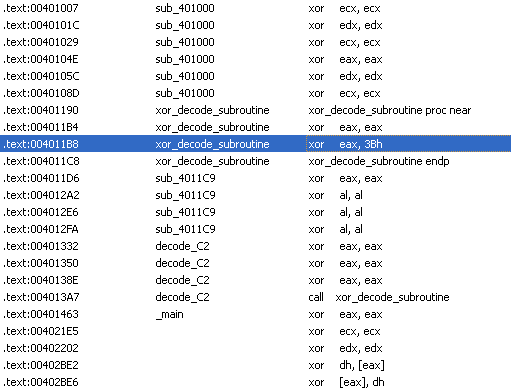
This is part of a single-byte Xor decode routine that will decode the domain to be contacted.
3) What is the key used for encoding and what content does it encode?
The Key 3B was used to encode the C2 domain (www.practicalmalwareanalysis.com).
4) Use the static tools FindCrypt2, Krypto ANALyzer (KANAL), and the IDA Entropy Plugin to identify any other encoding mechanisms. What do you find?
The plugin FindCrypt2 didn’t identify any encoding mechanisms.
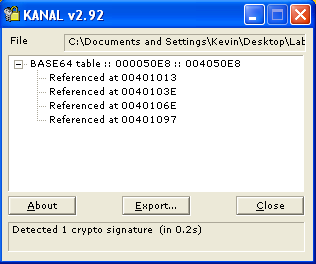
KANAL reported the use of Base64. The Base64 Table is at 004050E8 and is used 4 times:
And, with the IDA Entropy Calculator we can check for high entropy content.
After setting the chunk size to 64 (40h) and the max entropy to 5.95, we run the plugin against all sections in Deep Analyze mode. In the .rdata section a high entropy content at 004050E8.
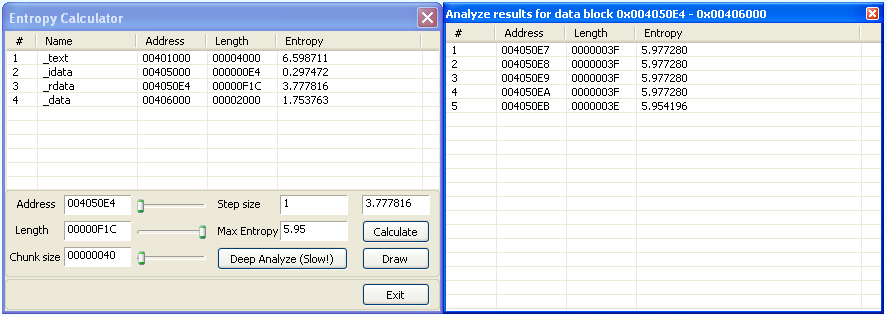
Checking this address, we can see that there’s a Base64 Table (just like KANAL reported):

5) What type of encoding is used for a portion of the network traffic sent by the malware?
Base64 encoding. The request made to the server contains part of the hostname, encoded in Base64, as the URI Path.
6) Where is the Base64 function in the disassembly?
The Base64 function in the disassembly is in sub_4010B1.
7) What is the maximum length of the Base64-encoded data that is sent? What is encoded?
The maximum length of the Base64-encoded date is 16. For every 3 characters in the input string, there will be 4 characters in the output string. As we know, in sub_4011C9 the gethostname output then limited to a maximum of 12 characters (via strncpy), thus, the maximum length of the encoded data is 16.
8) In this malware, would you ever see the padding characters ( = or == ) in the Base64-encoded data?
Yes, if the hostname is smaller than 12 (maximum size limited in sub_4011C9) and its length is not a multiple of 3 (bytes).
9) What does this malware do?
This Malware continuously probes www.practicalmalwareanalysis.com (every ~31 seconds) until it receives a response (6F). When it receives this response from the server, it will exit.