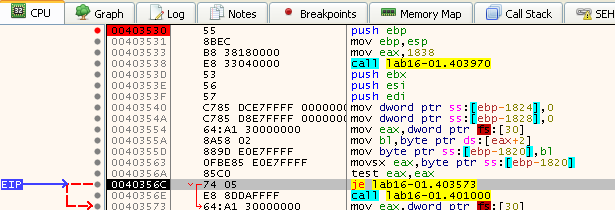
PMA Lab 16-1: Anti-Debugging
Analyze the malware found in Lab16-01.exe using a debugger. This is the same malware as Lab09-01.exe, with added anti-debugging techniques.
Lab 16-1
Analyze the malware found in Lab16-01.exe using a debugger. This is the same malware as Lab09-01.exe, with added anti-debugging techniques.
Analysis:
The Full analysis of the Malware variant without Anti-Debugging can be found here.
The Malware variant starts by performing some Anti-Debugging manual checks:
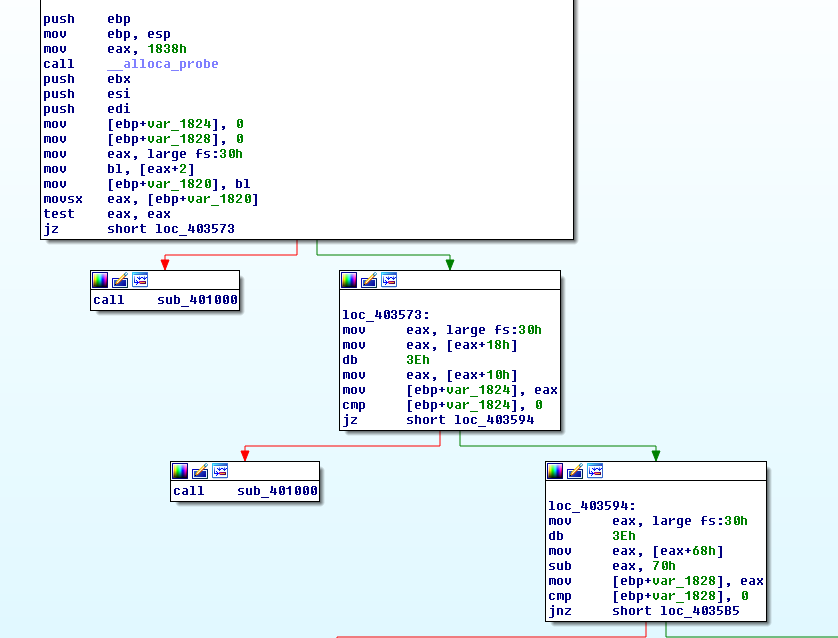
- Checks the BeingDebugged flag;
- Checks the ProcessHeap Flag
- Checks the NTGlobal Flag
These can all be seen in the previous image. If all of these checks fail, sub_401000 is going to be called. One can assume that the Malware will try to do something in case it is being Debugged, so in order to find other possible Anti-Debugging technique, it might be useful to check for Cross-References on this function:
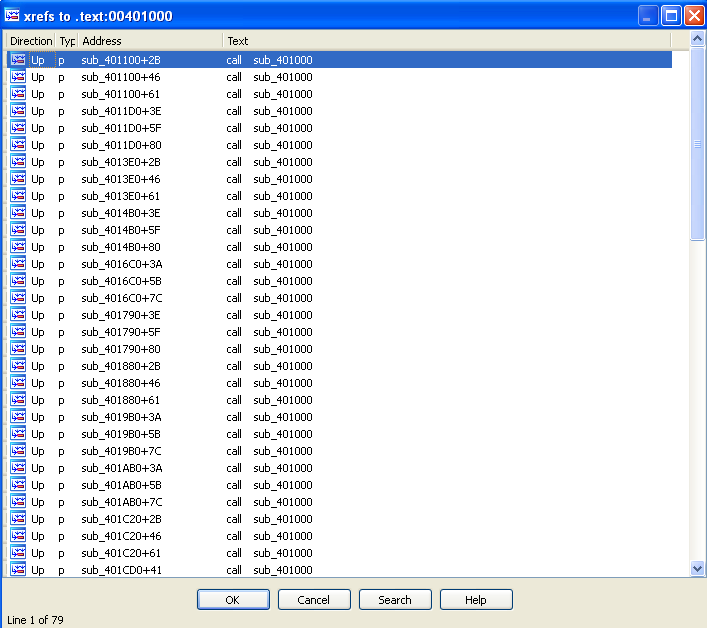
Although, one wasn’t probably expecting that many cross-references.
The Malware also performs all the manual structure checks on other functions such as sub_402D70, or sub_402E70. Once again, if it finds a clue that it is running inside a Debugger, it will call sub_401000. This function calls GetModuleFileNameA, with a Null hModule (which means it is getting its own name), followed by GetShortPathName.
The Malware then builds a command string, which is then executed using cmd.exe and that ends up deleting itself.
Questions:
-
Which anti-debugging techniques does this malware employ?
The Malware employs several Anti-Debugging techniques:
- Checks the BeingDebugged flag;
- Checks the ProcessHeap Flag
- Checks the NTGlobal Flag
-
What happens when each anti-debugging technique succeeds?
If the Malware finds out it is running under a debugger it will call out sub_401000, and delete itself.
-
How can you get around these anti-debugging techniques?
It is possible to change the Jump flags when the Malware checks the output of each technique, however, checking the amount of Cross-References to the “Delete&Exit” function, this solution isn’t practical. One could also change the values in memory (see question 4), but this needs to be done every time the Malware starts execution within the debugger. The best approach is to use a Plugin (see question 5).
-
How do you manually change the structures checked during runtime?
These flags are present in the Process Environment Block (PEB) structure.
-
The Flag BeingDebugged is present at offset 0x02 of PEB, and has a value of 1 if a Debugger has been detected;
-
The ProcessHeap is present at offset 0x18 of PEB. The ForceFlags is a DWORD (4 bytes) field at offset 0x10 (in the case of Windows XP) within the HEAP structure.
-
The Flag NTGlobal is present at offset 0x68 of PEB, and if it contains 0x70 it indicates that the Heap has been created within a Debugger.
How to manually change these values in PEB within x32dbg:
First we need to find the Address of PEB, which can be found with the following command
dump fs:[30]. Also PEB Address can be found in the Memory Map window.In this case PEB is at 0x7FFD9000. And, in order to bypass the previously mentioned techniques the Malware employs, the following bytes should be set to 0:
- 0x7FFD6000 set to 0 bypass checking BeingDebugged flag (highlighted in red in the following image);
- 0x7FFD6068 set to 0 bypass checking NTGlobal flag (highlighted in red in the following image);

- For the Process Heap (ForceFlags) check we need to find the address with the following command
dump ds:[fs:[30] + 0x18] + 0x10. In this case the address is at 0x00140010 contains the ForceFlags address, and should be set to 0 (highlighted in red in the following image):

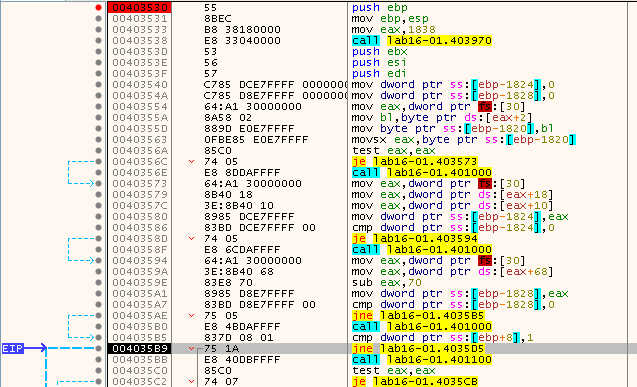
After editing these values, it is possible to see that the Malware was tricked and all the checks, and consequent calls to sub_401000 were bypassed:
-
-
Which OllyDbg plug-in will protect you from the anti-debugging techniques used by this malware?
Clearly this Malware uses the Anti-Debugging Techniques several times, so, it is not feasible to manually change the values of the cmp operations, not change the flag manually everytime the Malwre is going to be debugged. Thus, the best way to overcome the Anti-debugging techniques employed by this Malware is to use a tool that automatically do this.
In this case, I ended up using ScyllaHide.
While using ScyllaHide, here we can see the Malware avoiding the call to sub_401000, which means that it failed to detect the usage of x32dbg.