PMA Lab 17-3: Anti-VM Techniques
Analyze the malware Lab17-03.exe inside VMware. This lab is similar to Lab12-02.exe, with added anti-VMware techniques.
Lab 17-3
Analyze the malware Lab17-03.exe inside VMware. This lab is similar to Lab12-02.exe, with added anti-VMware techniques.
Analysis
The Analysis of Lab12-02.exe can be found here.
Note
I will try to go over the Lab, however as I’m using Virtualbox I’m certain there will be roadblocks to prevent me to completely answer all the questions.
Questions
-
What happens when you run this malware in a virtual machine?
Recalling Lab12-02.exe, this Malware is supposed to launch an svchost.exe process and perform Process Replacement. While monitoring with Process Explorer, it was possible to see that Lab17-03.exe exited before spawning any child svchost.exe process.
Although I’m using Virtualbox it is likely that any AntiVM technique figured it out that the Malware was running in a VM.
Let’s investigate with IDA Pro and x32dbg.
-
How could you get this malware to run and drop its keylogger?
At the start of the code, the Malware calls sub_401A80. This function is an Anti-VM check, by querying the I/O communication port:
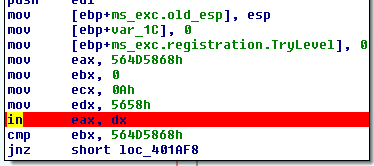
If the VM detection is missed, the Malware continues running, otherwise it will basically terminate, returning 0.
Continuing with the execution, the Malware calls sub_4011C0, providing some parameters related with the Registry.
By looking at the code it is obvious the Malware is searching the Registry for keys related with VMWare:
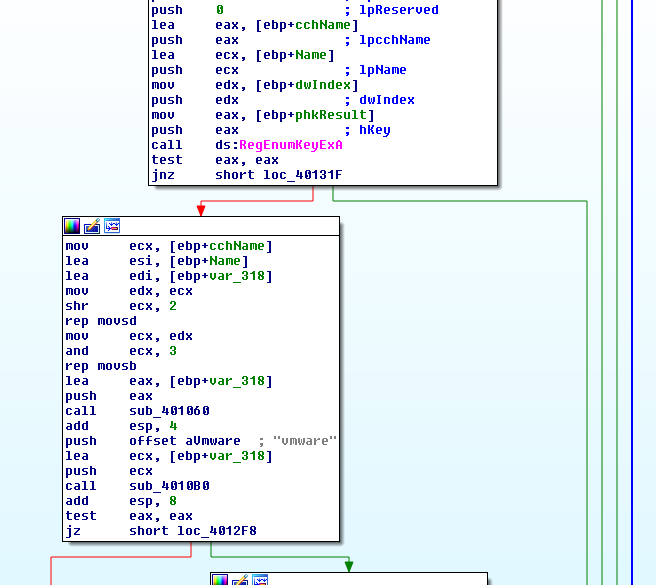
Just like before, if this function returns 0, the Malware will exit by returning 0 on Main, otherwise it will continue. Hence, let’s classify this function as an Anti-VM function and rename it to AntiVM_RegistryCheck.
The Malware then dynamically loads GetAdaptersInfo, from Iphlpapi.dll. The Address GetAdaptersInfo is moved into dword_403114, and we can investigate when it is used using XRefs on IDA Pro. It is called twice inside sub_401670:
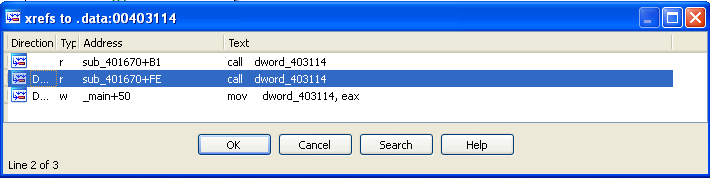
Inside this function the encoded Resource is Loaded, however, by executing the Malware with x32dbg, it is possible to see that not only the resource isn’t loaded, the function is returning 0. Let’s keep digging deeper…
The first function being called is precisely GetAdaptersInfo:
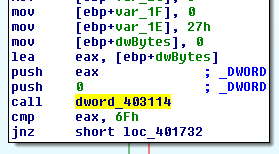
This function retrieves adapter information for the local computer.
Looking at the following image, it is possible to see that the Malware doesn’t do anything with the output of the first call. It’s like it is checking if it is able to execute it, and if successful, it will allocate memory to use as a buffer to receive the linked list of IP_ADAPTER_INFO structures. If it fails, it will end up returning 0:
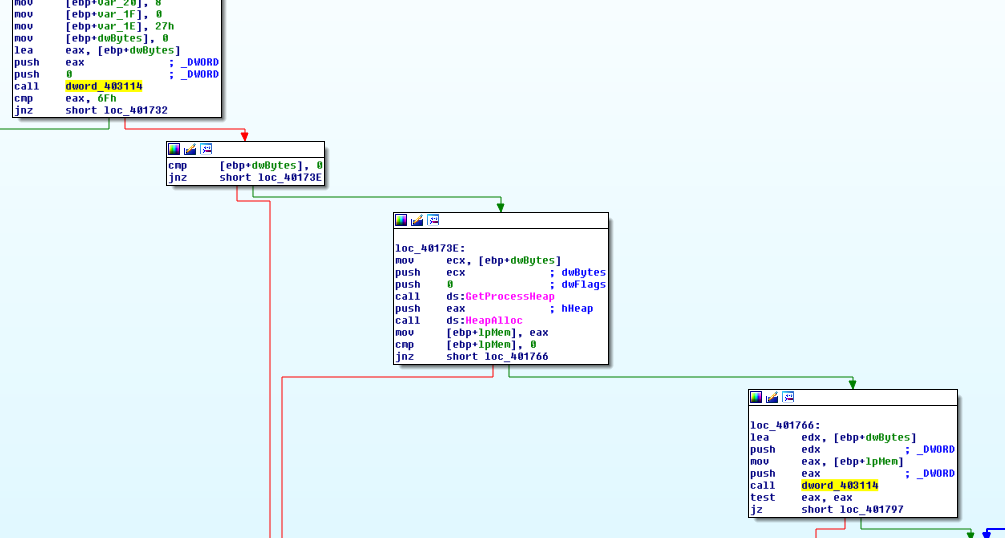
In this case, it isn’t here the problem, and the Malware was able to call the function twice. Here it is possible to see the content of the Memory address that received the structure from GetAdaptersInfo:
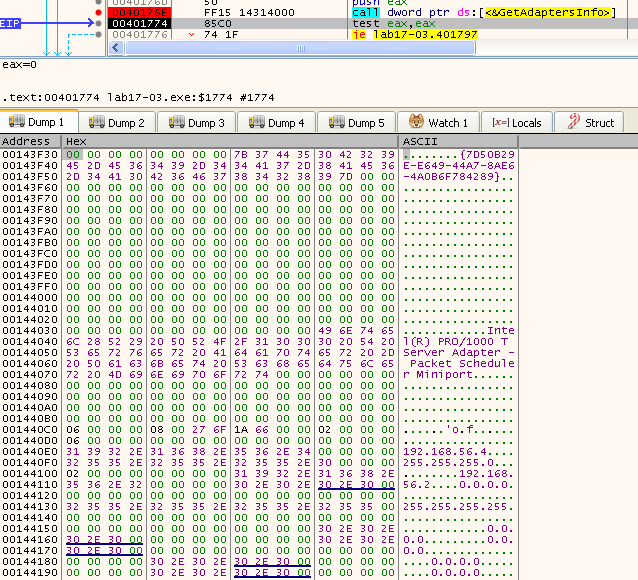
[ebp+lpMem] has the buffer represented in the previous image. The following code is checking if the buffer several values within the buffer. In order to make it easier to find out what they mean, and analyze the code, we need to import the structure to IDA, since it failed to recognize it:
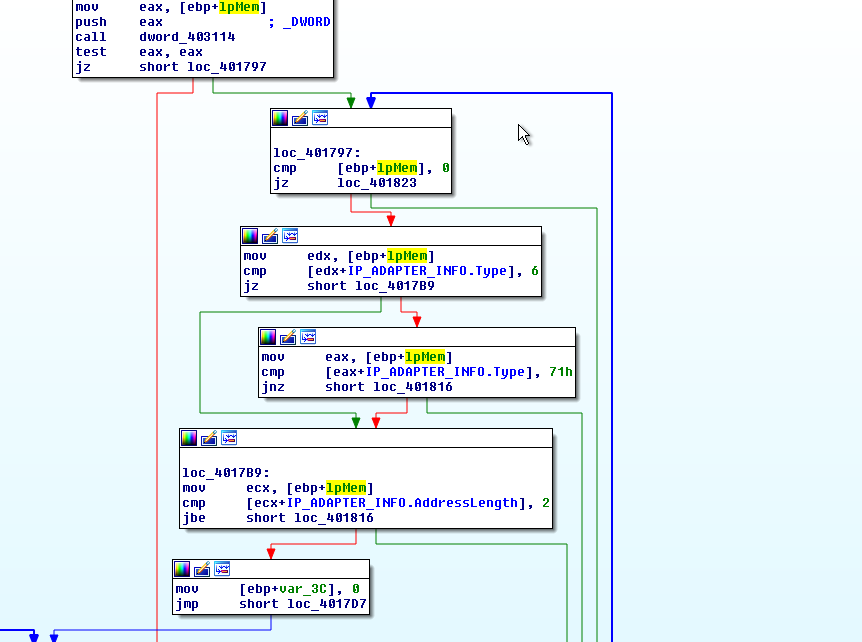
Here the Malware is checking if the IP_ADAPTER_INFO.Type is 6 or 71, which according to msdn mean Ethernet or Wireless respectively.
Then it checks if the IP_ADAPTER_INFO.AddressLength is greater than 2. This value is the length in bytes of the hardware address for the adapter, if the value is below or equal to 2, it will jump to loc_401816, and basically loop over the linked list, otherwise it will move to loc_4017D7.
In this case, the value is 6 (as expected, since a Mac Address has 6 bytes), which makes code execution reach loc_4017D7, and eventually arrive to 004017E9:
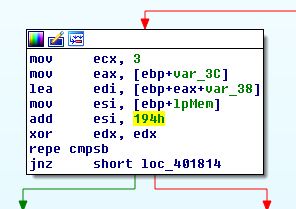
Here, the buffer is moved to esi, and then increased by 0x194. Using the Dump from x32dbg it is possible to see that esi will point to the Mac Address:
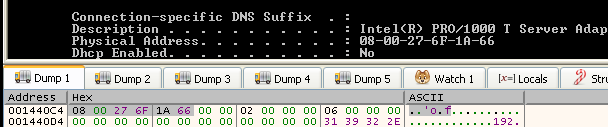
The repe cmpsb will compare the byte at [ESI] with the byte at [EDI], and set flags accordingly. edi is pointed to var_38. ecx, is 3, which means it will compare 3 bytes, and even though var_38 points to just one byte, it actually marks the start of a chain of bytes in the stack. So it kind of makes sense here, the prefixes of the Mac Address are being compared:
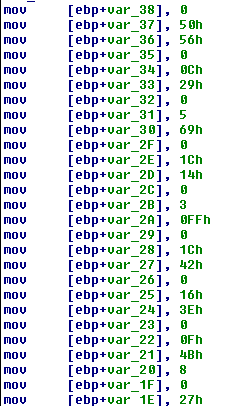
The very last Mac Address the Malware contains, matches the one on my Network card (08:00:27), hence, the function will reach 00401814, and from there it loop through loc_4017CE, and will eventually return 0. So, we need to either change the Mac Address, patch the binary or swap the ZF at 004017F6.
Because in the future other Malware may implement the same technique, I opted by changing the Mac Address:

Running it again, it is possible to see that the code has reached the part where the Resource will be loaded:

After sub_401670, the Malware calls sub_401400 and provides two parameters: lpApplicationName, and lpBuffer. The first one is the svchost.exe string, and the second the lpBuffer to which the resource was loaded and decoded into.
One can guess what is going to happen, but the Malware has another trick. sub_401130 is called and takes one parameter that apparently doesn’t says much (F30D12A5):
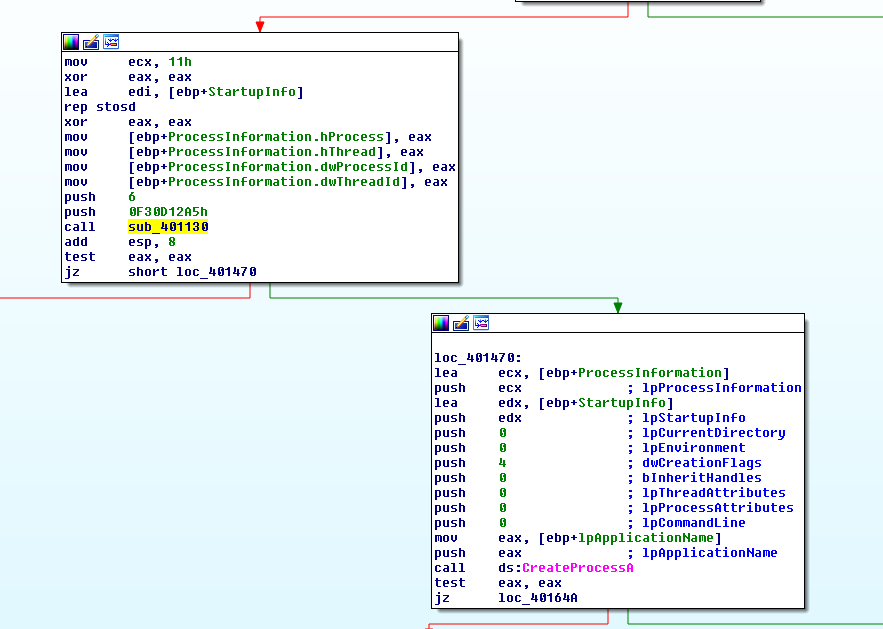
This function iterates over all the process of the machine (using CreateToolhelp32Snapshot, Process32First, and Process32Next), and uses the name of the executable of the process on two functions (sub_401060, and sub_401000). The first function is responsible for converting all bytes of the process name to lowercase, and the second function performs arithmetic operations on all the bytes of the string.
Looking at the following image, we can see the output of sub_401000 being compared to arg_0:
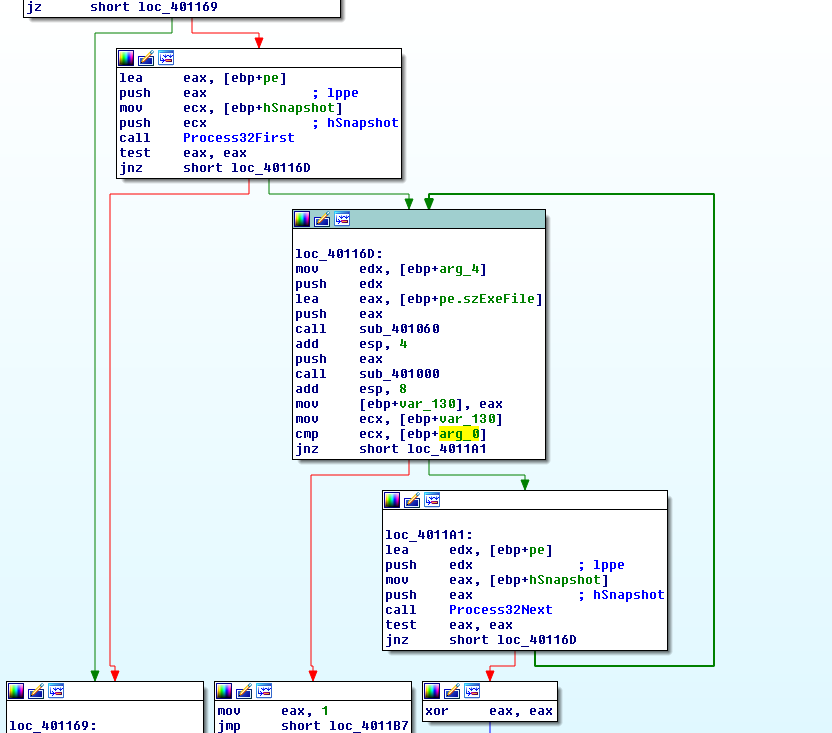
In a way the Malware is “hashing” all process names and looking for something. Using x32dbg we can look for some examples:

csrss.exe turns into CD6ADA8E:

This is probably an Anti-VM technique, because sub_401130 either returns 1 or 0, and the return value impacts the rest of the execution. If 0 is returned the code jumps to loc_401470, otherwise it make sub_401400 jump to the end and return 0 (completely avoiding the Process Replacement part).
It is possible to use the Malware to our advantage and make it hash anything, even if a given process is not running on the system, simply by editing the parameter prior to the call. Since this Malware sample is packed with other Anti-VM techniques that target VMWare, on the first try it was possible to obtain the exact same hash the Malware is looking for by using the process name “vmware.exe” (eax holds the value of the hash following the call to sub_401000):
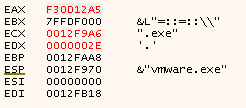
This is a very clever move by the Malware author because even though the Algorithm is relatively simple it has 3 major benefits:
- No clues are left in the binary (strings)
- Custom code is harder to be detected by generic Rules such as the provided IDA Script or even Yara Rules
- The Hashing algorithm is not reversal, and can only be brute-forced. In the case of the exercise it was obvious vmware.exe was the target, but in a real scenario, one could understand the function but not know for sure what the Malware was looking for.
-
Which anti-VM techniques does this malware use?
The Malware contains several Anti-VM techinques. All have been detailed in the previous question.
- Querying I/O communication port.
-
Checks the Registry for values containing the word vmware.
-
Validates the Mac Address for known (virtual machine) prefixes.
-
Looking for running processes and comparing them to a predefined hash.
-
What system changes could you make to permanently avoid the anti-VM techniques used by this malware?
There are a couple of things that can be done system-wise, in order to bypass this Malware.
First is not using some softwares that the Malware might be looking for such as VMWare Tools. Then, is changing the Mac Address to a prefix not known to be used in Virtual Environments.
In my case, all the Anti-VM techniques were bypassed (since I’m using Virtualbox), with the exception of the Mac Address check. Hence, I had to perform this system change.
-
How could you patch the binary in OllyDbg to force the anti-VM techniques to permanently fail?
The first technique can be easily bypassed with a NOP

The second technique can be bypassed by making the function return 0 all the time. If the function finds out something it will move 1 to var_8:
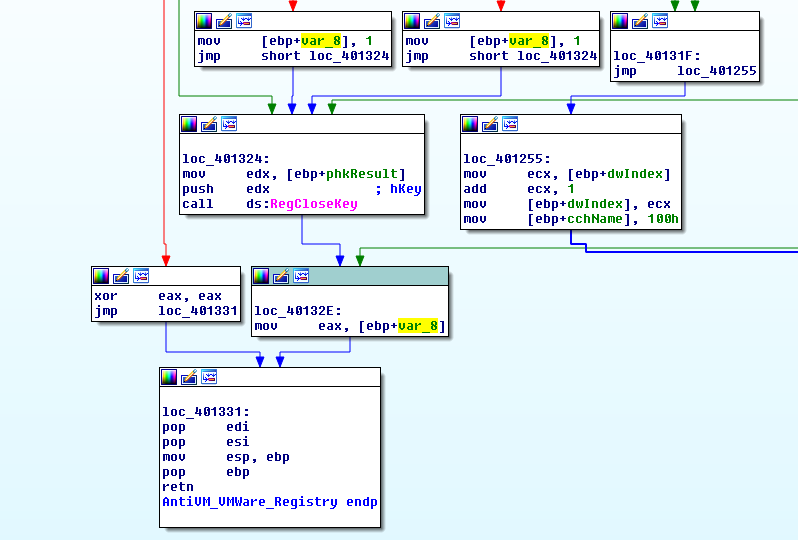
Which is the returned value in case the Malware found something related to VMWare in the registry. This instruction is 3 bytes long (8B 45 F8):

We can replace it with a xor eax, eax, and a NOP:

The third technique can be bypassed in many ways, some being more complex than others. One lazy way to do it could be to alter all the Mac Address prefixes.
But, why go over all the trouble when we can just use an unconditional jump towards the location where the resource is loaded? That can be achieved with the following change:

Finally, the Process Hashing. As it is possible to see in the following image, the function returns 0 or 1. The only thing that makes the function return 1 is if the hash has been found, meaning that we want the function to return 0:
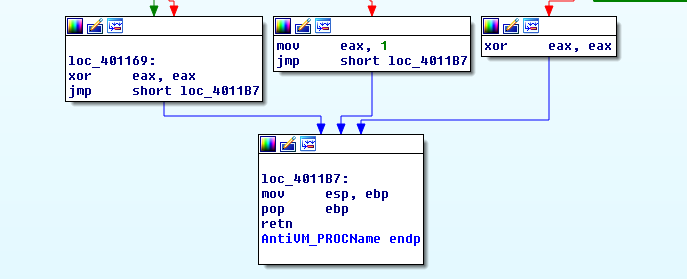
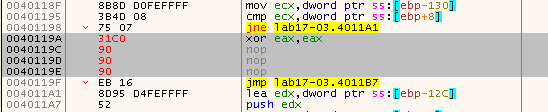
This can be done by replacing the mov eax, 1 at address 40119A. This instruction takes 5 bytes, thus let’s replace that with xor eax, eax, and pad the rest with NOPs:
With all these changes, let’s put our patched executable to the test. As it is possible to see, there’s a spawned svchost.exe, which is a child process of Lab17-03_patched.exe:

After a while, Lab17-03_patched.exe exits, leaving the keylogger second stage running in an orphan svchost.exe process:

Extra-mile Lab 17-02
Exports:
PSLIST
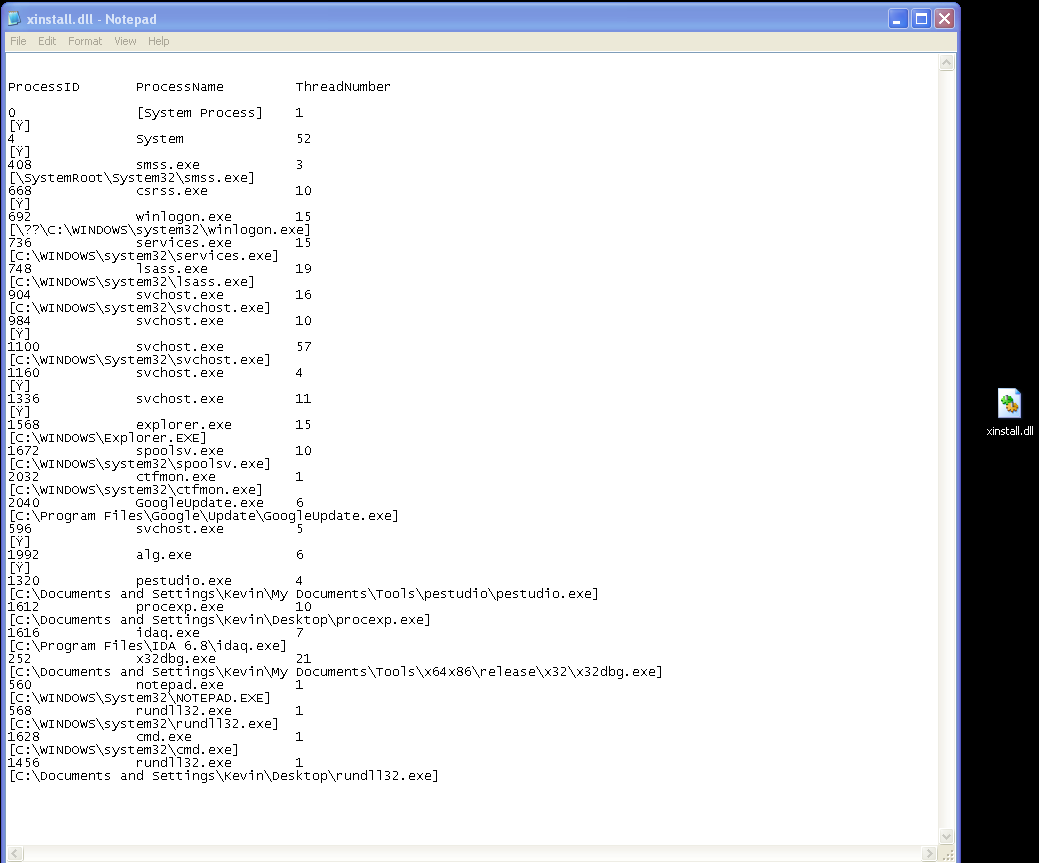
As the name hints, this Export creates a list of the processes running in the system.
This is done using a combination of CreateToolhelp32Snapshot, Process32First, Process32Next, and EnumProcessModules.
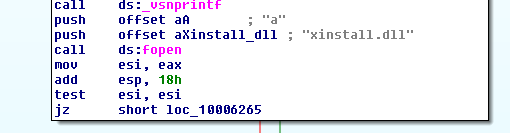
Then, the output is logged into a file called xinstall.dll (not xinstall.txt):
Here’s an example:
ServiceMain
StartEXS
This Export seems a bit too complex, and full of potential. From the analysis I was able to do, This Export uses Sockets, and sends/receives information from a C2 server.
Before asking the server for a command, it sends a buffer to the server:
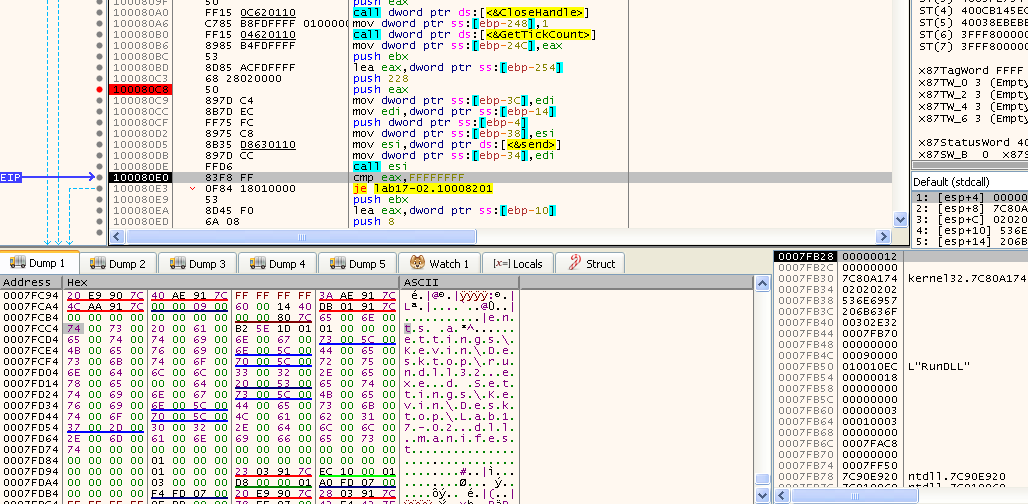
In x32dbg Dump it is possible to read some information, such as part of the Path of the Malware, and the word manifest. All of this is written in unicode.
Then, the Malware asks the server for a command, which is the parsed and used in a switch case:
| Command | Call | What it does? |
|---|---|---|
| 00 | Close Socket | |
| 2F | (loop) | Set dword_1009324C to 1 |
| 30 | (loop) | Set fBlockIt to 1 |
| 4F | sub_10007BAF sub_10007442 | Function that potentially takes screenshots |
| 50 | sub_100078AC sub_10007442 | Function that potentially takes screenshots? |
| 5E | sub_100076D5 | Mouse and Keystrokes |
| 5F | sub_10007D35 | Displays messages on the screen |
All of these functions were a bit too complex to analyze, without a proper C2 that could be used to analyze the code dynamically, hence, an attempt was made in order to create one.
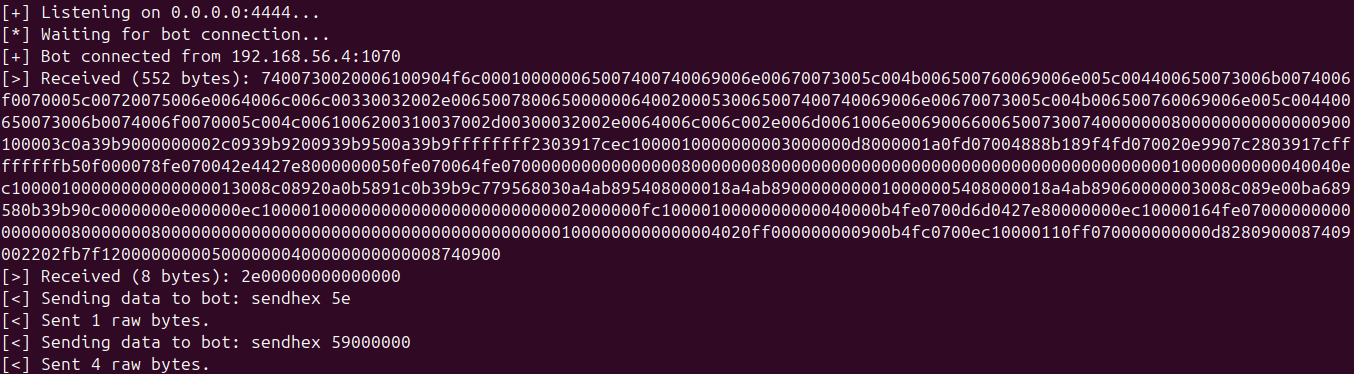
On this C2 server it was possible to test some functionalities, such as Mouse Movements and Keystrokes. Here the C2 receives the initial payload from the Bot, and immediately sends the command 5E, which ends up making the Malware execute sub_100076D5. On that function the bot asks the C2 again for a command using recv, and a second command was sent, in this case 59:
This command, makes the Malware execute case 7 on the switch case of that function, which is a mouse operation:
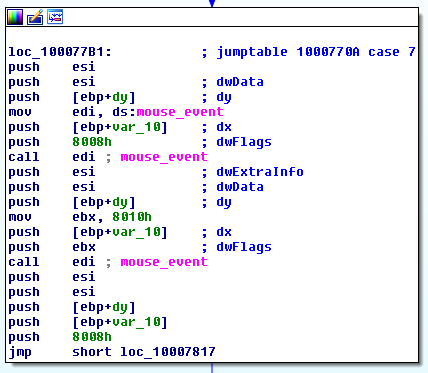
According to Microsoft, the dwFlags parameter is a combination of various values. For instance, in the previous image it is possible to see 0x8008 and 0x8010:
| dwFlags value | Result |
|---|---|
| 0x8008 | MOUSEEVENTF_ABSOLUTE + MOUSEEVENTF_RIGHTDOWN |
| 0x8010 | MOUSEEVENTF_ABSOLUTE + MOUSEEVENTF_RIGHTUP |
So, basically these two calls simulate a right click. The following image shows the analysis using x32dbg, after executing the second mouse_event (call edi), the right click pane shows up:
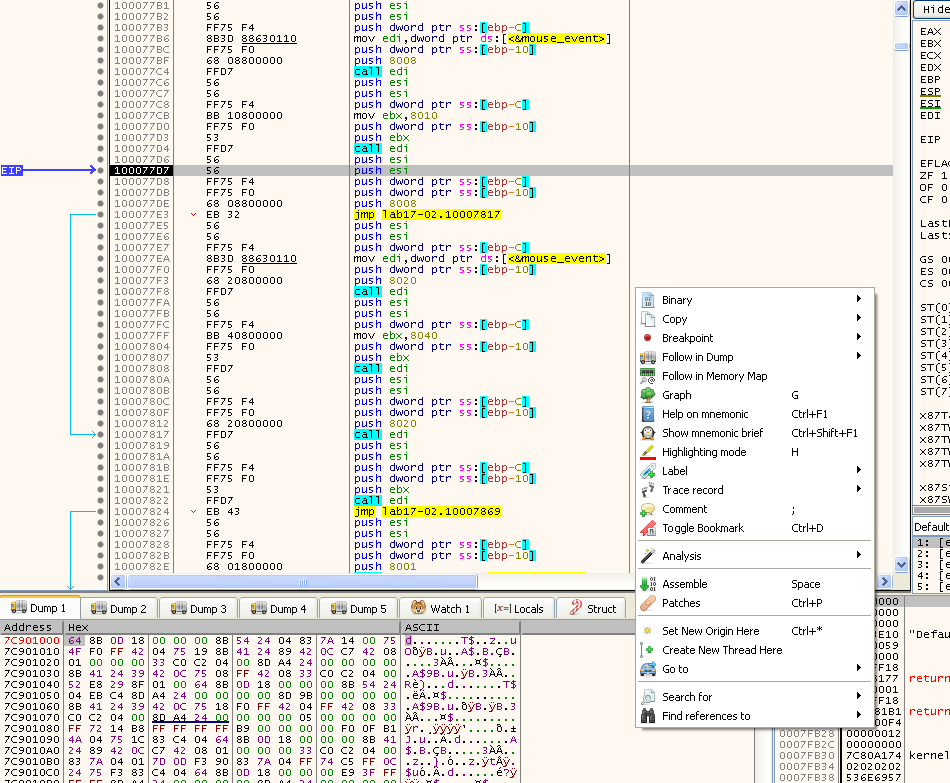
This proves the Malware can indeed receive mouse input remotely. The mouse movements didn’t work as intenteded as in reality the mouse ends up disapearing, however it might have moved.
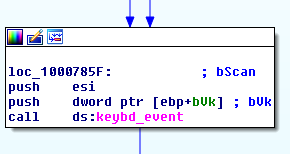
Also, there’s a functionality to simulate keyboard strokes, although I wasn’t able to reproduce it or at least see anything visually:
Command 4F seems related to Screenshots, when using this command it was possible to more data being sent to the C2:
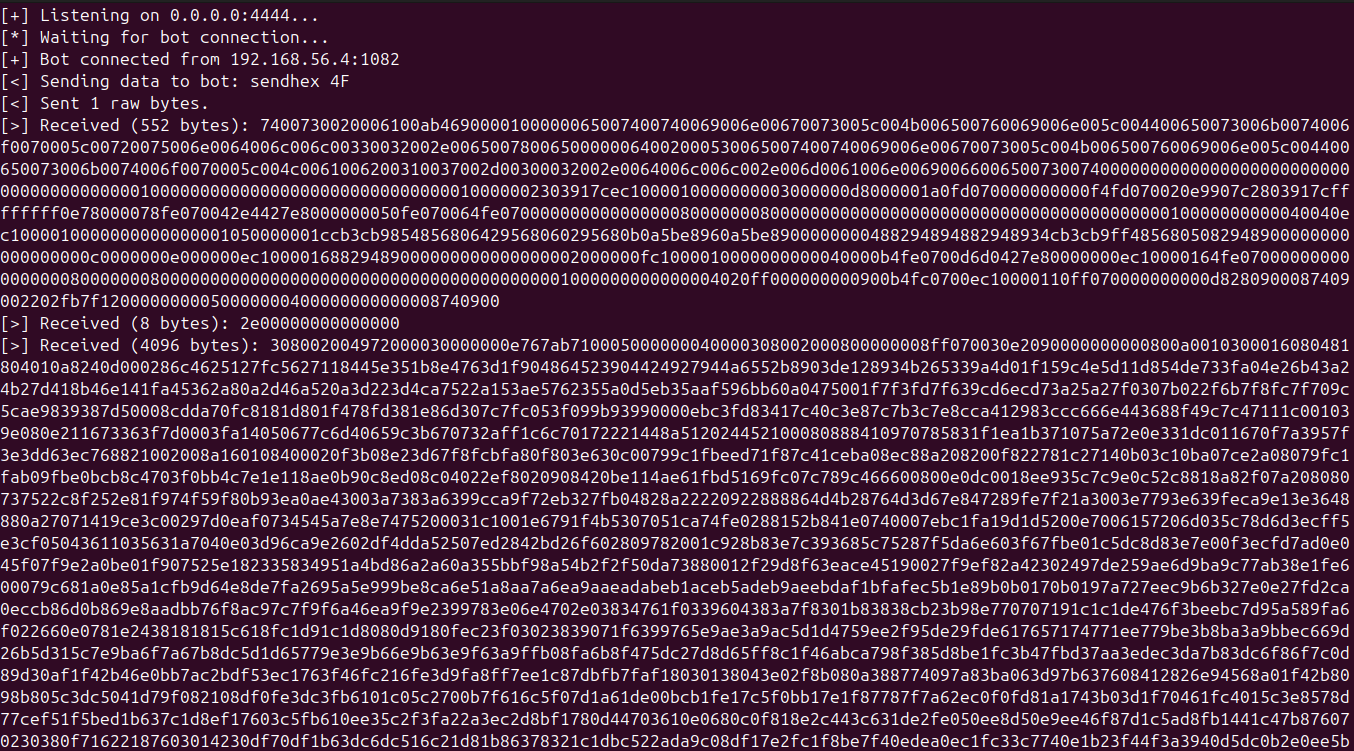
As mentioned before, this Export seems very complex and extensive. But in a way it provides the Malware some sort of remote access.
UninstallRT
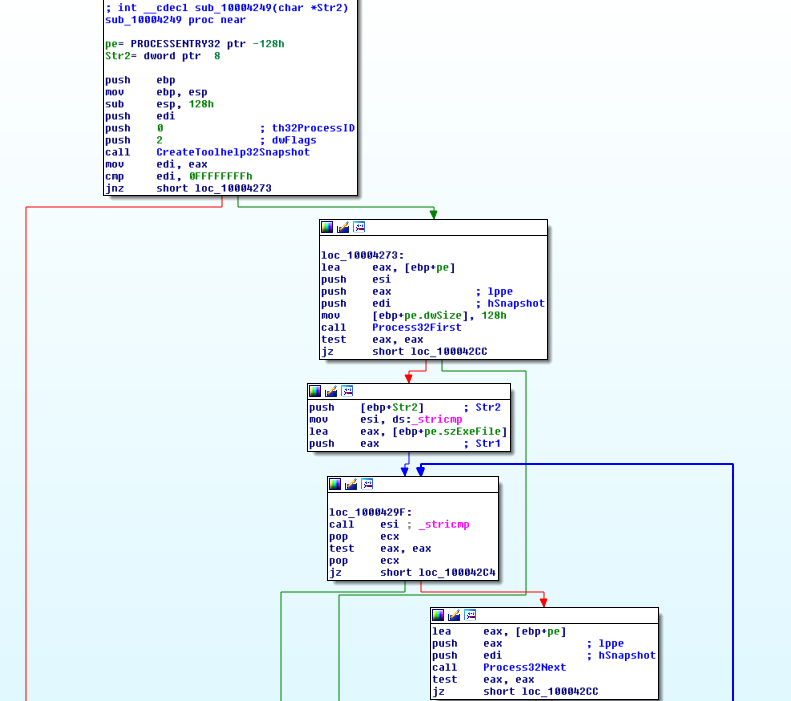
From the name of this Module it seems that t his is a way for uninstalling the Malware after it being installed using the InstallRT method. InstallRT performed DLL Injection into iexplore.exe, and as expected, the code is rather similar. In sub_10004249 it is possible to see the Malware looking through all the processes of the system using CreateToolhelp32Snapshot, Process32First, and Process32Next:
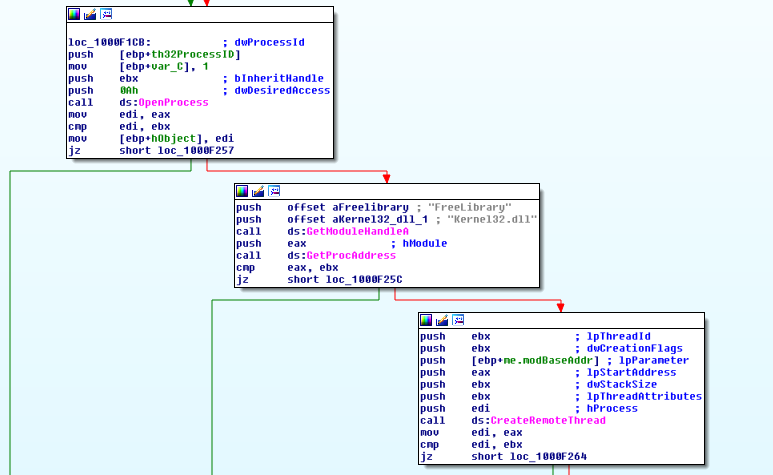
Then sub1000F145 is executed. In this function FreeLibrary is executed on iexplore.exe using CreateRemoteThread:
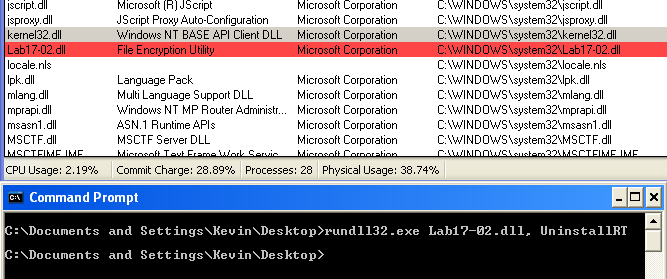
The Dll name is passed to CreateRemoteThread in the lpParameter parameter. Here it is possible to confirm the library being removed from iexplore.exe using Process Explorer:
Also, the output of xinstall.txt states that the injection was successful:

UninstallSA
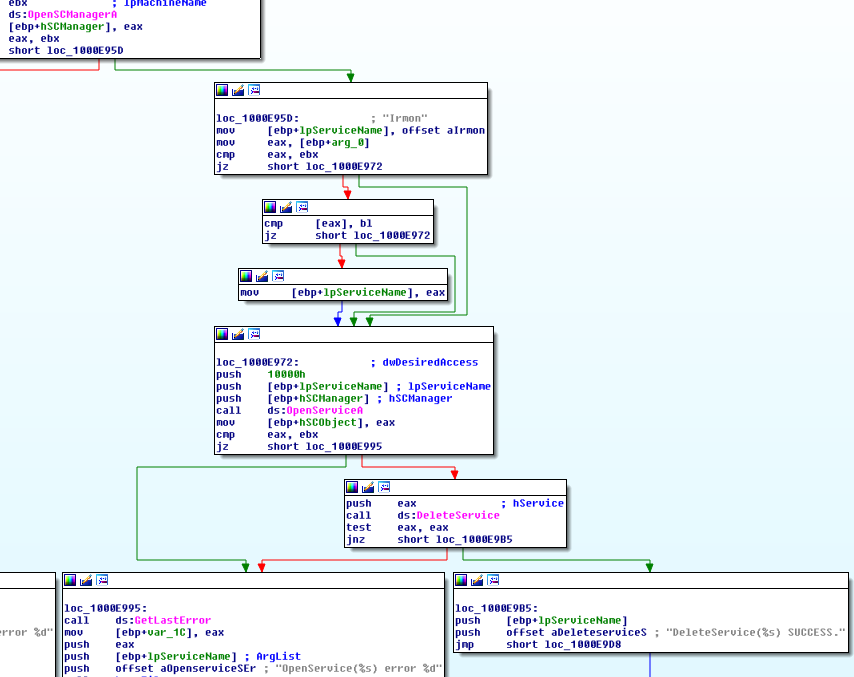
This export removes the Irmon service that has been created by InstallSA. Here it is possible to see the Malware doing so using OpenServiceA and DeleteService:
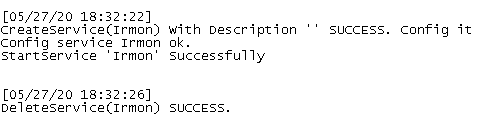
After removing the Malware using UninstallSA, it was possible to see through the xinstall.txt log file that the Service has been deleted successfully:
UninstallSB
As expected this Export also undoes everything that InstallSB does, and again is similar to InstallSA. Not only the service is deleted, but also the files that it copied are restored: